粒子(火焰) · Particle(Fire) · ▶ 在线运行案例
案例合集: 三维可视化功能案例(threehub.cn)
开源仓库github地址: https://github.com/z2586300277/three-cesium-examples
**400个案例代码: ** 网盘链接
你将学到什么
- Cesium Entity 高层实体 API
效果说明
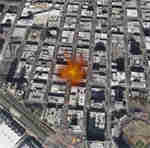
本案例演示 粒子(火焰) 效果:基于 WebGL 实现「粒子(火焰)」可视化效果,附完整可运行源码;核心用到 Cesium。建议先打开文首在线案例查看动态画面,再对照下方源码逐步理解。
核心概念
- Viewer 聚合 Scene、Camera、Clock 与渲染循环,是 Cesium 应用入口。
- Entity 面向点线面/模型/标签的高层 API;与 Primitive 相比更适合交互与属性驱动。
- 阅读下方完整源码时,建议从
init/load/animate三条主线入手,再深入 shader 与工具函数。
实现步骤
- 创建 Viewer,配置地形/影像(若案例需要)并设置初始相机
- 在
requestAnimationFrame循环中更新状态并 render(Cesium 为viewer.render或自动渲染)
代码要点
import * as Cesium from 'cesium'

const box = document.getElementById('box')
const viewer = new Cesium.Viewer(box, {
    animation: false,//是否创建动画小器件,左下角仪表
    baseLayerPicker: false,//是否显示图层选择器,右上角图层选择按钮
    baseLayer: Cesium.ImageryLayer.fromProviderAsync(Cesium.ArcGisMapServerImageryProvider.fromUrl(GLOBAL_CONFIG.getLayerUrl())),
    fullscreenButton: false,//是否显示全屏按钮,右下角全屏选择按钮
    geocoder: false,//是否显示geocoder小器件,右上角查询按钮
    homeButton: false,//是否显示Home按钮,右上角home按钮
    sceneMode: Cesium.SceneMode.SCENE3D,//初始场景模式
    sceneModePicker: false,//是否显示3D/2D选择器,右上角按钮
    navigationHelpButton: false,//是否显示右上角的帮助按钮
    selectionIndicator: false,//是否显示选取指示器组件
    timeline: false,//是否显示时间轴
    infoBox: false,//是否显示信息框
    scene3DOnly: true,//如果设置为true,则所有几何图形以3D模式绘制以节约GPU资源
    orderIndependentTranslucency: false, //是否启用无序透明
    contextOptions: { webgl: { alpha: true } },
    skyBox: new Cesium.SkyBox({ show: false })
})

viewer.scene.debugShowFramesPerSecond = true;
viewer.scene.globe.depthTestAgainstTerrain = true;

//火焰特效
class FireEffect {
    constructor(viewer, obj) {
        this.viewer = viewer
        this.viewModel = {
            emissionRate: 5,
            gravity: 0.0,//设置重力参数
            minimumParticleLife: 1,
            maximumParticleLife: 6,
            minimumSpeed: 1.0,//粒子发射的最小速度
            maximumSpeed: 4.0,//粒子发射的最大速度
            startScale: 0.0,
            endScale: 10.0,
            particleSize: 25.0,
        }
        this.emitterModelMatrix = new Cesium.Matrix4()
        this.translation = new Cesium.Cartesian3()
        this.rotation = new Cesium.Quaternion()
        this.hpr = new Cesium.HeadingPitchRoll()
        this.trs = new Cesium.TranslationRotationScale()
        this.scene = this.viewer.scene
        this.particleSystem = ''
        this.entity = this.viewer.entities.add({
            //选择粒子放置的坐标
            position: Cesium.Cartesian3.fromDegrees(
                obj.lng, obj.lat
            ),
        });

        this.init();
    }

    init() {
        const _this = this
        this.viewer.clock.shouldAnimate = true;
        this.viewer.scene.globe.depthTestAgainstTerrain = false;
        // this.viewer.trackedEntity = this.entity;

        var particleSystem = this.scene.primitives.add(
            new Cesium.ParticleSystem({
                image: './files/images/fire.png',//生成所需粒子的图片路径
                //粒子在生命周期开始时的颜色
                startColor: new Cesium.Color(1, 1, 1, 1),
                //粒子在生命周期结束时的颜色
                endColor: new Cesium.Color(0.5, 0, 0, 0),
                //粒子在生命周期开始时初始比例
                startScale: _this.viewModel.startScale,
                //粒子在生命周期结束时比例
                endScale: _this.viewModel.endScale,
                //粒子发射的最小速度
                minimumParticleLife: _this.viewModel.minimumParticleLife,
                //粒子发射的最大速度
                maximumParticleLife: _this.viewModel.maximumParticleLife,
                //粒子质量的最小界限
                minimumSpeed: _this.viewModel.minimumSpeed,
                //粒子质量的最大界限
                maximumSpeed: _this.viewModel.maximumSpeed,
                //以像素为单位缩放粒子图像尺寸
                imageSize: new Cesium.Cartesian2(
                    _this.viewModel.particleSize,
                    _this.viewModel.particleSize
                ),
                //每秒发射的粒子数
                emissionRate: _this.viewModel.emissionRate,
                //粒子系统发射粒子的时间(秒)
                lifetime: 16.0,
                //粒子系统是否应该在完成时循环其爆发
                loop: true,
                //设置粒子的大小是否以米或像素为单位
                sizeInMeters: true,
                //系统的粒子发射器
                emitter: new Cesium.ConeEmitter(Cesium.Math.toRadians(45.0)),//BoxEmitter 盒形发射器,ConeEmitter 锥形发射器,SphereEmitter 球形发射器,CircleEmitter圆形发射器
            })
        );
        this.particleSystem = particleSystem;
        this.preUpdateEvent()
    }

    //场景渲染事件
    preUpdateEvent() {
        let _this = this;
        this.viewer.scene.preUpdate.addEventListener(function (scene, time) {
            //发射器地理位置
            _this.particleSystem.modelMatrix = _this.computeModelMatrix(_this.entity, time);
            //发射器局部位置
            _this.particleSystem.emitterModelMatrix = _this.computeEmitterModelMatrix();
            // 将发射器旋转
            if (_this.viewModel.spin) {
                _this.viewModel.heading += 1.0;
                _this.viewModel.pitch += 1.0;
                _this.viewModel.roll += 1.0;
            }
        });
    }

    computeModelMatrix(entity, time) {
        return entity.computeModelMatrix(time, new Cesium.Matrix4());
    }

    computeEmitterModelMatrix() {
        this.hpr = Cesium.HeadingPitchRoll.fromDegrees(0.0, 0.0, 0.0, this.hpr);
        this.trs.translation = Cesium.Cartesian3.fromElements(
            -4.0,
            0.0,
            1.4,
            this.translation
        );
        this.trs.rotation = Cesium.Quaternion.fromHeadingPitchRoll(this.hpr, this.rotation);

        return Cesium.Matrix4.fromTranslationRotationScale(
            this.trs,
            this.emitterModelMatrix
        );
    }

    removeEvent() {
        this.viewer.scene.preUpdate.removeEventListener(this.preUpdateEvent, this);
        this.emitterModelMatrix = undefined;
        this.translation = undefined;
        this.rotation = undefined;
        this.hpr = undefined;
        this.trs = undefined;
    }

    //移除粒子特效
    remove() {
        () => { return this.removeEvent() }; //清除事件
        this.viewer.scene.primitives.remove(this.particleSystem); //删除粒子对象
        this.viewer.entities.remove(this.entity); //删除entity
    }

}
new FireEffect(viewer, {
    lng: -117.16,
    lat: 32.71
})
viewer.camera.setView({
    destination: Cesium.Cartesian3.fromDegrees(-117.16, 32.71, 1500.0)
});
完整源码:GitHub
小结
- 本文提供 粒子(火焰) 完整 Cesium.js 源码与在线 Demo,建议先运行案例再改 uniform/参数做二次实验
- 更多 Cesium.js 实战案例见 three-cesium-examples 合集 与 GitHub 开源仓库