第一人称移动 · First Move · ▶ 在线运行案例
案例合集: 三维可视化功能案例(threehub.cn)
开源仓库github地址: https://github.com/z2586300277/three-cesium-examples
**400个案例代码: ** 网盘链接
你将学到什么
- ShaderMaterial 自定义着色器实现核心视觉效果
- THREE.Points 粒子点渲染
- FBXLoader 加载 FBX 城市/角色模型
- glTF/Draco 模型加载与优化
- Raycaster 鼠标拾取与交互
- BufferGeometry 自定义顶点/索引数据
requestAnimationFrame渲染循环与resize自适应
效果说明
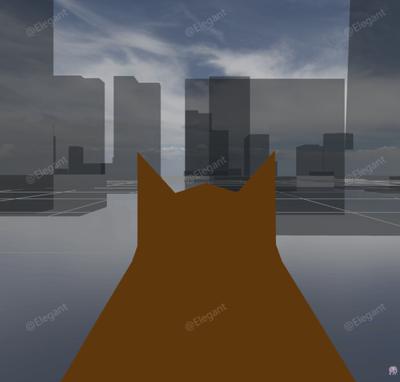
本案例演示 第一人称移动 效果:支持鼠标拾取、绘制或拖拽交互;核心用到 ShaderMaterial、THREE.Points、FBXLoader。建议先打开文首在线案例查看动态画面,再对照下方源码逐步理解。
核心概念
- Scene / Camera / WebGLRenderer 构成最小渲染闭环;大场景可开
logarithmicDepthBuffer缓解 Z-fighting。 - ShaderMaterial 通过
uniforms+ 自定义 GLSL 控制逐像素/逐点效果;透明粒子常配合depthTest: false。 - THREE.Points 将每个顶点渲染为可控大小的粒子;可用自定义 attribute(如
u_index)驱动片元/顶点动画。
实现步骤
- 搭建 Scene、PerspectiveCamera、WebGLRenderer,挂载 canvas 并处理
resize - 异步加载模型 / 3D Tiles / GeoJSON 等资源并加入 scene 或 entities
- 定义 uniforms / onBeforeCompile 或 ShaderMaterial,编写 GLSL 与材质参数
- 在
requestAnimationFrame循环中更新状态并 render(Cesium 为viewer.render或自动渲染)
代码要点
import * as THREE from 'three';
import { GLTFLoader } from 'three/examples/jsm/loaders/GLTFLoader.js';
import { GUI } from 'three/examples/jsm/libs/lil-gui.module.min.js';
import { FBXLoader } from 'three/examples/jsm/loaders/FBXLoader.js';
import { MeshBVH, acceleratedRaycast, computeBoundsTree } from 'three-mesh-bvh';
// 启用 BVH 加速光线投射
THREE.Mesh.prototype.raycast = acceleratedRaycast;
// 初始化场景、相机和渲染器
const scene = new THREE.Scene();
const camera = new THREE.PerspectiveCamera(120, window.innerWidth / window.innerHeight, 0.1, 1000);
const renderer = new THREE.WebGLRenderer({ antialias: true });
renderer.setSize(window.innerWidth, window.innerHeight);
document.body.appendChild(renderer.domElement);
// 创建赛博朋克着色器材质
function createCyberpunkMaterial(originalColor) {
const cyberpunkVertexShader = `
varying vec3 vPosition;
varying vec3 vNormal;
varying vec2 vUv;
void main() {
vPosition = position;
vNormal = normalize(normalMatrix * normal);
vUv = uv;
gl_Position = projectionMatrix * modelViewMatrix * vec4(position, 1.0);
}
`;
const cyberpunkFragmentShader = `
uniform vec3 baseColor;
uniform float time;
uniform vec3 neonColor1;
uniform vec3 neonColor2;
varying vec3 vPosition;
varying vec3 vNormal;
varying vec2 vUv;
// 简单噪声函数
float hash(vec2 p) {
return fract(sin(dot(p, vec2(127.1, 311.7))) * 43758.5453);
}
float noise(vec2 p) {
vec2 i = floor(p);
vec2 f = fract(p);
f = f * f * (3.0 - 2.0 * f);
float a = hash(i);
float b = hash(i + vec2(1.0, 0.0));
float c = hash(i + vec2(0.0, 1.0));
float d = hash(i + vec2(1.0, 1.0));
return mix(mix(a, b, f.x), mix(c, d, f.x), f.y);
}
void main() {
// 基础颜色
vec3 color = baseColor;
// 扫描线效果
float scanline = sin(vPosition.y * 50.0 + time * 2.0) * 0.5 + 0.5;
scanline = smoothstep(0.3, 0.7, scanline);
// 霓虹灯光效果 - 基于高度和位置
float heightGlow = smoothstep(-0.5, 2.0, vPosition.y);
float neonPulse = sin(time * 3.0 + vPosition.y * 2.0) * 0.5 + 0.5;
// 网格线效果
float gridX = abs(fract(vPosition.x * 2.0) - 0.5);
float gridZ = abs(fract(vPosition.z * 2.0) - 0.5);
float grid = smoothstep(0.48, 0.5, max(gridX, gridZ));
// 随机霓虹灯闪烁
float flicker = noise(vec2(vPosition.x, vPosition.z) * 0.5 + time * 0.5);
flicker = step(0.7, flicker);
// 边缘发光(Fresnel效果)
vec3 viewDir = normalize(cameraPosition - vPosition);
float fresnel = pow(1.0 - abs(dot(viewDir, vNormal)), 3.0);
// 混合霓虹灯颜色
vec3 neonColor = mix(neonColor1, neonColor2, neonPulse);
// 应用效果
color = mix(color, neonColor, heightGlow * 0.3);
color += neonColor * scanline * 0.2;
color += neonColor * grid * flicker * 0.5;
color += neonColor * fresnel * 0.4;
// 增加对比度和饱和度
color = pow(color, vec3(1.2));
gl_FragColor = vec4(color, 1.0);
}
`;
return new THREE.ShaderMaterial({
uniforms: {
baseColor: { value: originalColor },
time: { value: 0 },
neonColor1: { value: new THREE.Color(0x00ffff) }, // 青色霓虹
neonColor2: { value: new THREE.Color(0xff00ff) } // 品红色霓虹
},
vertexShader: cyberpunkVertexShader,
fragmentShader: cyberpunkFragmentShader
});
}
// 加载模型 fbx
let cityModel;
const collidableObjects = []; // 存储所有可碰撞对象
const cyberpunkMaterials = []; // 存储赛博朋克材质以便更新
new FBXLoader().load(HOST + '/files/model/city.FBX', (object3d) => {
object3d.scale.multiplyScalar(0.01)
object3d.position.set(0, -1, 0)
scene.add(object3d)
cityModel = object3d;
// 为所有网格生成 BVH 用于碰撞检测,并应用赛博朋克着色器
object3d.traverse((child) => {
if (child.isMesh) {
child.geometry.computeBoundsTree = computeBoundsTree;
child.geometry.computeBoundsTree();
collidableObjects.push(child);
// 应用赛博朋克着色器
if (child.material) {
const originalColor = child.material.color ? child.material.color.clone() : new THREE.Color(0x666666);
const cyberpunkMat = createCyberpunkMaterial(originalColor);
child.material = cyberpunkMat;
cyberpunkMaterials.push(cyberpunkMat);
}
}
});
})
// 添加装饰模型用于美化场景和测试碰撞
// 添加汽车模型
new GLTFLoader().load(FILE_HOST + 'files/model/car.glb', (gltf) => {
const car = gltf.scene;
car.scale.multiplyScalar(2);
car.position.set(10, 0, 5);
car.rotation.y = Math.PI / 4;
scene.add(car);
// 为汽车添加碰撞检测,并移除贴图
car.traverse((child) => {
if (child.isMesh) {
child.geometry.computeBoundsTree = computeBoundsTree;
child.geometry.computeBoundsTree();
collidableObjects.push(child);
// 移除贴图,使用纯色材质
if (child.material) {
const originalColor = child.material.color ? child.material.color.clone() : new THREE.Color(0xcccccc);
child.material = new THREE.MeshStandardMaterial({
color: originalColor,
roughness: 0.8,
metalness: 0.2
});
}
}
});
});
// 添加飞机模型
new GLTFLoader().load(FILE_HOST + 'files/model/Cesium_Air.glb', (gltf) => {
const plane = gltf.scene;
plane.scale.multiplyScalar(3);
plane.position.set(-15, 0, -10);
plane.rotation.y = -Math.PI / 6;
scene.add(plane);
// 为飞机添加碰撞检测,并移除贴图
plane.traverse((child) => {
if (child.isMesh) {
child.geometry.computeBoundsTree = computeBoundsTree;
child.geometry.computeBoundsTree();
collidableObjects.push(child);
// 移除贴图,使用纯色材质
if (child.material) {
const originalColor = child.material.color ? child.material.color.clone() : new THREE.Color(0xcccccc);
child.material = new THREE.MeshStandardMaterial({
color: originalColor,
roughness: 0.8,
metalness: 0.2
});
}
}
});
});
// 添加优雅模型
new GLTFLoader().load(FILE_HOST + 'files/model/elegant.glb', (gltf) => {
const elegant = gltf.scene;
elegant.scale.multiplyScalar(2);
elegant.position.set(-8, 0, 10);
elegant.rotation.y = -Math.PI / 3;
scene.add(elegant);
// 为模型添加碰撞检测,并移除贴图
elegant.traverse((child) => {
if (child.isMesh) {
child.geometry.computeBoundsTree = computeBoundsTree;
child.geometry.computeBoundsTree();
collidableObjects.push(child);
// 移除贴图,使用纯色材质
if (child.material) {
const originalColor = child.material.color ? child.material.color.clone() : new THREE.Color(0xcccccc);
child.material = new THREE.MeshStandardMaterial({
color: originalColor,
roughness: 0.8,
metalness: 0.2
});
}
}
});
});
// 添加一些简单的几何体作为障碍物测试碰撞
// 立方体障碍物
const cubeGeometry = new THREE.BoxGeometry(2, 2, 2);
const cubeMaterial = new THREE.MeshStandardMaterial({ color: 0x00ff00 });
const cube1 = new THREE.Mesh(cubeGeometry, cubeMaterial);
cube1.position.set(0, 1, 10);
cube1.geometry.computeBoundsTree = computeBoundsTree;
cube1.geometry.computeBoundsTree();
scene.add(cube1);
collidableObjects.push(cube1);
const cube2 = new THREE.Mesh(cubeGeometry, cubeMaterial);
cube2.position.set(-10, 1, 0);
cube2.geometry.computeBoundsTree = computeBoundsTree;
cube2.geometry.computeBoundsTree();
scene.add(cube2);
collidableObjects.push(cube2);
// 圆柱体障碍物
const cylinderGeometry = new THREE.CylinderGeometry(1, 1, 3, 16);
const cylinderMaterial = new THREE.MeshStandardMaterial({ color: 0xff0000 });
const cylinder = new THREE.Mesh(cylinderGeometry, cylinderMaterial);
cylinder.position.set(15, 1.5, -5);
cylinder.geometry.computeBoundsTree = computeBoundsTree;
cylinder.geometry.computeBoundsTree();
scene.add(cylinder);
collidableObjects.push(cylinder);
// 添加方向光以更好地显示模型 - 模拟太阳光
const directionalLight = new THREE.DirectionalLight(0xfff4e6, 1.2);
directionalLight.position.set(200, 150, -300); // 与太阳位置对齐
directionalLight.castShadow = true;
scene.add(directionalLight);
// 添加半球光实现全局光照效果
const hemisphereLight = new THREE.HemisphereLight(
0x87ceeb, // 天空颜色
0x8b7355, // 地面颜色
0.6
);
scene.add(hemisphereLight);
// 移除天空盒,添加体积云和太阳效果
// 添加网格和环境光
scene.add(new THREE.GridHelper(100, 40));
// 降低环境光强度,让全局光照更明显
scene.add(new THREE.AmbientLight(0xffffff, 0.3));
// 创建体积云着色器
const createVolumetricClouds = () => {
const cloudVertexShader = `
varying vec3 vWorldPosition;
varying vec3 vNormal;
void main() {
vec4 worldPosition = modelMatrix * vec4(position, 1.0);
vWorldPosition = worldPosition.xyz;
vNormal = normalize(normalMatrix * normal);
gl_Position = projectionMatrix * modelViewMatrix * vec4(position, 1.0);
}
`;
const cloudFragmentShader = `
uniform float time;
uniform vec3 cloudColor;
uniform vec3 skyColor;
uniform vec3 sunPosition;
varying vec3 vWorldPosition;
varying vec3 vNormal;
// 3D噪声函数
vec3 mod289(vec3 x) { return x - floor(x * (1.0 / 289.0)) * 289.0; }
vec4 mod289(vec4 x) { return x - floor(x * (1.0 / 289.0)) * 289.0; }
vec4 permute(vec4 x) { return mod289(((x*34.0)+1.0)*x); }
vec4 taylorInvSqrt(vec4 r) { return 1.79284291400159 - 0.85373472095314 * r; }
float snoise(vec3 v) {
const vec2 C = vec2(1.0/6.0, 1.0/3.0);
const vec4 D = vec4(0.0, 0.5, 1.0, 2.0);
vec3 i = floor(v + dot(v, C.yyy));
vec3 x0 = v - i + dot(i, C.xxx);
vec3 g = step(x0.yzx, x0.xyz);
vec3 l = 1.0 - g;
vec3 i1 = min(g.xyz, l.zxy);
vec3 i2 = max(g.xyz, l.zxy);
vec3 x1 = x0 - i1 + C.xxx;
vec3 x2 = x0 - i2 + C.yyy;
vec3 x3 = x0 - D.yyy;
i = mod289(i);
vec4 p = permute(permute(permute(
i.z + vec4(0.0, i1.z, i2.z, 1.0))
+ i.y + vec4(0.0, i1.y, i2.y, 1.0))
+ i.x + vec4(0.0, i1.x, i2.x, 1.0));
float n_ = 0.142857142857;
vec3 ns = n_ * D.wyz - D.xzx;
vec4 j = p - 49.0 * floor(p * ns.z * ns.z);
vec4 x_ = floor(j * ns.z);
vec4 y_ = floor(j - 7.0 * x_);
vec4 x = x_ *ns.x + ns.yyyy;
vec4 y = y_ *ns.x + ns.yyyy;
vec4 h = 1.0 - abs(x) - abs(y);
vec4 b0 = vec4(x.xy, y.xy);
vec4 b1 = vec4(x.zw, y.zw);
vec4 s0 = floor(b0)*2.0 + 1.0;
vec4 s1 = floor(b1)*2.0 + 1.0;
vec4 sh = -step(h, vec4(0.0));
vec4 a0 = b0.xzyw + s0.xzyw*sh.xxyy;
vec4 a1 = b1.xzyw + s1.xzyw*sh.zzww;
vec3 p0 = vec3(a0.xy, h.x);
vec3 p1 = vec3(a0.zw, h.y);
vec3 p2 = vec3(a1.xy, h.z);
vec3 p3 = vec3(a1.zw, h.w);
vec4 norm = taylorInvSqrt(vec4(dot(p0,p0), dot(p1,p1), dot(p2,p2), dot(p3,p3)));
p0 *= norm.x;
p1 *= norm.y;
p2 *= norm.z;
p3 *= norm.w;
vec4 m = max(0.6 - vec4(dot(x0,x0), dot(x1,x1), dot(x2,x2), dot(x3,x3)), 0.0);
m = m * m;
return 42.0 * dot(m*m, vec4(dot(p0,x0), dot(p1,x1), dot(p2,x2), dot(p3,x3)));
}
// 分形布朗运动 - 创建多层噪声
float fbm(vec3 p) {
float value = 0.0;
float amplitude = 0.5;
float frequency = 1.0;
for(int i = 0; i < 5; i++) {
value += amplitude * snoise(p * frequency);
frequency *= 2.0;
amplitude *= 0.5;
}
return value;
}
// Rayleigh散射 - 大气散射效果
vec3 rayleighScattering(vec3 viewDir, vec3 sunDir) {
float cosTheta = dot(viewDir, sunDir);
float rayleighPhase = 0.75 * (1.0 + cosTheta * cosTheta);
return vec3(0.23, 0.56, 1.0) * rayleighPhase;
}
// Mie散射 - 云层光散射
float mieScattering(vec3 viewDir, vec3 sunDir) {
float cosTheta = dot(viewDir, sunDir);
float g = 0.76; // 各向异性参数
float g2 = g * g;
return (1.0 - g2) / (4.0 * 3.14159 * pow(1.0 + g2 - 2.0 * g * cosTheta, 1.5));
}
void main() {
// 使用时间创建运动效果
vec3 pos = vWorldPosition * 0.001;
pos.x += time * 0.01;
pos.z += time * 0.005;
// 创建多层云效果
float noise1 = fbm(pos * 2.0);
float noise2 = fbm(pos * 4.0 + vec3(time * 0.02));
float cloudDensity = noise1 * 0.7 + noise2 * 0.3;
// 创建云层形状
cloudDensity = smoothstep(0.2, 0.6, cloudDensity);
// 归一化视角方向和太阳方向
vec3 viewDir = normalize(vWorldPosition);
vec3 sunDir = normalize(sunPosition);
// 根据高度调整云密度和颜色
float heightFactor = smoothstep(-0.3, 0.5, viewDir.y);
cloudDensity *= heightFactor;
// 计算大气散射
vec3 rayleigh = rayleighScattering(viewDir, sunDir);
float mie = mieScattering(viewDir, sunDir);
// 天空渐变 - 从地平线到天顶
vec3 horizonColor = vec3(0.8, 0.85, 1.0);
vec3 zenithColor = vec3(0.3, 0.5, 0.9);
vec3 baseSkyColor = mix(horizonColor, zenithColor, smoothstep(0.0, 0.5, viewDir.y));
// 应用Rayleigh散射到天空颜色
vec3 skyColorWithScattering = baseSkyColor + rayleigh * 0.3;
// 太阳光照对云的影响
float sunInfluence = max(dot(viewDir, sunDir), 0.0);
sunInfluence = pow(sunInfluence, 4.0);
// 云层光散射效果
float cloudScattering = mie * sunInfluence;
// 环境光遮蔽 - 云层密度越高,遮蔽越强
float ambientOcclusion = 1.0 - cloudDensity * 0.5;
// 云层颜色受光照影响
vec3 illuminatedCloudColor = cloudColor;
illuminatedCloudColor += vec3(1.0, 0.9, 0.7) * sunInfluence * 0.6; // 太阳光色调
illuminatedCloudColor += vec3(1.0, 0.8, 0.5) * cloudScattering * 2.0; // 散射光
illuminatedCloudColor *= ambientOcclusion; // 应用环境光遮蔽
// 混合云和天空颜色
vec3 color = mix(skyColorWithScattering, illuminatedCloudColor, cloudDensity);
// 添加高度相关的色调变化
float horizonGlow = pow(1.0 - abs(viewDir.y), 3.0);
color += vec3(1.0, 0.7, 0.4) * horizonGlow * 0.2;
// 添加动态亮度变化
float brightness = 1.0 + noise2 * 0.15;
color *= brightness;
// 增强对比度和饱和度
color = pow(color, vec3(1.1));
gl_FragColor = vec4(color, 1.0);
}
`;
const cloudUniforms = {
time: { value: 0 },
cloudColor: { value: new THREE.Color(0xffffff) },
skyColor: { value: new THREE.Color(0x87ceeb) },
sunPosition: { value: new THREE.Vector3(200, 150, -300) }
};
const cloudGeometry = new THREE.SphereGeometry(500, 64, 64);
const cloudMaterial = new THREE.ShaderMaterial({
uniforms: cloudUniforms,
vertexShader: cloudVertexShader,
fragmentShader: cloudFragmentShader,
side: THREE.BackSide,
depthWrite: false
});
return new THREE.Mesh(cloudGeometry, cloudMaterial);
};
// 创建太阳着色器
const createSun = () => {
const sunVertexShader = `
varying vec2 vUv;
varying vec3 vPosition;
void main() {
vUv = uv;
vPosition = position;
gl_Position = projectionMatrix * modelViewMatrix * vec4(position, 1.0);
}
`;
const sunFragmentShader = `
uniform float time;
uniform vec3 sunColor;
uniform vec3 coronaColor;
varying vec2 vUv;
varying vec3 vPosition;
// 简单的噪声函数
float hash(vec2 p) {
return fract(sin(dot(p, vec2(127.1, 311.7))) * 43758.5453);
}
float noise(vec2 p) {
vec2 i = floor(p);
vec2 f = fract(p);
f = f * f * (3.0 - 2.0 * f);
float a = hash(i);
float b = hash(i + vec2(1.0, 0.0));
float c = hash(i + vec2(0.0, 1.0));
float d = hash(i + vec2(1.0, 1.0));
return mix(mix(a, b, f.x), mix(c, d, f.x), f.y);
}
// 分形噪声用于更复杂的纹理
float fbm(vec2 p) {
float value = 0.0;
float amplitude = 0.5;
for(int i = 0; i < 4; i++) {
value += amplitude * noise(p);
p *= 2.0;
amplitude *= 0.5;
}
return value;
}
void main() {
vec2 uv = vUv - 0.5;
float dist = length(uv);
// 太阳主体 - 更清晰的边缘
float sun = smoothstep(0.52, 0.44, dist);
// 多层光晕效果 - 模拟太阳大气层
float corona1 = smoothstep(0.65, 0.3, dist);
float corona2 = smoothstep(0.75, 0.4, dist);
float corona3 = smoothstep(0.85, 0.5, dist);
// 添加动态噪声到光晕
float coronaNoise1 = fbm(vUv * 8.0 + time * 0.3);
float coronaNoise2 = fbm(vUv * 12.0 - time * 0.2);
corona1 *= 0.4 + coronaNoise1 * 0.6;
corona2 *= 0.3 + coronaNoise2 * 0.7;
// 太阳表面纹理 - 模拟太阳耀斑和色斑
float surface1 = fbm(vUv * 18.0 + time * 0.25);
float surface2 = fbm(vUv * 25.0 - time * 0.15);
float surfaceDetail = surface1 * surface2;
// 径向光芒效果
float angle = atan(uv.y, uv.x);
float rays = sin(angle * 12.0 + time * 2.0) * 0.5 + 0.5;
rays *= smoothstep(0.7, 0.2, dist) * smoothstep(0.0, 0.3, dist);
// 组合核心太阳颜色
vec3 coreColor = sunColor * (1.2 + surfaceDetail * 0.3);
vec3 finalColor = coreColor * sun;
// 添加光晕层次
finalColor += coronaColor * corona1 * 0.8;
finalColor += mix(coronaColor, sunColor, 0.5) * corona2 * 0.5;
finalColor += vec3(1.0, 0.85, 0.6) * corona3 * 0.3;
// 添加表面细节
finalColor += coreColor * surfaceDetail * sun * 0.4;
// 添加径向光芒
finalColor += vec3(1.0, 0.9, 0.6) * rays * 0.5;
// 外层柔和发光
float outerGlow = smoothstep(0.9, 0.0, dist);
finalColor += coronaColor * outerGlow * 0.25;
// 增强中心亮度 - 模拟高动态范围
float centerBrightness = smoothstep(0.5, 0.0, dist);
finalColor += sunColor * centerBrightness * 0.8;
// 计算最终透明度
float alpha = sun + corona1 * 0.6 + corona2 * 0.4 + corona3 * 0.3 + outerGlow * 0.2 + rays * 0.3;
alpha = min(alpha, 1.0);
// 增强整体亮度和色彩饱和度
finalColor *= 1.3;
gl_FragColor = vec4(finalColor, alpha);
}
`;
const sunUniforms = {
time: { value: 0 },
sunColor: { value: new THREE.Color(0xffdd44) },
coronaColor: { value: new THREE.Color(0xffaa00) }
};
const sunGeometry = new THREE.CircleGeometry(40, 64);
const sunMaterial = new THREE.ShaderMaterial({
uniforms: sunUniforms,
vertexShader: sunVertexShader,
fragmentShader: sunFragmentShader,
transparent: true,
blending: THREE.AdditiveBlending,
depthWrite: false
});
const sun = new THREE.Mesh(sunGeometry, sunMaterial);
sun.position.set(200, 150, -300);
sun.lookAt(0, 0, 0);
return sun;
};
// 添加体积云和太阳到场景
const volumetricClouds = createVolumetricClouds();
const sun = createSun();
scene.add(volumetricClouds);
scene.add(sun);
// 添加补光 - 模拟全局光照的反射光
// 从地面反射的暖色调补光
const fillLight1 = new THREE.PointLight(0xffaa77, 0.4, 50);
fillLight1.position.set(0, 2, 0);
scene.add(fillLight1);
// 来自天空的冷色调补光
const fillLight2 = new THREE.PointLight(0x88ccff, 0.3, 40);
fillLight2.position.set(-10, 15, 10);
scene.add(fillLight2);
// 边缘光 - 增强模型轮廓
const rimLight = new THREE.PointLight(0xffffff, 0.5, 60);
rimLight.position.set(20, 10, -20);
scene.add(rimLight);
// 创建体积光聚光灯着色器 - 增加戏剧性光束效果
function createVolumetricSpotlight(color, position, target) {
const spotlightVertexShader = `
varying vec3 vWorldPosition;
varying vec3 vNormal;
void main() {
vec4 worldPosition = modelMatrix * vec4(position, 1.0);
vWorldPosition = worldPosition.xyz;
vNormal = normalize(normalMatrix * normal);
gl_Position = projectionMatrix * modelViewMatrix * vec4(position, 1.0);
}
`;
const spotlightFragmentShader = `
uniform vec3 lightColor;
uniform vec3 lightPosition;
uniform vec3 lightTarget;
uniform float time;
uniform float intensity;
uniform float coneAngle;
varying vec3 vWorldPosition;
varying vec3 vNormal;
// 噪声函数用于体积光扰动
float hash(vec2 p) {
return fract(sin(dot(p, vec2(127.1, 311.7))) * 43758.5453);
}
float noise(vec2 p) {
vec2 i = floor(p);
vec2 f = fract(p);
f = f * f * (3.0 - 2.0 * f);
float a = hash(i);
float b = hash(i + vec2(1.0, 0.0));
float c = hash(i + vec2(0.0, 1.0));
float d = hash(i + vec2(1.0, 1.0));
return mix(mix(a, b, f.x), mix(c, d, f.x), f.y);
}
void main() {
vec3 lightDir = normalize(lightTarget - lightPosition);
vec3 pixelDir = normalize(vWorldPosition - lightPosition);
// 计算像素是否在聚光灯锥体内
float spotEffect = dot(lightDir, pixelDir);
float coneThreshold = cos(coneAngle);
if (spotEffect < coneThreshold) {
discard;
}
// 距离衰减
float distance = length(vWorldPosition - lightPosition);
float attenuation = 1.0 / (1.0 + distance * 0.02);
// 聚光灯锥体边缘软化
float spotFalloff = smoothstep(coneThreshold, coneThreshold + 0.1, spotEffect);
// 添加体积噪声扰动
float noiseValue = noise(vWorldPosition.xy * 0.5 + time * 0.1);
noiseValue += noise(vWorldPosition.xz * 0.8 - time * 0.15) * 0.5;
noiseValue = noiseValue * 0.5;
// 计算最终亮度
float brightness = spotFalloff * attenuation * intensity * (0.7 + noiseValue * 0.3);
vec3 color = lightColor * brightness;
gl_FragColor = vec4(color, brightness * 0.3);
}
`;
const spotlightUniforms = {
lightColor: { value: new THREE.Color(color) },
lightPosition: { value: position },
lightTarget: { value: target },
time: { value: 0 },
intensity: { value: 2.0 },
coneAngle: { value: Math.PI / 6 }
};
// 创建聚光灯锥体几何体
const geometry = new THREE.ConeGeometry(5, 20, 32, 1, true);
const material = new THREE.ShaderMaterial({
uniforms: spotlightUniforms,
vertexShader: spotlightVertexShader,
fragmentShader: spotlightFragmentShader,
transparent: true,
blending: THREE.AdditiveBlending,
side: THREE.DoubleSide,
depthWrite: false
});
const spotlight = new THREE.Mesh(geometry, material);
spotlight.position.copy(position);
spotlight.lookAt(target);
return spotlight;
}
// 创建动态霓虹灯点光源着色器
function createNeonPointLight(color1, color2, position, radius) {
const neonVertexShader = `
varying vec3 vWorldPosition;
varying vec2 vUv;
void main() {
vUv = uv;
vec4 worldPosition = modelMatrix * vec4(position, 1.0);
vWorldPosition = worldPosition.xyz;
gl_Position = projectionMatrix * modelViewMatrix * vec4(position, 1.0);
}
`;
const neonFragmentShader = `
uniform vec3 color1;
uniform vec3 color2;
uniform vec3 lightPosition;
uniform float time;
uniform float radius;
varying vec3 vWorldPosition;
varying vec2 vUv;
void main() {
vec3 toLight = vWorldPosition - lightPosition;
float distance = length(toLight);
// 距离衰减
float attenuation = 1.0 - smoothstep(0.0, radius, distance);
// 颜色脉动
float pulse = sin(time * 2.0) * 0.5 + 0.5;
vec3 color = mix(color1, color2, pulse);
// 添加闪烁效果
float flicker = sin(time * 10.0 + distance) * 0.1 + 0.9;
// 径向渐变
float radial = 1.0 - length(vUv - 0.5) * 2.0;
radial = smoothstep(0.0, 1.0, radial);
float brightness = attenuation * radial * flicker;
gl_FragColor = vec4(color * brightness * 2.0, brightness * 0.8);
}
`;
const neonUniforms = {
color1: { value: new THREE.Color(color1) },
color2: { value: new THREE.Color(color2) },
lightPosition: { value: position },
time: { value: 0 },
radius: { value: radius }
};
const geometry = new THREE.SphereGeometry(radius * 0.8, 32, 32);
const material = new THREE.ShaderMaterial({
uniforms: neonUniforms,
vertexShader: neonVertexShader,
fragmentShader: neonFragmentShader,
transparent: true,
blending: THREE.AdditiveBlending,
depthWrite: false
});
const neonLight = new THREE.Mesh(geometry, material);
neonLight.position.copy(position);
return neonLight;
}
// 创建神光/光束着色器效果
function createGodRays() {
const godRaysVertexShader = `
varying vec3 vWorldPosition;
varying vec3 vNormal;
void main() {
vec4 worldPosition = modelMatrix * vec4(position, 1.0);
vWorldPosition = worldPosition.xyz;
vNormal = normalize(normalMatrix * normal);
gl_Position = projectionMatrix * modelViewMatrix * vec4(position, 1.0);
}
`;
const godRaysFragmentShader = `
uniform vec3 sunPosition;
uniform float time;
uniform vec3 rayColor;
varying vec3 vWorldPosition;
varying vec3 vNormal;
float hash(vec2 p) {
return fract(sin(dot(p, vec2(127.1, 311.7))) * 43758.5453);
}
float noise(vec2 p) {
vec2 i = floor(p);
vec2 f = fract(p);
f = f * f * (3.0 - 2.0 * f);
float a = hash(i);
float b = hash(i + vec2(1.0, 0.0));
float c = hash(i + vec2(0.0, 1.0));
float d = hash(i + vec2(1.0, 1.0));
return mix(mix(a, b, f.x), mix(c, d, f.x), f.y);
}
void main() {
vec3 viewDir = normalize(cameraPosition - vWorldPosition);
vec3 sunDir = normalize(sunPosition - vWorldPosition);
// 计算视线与太阳方向的角度
float sunAlignment = max(dot(viewDir, sunDir), 0.0);
sunAlignment = pow(sunAlignment, 8.0);
// 距离衰减
float distance = length(vWorldPosition - sunPosition);
float attenuation = 1.0 / (1.0 + distance * 0.001);
// 射线噪声
vec2 noiseCoord = vWorldPosition.xy * 0.01 + time * 0.05;
float rayNoise = noise(noiseCoord);
rayNoise += noise(noiseCoord * 2.0) * 0.5;
rayNoise = rayNoise * 0.5;
// 径向光束效果
float angle = atan(vWorldPosition.y - sunPosition.y, vWorldPosition.x - sunPosition.x);
float rayPattern = sin(angle * 12.0 + time) * 0.5 + 0.5;
float brightness = sunAlignment * attenuation * (0.6 + rayNoise * 0.4) * (0.8 + rayPattern * 0.2);
vec3 color = rayColor * brightness;
gl_FragColor = vec4(color, brightness * 0.15);
}
`;
const godRaysUniforms = {
sunPosition: { value: new THREE.Vector3(200, 150, -300) },
time: { value: 0 },
rayColor: { value: new THREE.Color(0xffd700) }
};
const geometry = new THREE.PlaneGeometry(600, 600, 1, 1);
const material = new THREE.ShaderMaterial({
uniforms: godRaysUniforms,
vertexShader: godRaysVertexShader,
fragmentShader: godRaysFragmentShader,
transparent: true,
blending: THREE.AdditiveBlending,
side: THREE.DoubleSide,
depthWrite: false
});
const godRays = new THREE.Mesh(geometry, material);
godRays.position.set(100, 75, -150);
godRays.lookAt(0, 0, 0);
return godRays;
}
// 添加体积光聚光灯到场景
const volumetricSpot1 = createVolumetricSpotlight(
0x00ffff,
new THREE.Vector3(15, 25, 10),
new THREE.Vector3(15, 0, 10)
);
scene.add(volumetricSpot1);
const volumetricSpot2 = createVolumetricSpotlight(
0xff00ff,
new THREE.Vector3(-12, 30, -8),
new THREE.Vector3(-12, 0, -8)
);
scene.add(volumetricSpot2);
// 添加动态霓虹灯点光源
const neonLight1 = createNeonPointLight(
0x00ffff,
0x00ff88,
new THREE.Vector3(8, 5, 5),
12
);
scene.add(neonLight1);
const neonLight2 = createNeonPointLight(
0xff0088,
0xff00ff,
new THREE.Vector3(-10, 6, -6),
10
);
scene.add(neonLight2);
const neonLight3 = createNeonPointLight(
0xffaa00,
0xff5500,
new THREE.Vector3(0, 8, -12),
14
);
scene.add(neonLight3);
// 添加神光效果
const godRays = createGodRays();
scene.add(godRays);
// 创建大气发光效果着色器
function createAtmosphericGlow() {
const glowVertexShader = `
varying vec3 vWorldPosition;
varying vec3 vNormal;
varying float vIntensity;
void main() {
vNormal = normalize(normalMatrix * normal);
vec4 worldPosition = modelMatrix * vec4(position, 1.0);
vWorldPosition = worldPosition.xyz;
// 计算边缘强度
vec3 viewVector = normalize(cameraPosition - worldPosition.xyz);
vIntensity = pow(1.0 - abs(dot(vNormal, viewVector)), 2.5);
gl_Position = projectionMatrix * modelViewMatrix * vec4(position, 1.0);
}
`;
const glowFragmentShader = `
uniform vec3 glowColor;
uniform float time;
uniform float intensity;
varying vec3 vWorldPosition;
varying vec3 vNormal;
varying float vIntensity;
float hash(vec2 p) {
return fract(sin(dot(p, vec2(127.1, 311.7))) * 43758.5453);
}
float noise(vec2 p) {
vec2 i = floor(p);
vec2 f = fract(p);
f = f * f * (3.0 - 2.0 * f);
float a = hash(i);
float b = hash(i + vec2(1.0, 0.0));
float c = hash(i + vec2(0.0, 1.0));
float d = hash(i + vec2(1.0, 1.0));
return mix(mix(a, b, f.x), mix(c, d, f.x), f.y);
}
void main() {
// 高度渐变
float heightFactor = smoothstep(-0.5, 1.0, vWorldPosition.y * 0.01);
// 动态噪声
float noiseValue = noise(vWorldPosition.xz * 0.01 + time * 0.1);
noiseValue += noise(vWorldPosition.xz * 0.02 - time * 0.05) * 0.5;
// 脉动效果
float pulse = sin(time * 0.5) * 0.3 + 0.7;
// 组合发光强度
float glowIntensity = vIntensity * intensity * heightFactor * pulse * (0.8 + noiseValue * 0.2);
vec3 color = glowColor * glowIntensity;
gl_FragColor = vec4(color, glowIntensity * 0.4);
}
`;
const glowUniforms = {
glowColor: { value: new THREE.Color(0x4488ff) },
time: { value: 0 },
intensity: { value: 1.5 }
};
const geometry = new THREE.SphereGeometry(450, 64, 64);
const material = new THREE.ShaderMaterial({
uniforms: glowUniforms,
vertexShader: glowVertexShader,
fragmentShader: glowFragmentShader,
transparent: true,
blending: THREE.AdditiveBlending,
side: THREE.BackSide,
depthWrite: false
});
const glow = new THREE.Mesh(geometry, material);
return glow;
}
// 创建环境边缘光着色器 - 为场景中的对象添加轮廓光
function createEnvironmentalRimLighting() {
const rimVertexShader = `
varying vec3 vNormal;
varying vec3 vViewPosition;
void main() {
vNormal = normalize(normalMatrix * normal);
vec4 mvPosition = modelViewMatrix * vec4(position, 1.0);
vViewPosition = -mvPosition.xyz;
gl_Position = projectionMatrix * mvPosition;
}
`;
const rimFragmentShader = `
uniform vec3 rimColor1;
uniform vec3 rimColor2;
uniform float time;
uniform float rimPower;
uniform float rimIntensity;
varying vec3 vNormal;
varying vec3 vViewPosition;
void main() {
vec3 viewDir = normalize(vViewPosition);
float rimValue = 1.0 - max(0.0, dot(viewDir, vNormal));
rimValue = pow(rimValue, rimPower);
// 颜色脉动
float pulse = sin(time * 1.5) * 0.5 + 0.5;
vec3 rimColor = mix(rimColor1, rimColor2, pulse);
vec3 color = rimColor * rimValue * rimIntensity;
float alpha = rimValue * 0.6;
gl_FragColor = vec4(color, alpha);
}
`;
// 这个材质函数将被应用到需要边缘光的对象上
return {
createMaterial: function(color1 = 0x00ffff, color2 = 0xff00ff) {
return new THREE.ShaderMaterial({
uniforms: {
rimColor1: { value: new THREE.Color(color1) },
rimColor2: { value: new THREE.Color(color2) },
time: { value: 0 },
rimPower: { value: 3.0 },
rimIntensity: { value: 2.0 }
},
vertexShader: rimVertexShader,
fragmentShader: rimFragmentShader,
transparent: true,
blending: THREE.AdditiveBlending,
depthWrite: false
});
}
};
}
// 添加大气发光效果
const atmosphericGlow = createAtmosphericGlow();
scene.add(atmosphericGlow);
// 创建环境边缘光材质生成器
const rimLightingGenerator = createEnvironmentalRimLighting();
// 创建程序化闪电效果着色器
function createProceduralLightning(startPos, endPos) {
const lightningVertexShader = `
varying vec2 vUv;
varying vec3 vPosition;
void main() {
vUv = uv;
vPosition = position;
gl_Position = projectionMatrix * modelViewMatrix * vec4(position, 1.0);
}
`;
const lightningFragmentShader = `
uniform float time;
uniform vec3 lightningColor;
uniform float intensity;
uniform vec3 startPos;
uniform vec3 endPos;
varying vec2 vUv;
varying vec3 vPosition;
float random(vec2 st) {
return fract(sin(dot(st.xy, vec2(12.9898, 78.233))) * 43758.5453123);
}
float noise(vec2 st) {
vec2 i = floor(st);
vec2 f = fract(st);
float a = random(i);
float b = random(i + vec2(1.0, 0.0));
float c = random(i + vec2(0.0, 1.0));
float d = random(i + vec2(1.0, 1.0));
vec2 u = f * f * (3.0 - 2.0 * f);
return mix(a, b, u.x) + (c - a)* u.y * (1.0 - u.x) + (d - b) * u.x * u.y;
}
float fbm(vec2 st) {
float value = 0.0;
float amplitude = 0.5;
for(int i = 0; i < 5; i++) {
value += amplitude * noise(st);
st *= 2.0;
amplitude *= 0.5;
}
return value;
}
void main() {
// 创建闪电主干
float trunk = smoothstep(0.52, 0.48, abs(vUv.y - 0.5));
// 添加分支效果
vec2 noiseCoord = vec2(vUv.x * 10.0, vUv.y * 5.0 + time * 2.0);
float branch = fbm(noiseCoord);
branch = step(0.75, branch);
// 闪烁效果
float flicker = step(0.5, random(vec2(time * 10.0, vUv.x)));
flicker = mix(0.7, 1.0, flicker);
// 亮度渐变
float fade = smoothstep(0.0, 0.2, vUv.x) * smoothstep(1.0, 0.8, vUv.x);
// 脉动效果
float pulse = sin(time * 20.0 + vUv.x * 10.0) * 0.3 + 0.7;
// 组合效果
float lightning = (trunk + branch * 0.3) * fade * flicker * pulse;
// 电弧发光
float glow = smoothstep(0.6, 0.3, abs(vUv.y - 0.5)) * 0.5;
vec3 color = lightningColor * (lightning + glow) * intensity;
float alpha = (lightning + glow * 0.5) * 0.8;
gl_FragColor = vec4(color, alpha);
}
`;
const lightningUniforms = {
time: { value: 0 },
lightningColor: { value: new THREE.Color(0x88ffff) },
intensity: { value: 3.0 },
startPos: { value: startPos },
endPos: { value: endPos }
};
const geometry = new THREE.PlaneGeometry(
startPos.distanceTo(endPos),
2,
1,
1
);
const material = new THREE.ShaderMaterial({
uniforms: lightningUniforms,
vertexShader: lightningVertexShader,
fragmentShader: lightningFragmentShader,
transparent: true,
blending: THREE.AdditiveBlending,
side: THREE.DoubleSide,
depthWrite: false
});
const lightning = new THREE.Mesh(geometry, material);
lightning.position.copy(startPos.clone().add(endPos).multiplyScalar(0.5));
const direction = new THREE.Vector3().subVectors(endPos, startPos);
lightning.lookAt(lightning.position.clone().add(direction));
// 添加触发器控制闪电的出现
lightning.visible = false;
lightning.userData.nextTrigger = Math.random() * 5000 + 3000; // 3-8秒随机出现
lightning.userData.duration = 200; // 持续200ms
lightning.userData.triggered = false;
return lightning;
}
// 添加程序化闪电效果
const lightning1 = createProceduralLightning(
new THREE.Vector3(10, 15, 5),
new THREE.Vector3(12, 0, 5)
);
scene.add(lightning1);
const lightning2 = createProceduralLightning(
new THREE.Vector3(-8, 18, -10),
new THREE.Vector3(-10, 0, -12)
);
scene.add(lightning2);
const lightning3 = createProceduralLightning(
new THREE.Vector3(0, 20, 15),
new THREE.Vector3(2, 0, 16)
);
scene.add(lightning3);
// 存储引用以便动画更新
const cloudSystem = { clouds: volumetricClouds, sun: sun };
const lightingEffects = {
spotlights: [volumetricSpot1, volumetricSpot2],
neonLights: [neonLight1, neonLight2, neonLight3],
godRays: godRays,
atmosphericGlow: atmosphericGlow,
rimLightingGenerator: rimLightingGenerator,
lightning: [lightning1, lightning2, lightning3]
};
// 创建喷气背包粒子系统
function createJetpackParticles() {
const particleCount = 500;
const geometry = new THREE.BufferGeometry();
const positions = new Float32Array(particleCount * 3);
const velocities = new Float32Array(particleCount * 3);
const lifetimes = new Float32Array(particleCount);
const sizes = new Float32Array(particleCount);
for (let i = 0; i < particleCount; i++) {
positions[i * 3] = 0;
positions[i * 3 + 1] = 0;
positions[i * 3 + 2] = 0;
velocities[i * 3] = 0;
velocities[i * 3 + 1] = 0;
velocities[i * 3 + 2] = 0;
lifetimes[i] = 0;
sizes[i] = Math.random() * 0.75 + 0.25;
}
geometry.setAttribute('position', new THREE.BufferAttribute(positions, 3));
geometry.setAttribute('velocity', new THREE.BufferAttribute(velocities, 3));
geometry.setAttribute('lifetime', new THREE.BufferAttribute(lifetimes, 1));
geometry.setAttribute('size', new THREE.BufferAttribute(sizes, 1));
const material = new THREE.PointsMaterial({
color: 0xff6600,
size: 1.0,
transparent: true,
opacity: 0.8,
blending: THREE.AdditiveBlending,
depthWrite: false
});
const particles = new THREE.Points(geometry, material);
particles.visible = false;
return particles;
}
// 更新喷气背包粒子系统
function updateJetpackParticles() {
if (!jetpackParticles || !character) return;
const isJetpackActive = state.jetpack.active && state.jetpack.fuel > 0;
jetpackParticles.visible = isJetpackActive;
if (!isJetpackActive) return;
const positions = jetpackParticles.geometry.attributes.position.array;
const velocities = jetpackParticles.geometry.attributes.velocity.array;
const lifetimes = jetpackParticles.geometry.attributes.lifetime.array;
const sizes = jetpackParticles.geometry.attributes.size.array;
for (let i = 0; i < positions.length / 3; i++) {
const idx = i * 3;
if (lifetimes[i] <= 0) {
// 重置粒子
const angle = Math.random() * Math.PI * 2;
const spread = 0.75;
// 从角色背后发射
const offset = new THREE.Vector3(
Math.cos(angle) * spread,
-0.2,
Math.sin(angle) * spread
);
// 转换到角色坐标系
offset.applyQuaternion(character.quaternion);
positions[idx] = character.position.x + offset.x;
positions[idx + 1] = character.position.y + offset.y;
positions[idx + 2] = character.position.z + offset.z;
// 向下和向外的速度
velocities[idx] = (Math.random() - 0.5) * 0.1;
velocities[idx + 1] = -(Math.random() * 0.4 + 0.5);
velocities[idx + 2] = (Math.random() - 0.5) * 0.1;
lifetimes[i] = Math.random() * 0.5 + 0.3;
} else {
// 更新粒子位置
positions[idx] += velocities[idx];
positions[idx + 1] += velocities[idx + 1];
positions[idx + 2] += velocities[idx + 2];
// 应用重力
velocities[idx + 1] -= 0.003;
// 减少生命值
lifetimes[i] -= 0.016;
}
}
jetpackParticles.geometry.attributes.position.needsUpdate = true;
jetpackParticles.geometry.attributes.velocity.needsUpdate = true;
jetpackParticles.geometry.attributes.lifetime.needsUpdate = true;
}
// 游戏状态
const state = {
// 输入控制
keys: { w: false, a: false, s: false, d: false, space: false, shift: false },
// 视角控制
view: {
yaw: 0,
pitch: 0,
mouseSensitivity: 0.002,
pitchLimit: Math.PI/3
},
// 物理参数
physics: {
velocity: new THREE.Vector3(),
speed: 0.1,
sprintMultiplier: 1.8,
jumpForce: 0.2,
gravity: 0.01,
airborne: false,
collisionRadius: 0.5, // 碰撞检测半径
collisionHeight: 1.8, // 角色高度
collisionDamping: 0.8 // 碰撞阻尼,防止抖动
},
// 喷气背包参数
jetpack: {
enabled: true, // 是否启用喷气背包 - 默认启用
fuel: 100, // 燃料量(0-100)
maxFuel: 100, // 最大燃料
fuelConsumption: 0.5, // 燃料消耗速度
fuelRecharge: 0.3, // 燃料恢复速度(在地面时)
thrustForce: 0.15, // 推力
maxSpeed: 0.3, // 最大飞行速度
active: false, // 当前是否正在使用
cooldown: false // 冷却中
},
// 相机参数
camera: {
height: 0.7
},
// 眩晕效果参数
dizziness: {
active: false, // 是否处于眩晕状态
intensity: 0, // 眩晕强度
duration: 0, // 眩晕持续时间
shakeOffset: { x: 0, y: 0 }, // 相机抖动偏移
lastCollisionTime: 0 // 上次碰撞时间
}
};
// 加载角色模型
let character;
let jetpackParticles; // 喷气背包粒子系统
new GLTFLoader().load(FILE_HOST + "files/model/Fox.glb", (gltf) => {
character = gltf.scene;
scene.add(character);
character.scale.multiplyScalar(0.01);
character.rotation.y = Math.PI; // 修正朝向
// 保留玩家原有贴图,不做任何修改
// character.traverse((child) => {
// if (child.isMesh && child.material) {
// // 玩家保留原始材质和贴图
// }
// });
// 设置动画
const mixer = new THREE.AnimationMixer(character);
const action = mixer.clipAction(gltf.animations[1]);
const clock = new THREE.Clock();
character.mixerUpdate = () => mixer.update(clock.getDelta());
action.play();
// 创建喷气背包粒子系统
jetpackParticles = createJetpackParticles();
scene.add(jetpackParticles);
// 初始化GUI控制面板
setupGUI();
});
// 鼠标锁定和视角控制
document.addEventListener('click', () => document.body.requestPointerLock());
document.addEventListener('mousemove', (event) => {
if (document.pointerLockElement !== document.body) return;
// 水平和垂直旋转
state.view.yaw -= event.movementX * state.view.mouseSensitivity;
state.view.pitch -= event.movementY * state.view.mouseSensitivity;
// 限制垂直视角
state.view.pitch = Math.max(-state.view.pitchLimit, Math.min(state.view.pitchLimit, state.view.pitch));
// 更新角色旋转
if (character) character.rotation.y = state.view.yaw + Math.PI;
});
// 键盘输入处理
document.addEventListener('keydown', ({ key }) => {
switch(key.toLowerCase()) {
case 'w': state.keys.w = true; break;
case 'a': state.keys.a = true; break;
case 's': state.keys.s = true; break;
case 'd': state.keys.d = true; break;
case ' ':
state.keys.space = true;
// 喷气背包逻辑
if (state.jetpack.enabled && state.jetpack.fuel > 0 && !state.jetpack.cooldown) {
state.jetpack.active = true;
}
// 普通跳跃(喷气背包未启用或燃料不足时)
else if (!state.physics.airborne && !state.jetpack.enabled) {
state.physics.velocity.y = state.physics.jumpForce;
state.physics.airborne = true;
}
break;
case 'shift': state.keys.shift = true; break;
}
});
document.addEventListener('keyup', ({ key }) => {
const k = key.toLowerCase();
if (k === ' ') {
state.keys.space = false;
state.jetpack.active = false; // 停止喷气背包
} else if (k in state.keys) {
state.keys[k] = false;
}
});
// 改进的碰撞检测函数
function checkCollision(position, velocity) {
if (collidableObjects.length === 0) return { collided: false, correction: new THREE.Vector3() };
const correction = new THREE.Vector3();
const radius = state.physics.collisionRadius;
const height = state.physics.collisionHeight;
// 创建射线检测点(上中下三个点)
const checkPoints = [
new THREE.Vector3(0, height * 0.2, 0), // 下部
new THREE.Vector3(0, height * 0.5, 0), // 中部
new THREE.Vector3(0, height * 0.8, 0) // 上部
];
// 16个方向进行射线检测,提高碰撞检测精度
const directions = [];
for (let i = 0; i < 16; i++) {
const angle = (i / 16) * Math.PI * 2;
directions.push(new THREE.Vector3(Math.cos(angle), 0, Math.sin(angle)));
}
const raycaster = new THREE.Raycaster();
raycaster.near = 0;
raycaster.far = radius * 1.2; // 稍微增加检测范围
let collisionDetected = false;
// 对每个高度点和每个方向进行检测
checkPoints.forEach(point => {
const checkPos = position.clone().add(point);
directions.forEach(dir => {
raycaster.set(checkPos, dir);
// 检测所有可碰撞对象
const intersects = raycaster.intersectObjects(collidableObjects, false);
if (intersects.length > 0) {
const hit = intersects[0];
if (hit.distance < radius) {
collisionDetected = true;
// 计算推出向量,平滑处理
const pushDistance = radius - hit.distance;
const pushForce = Math.pow(pushDistance / radius, 2); // 使用平方使推力更平滑
correction.add(dir.clone().multiplyScalar(-pushForce * 0.15));
}
}
});
});
// 改进的地面检测 - 从多个点进行向下检测以处理建筑物表面
const groundCheckPoints = [
new THREE.Vector3(0, 0.5, 0), // 中心点
new THREE.Vector3(0.3, 0.5, 0), // 前
new THREE.Vector3(-0.3, 0.5, 0), // 后
new THREE.Vector3(0, 0.5, 0.3), // 右
new THREE.Vector3(0, 0.5, -0.3) // 左
];
let onGround = false;
let minGroundDistance = Infinity;
groundCheckPoints.forEach(offset => {
const checkPos = position.clone().add(offset);
raycaster.set(checkPos, new THREE.Vector3(0, -1, 0));
raycaster.far = 1.5;
const groundIntersects = raycaster.intersectObjects(collidableObjects, false);
if (groundIntersects.length > 0) {
const groundHit = groundIntersects[0];
// 检查是否是水平表面(法向量朝上)
const normal = groundHit.face ? groundHit.face.normal : new THREE.Vector3(0, 1, 0);
const worldNormal = normal.clone().transformDirection(groundHit.object.matrixWorld);
// 如果法向量与向上方向的点积大于0.5,认为是可站立的表面
if (worldNormal.y > 0.5) {
if (groundHit.distance < minGroundDistance) {
minGroundDistance = groundHit.distance;
}
if (groundHit.distance < 0.5) {
correction.y = 0.5 - groundHit.distance;
collisionDetected = true;
onGround = true;
}
}
}
});
// 如果检测到可站立的地面,更新airborne状态
if (onGround && state.physics.velocity.y <= 0) {
state.physics.airborne = false;
state.physics.velocity.y = 0;
} else if (minGroundDistance > 0.5) {
state.physics.airborne = true;
}
return { collided: collisionDetected, correction };
}
// 游戏更新函数
function update() {
if (!character) return;
// 喷气背包燃料管理
if (state.jetpack.enabled) {
if (state.jetpack.active && state.jetpack.fuel > 0) {
// 消耗燃料
state.jetpack.fuel -= state.jetpack.fuelConsumption;
if (state.jetpack.fuel < 0) state.jetpack.fuel = 0;
// 如果燃料耗尽,停用喷气背包并进入冷却
if (state.jetpack.fuel <= 0) {
state.jetpack.active = false;
state.jetpack.cooldown = true;
}
} else if (!state.jetpack.active && !state.physics.airborne) {
// 在地面时恢复燃料
state.jetpack.fuel += state.jetpack.fuelRecharge;
if (state.jetpack.fuel > state.jetpack.maxFuel) {
state.jetpack.fuel = state.jetpack.maxFuel;
}
// 燃料恢复到一定程度后解除冷却
if (state.jetpack.fuel >= 20) {
state.jetpack.cooldown = false;
}
}
}
// 计算移动方向和速度
const moveSpeed = state.keys.shift ?
state.physics.speed * state.physics.sprintMultiplier :
state.physics.speed;
let [moveX, moveZ] = [0, 0];
if (state.keys.w) moveZ = -1;
if (state.keys.s) moveZ = 1;
if (state.keys.a) moveX = -1;
if (state.keys.d) moveX = 1;
// 归一化对角线移动
if (moveX !== 0 && moveZ !== 0) {
const length = Math.sqrt(2);
moveX /= length;
moveZ /= length;
}
// 转换为世界坐标
const rotation = state.view.yaw;
const dx = (moveX * Math.cos(rotation) + moveZ * Math.sin(rotation)) * moveSpeed;
const dz = (moveZ * Math.cos(rotation) - moveX * Math.sin(rotation)) * moveSpeed;
// 喷气背包推力
if (state.jetpack.active && state.jetpack.fuel > 0) {
// 向上推力
state.physics.velocity.y += state.jetpack.thrustForce;
// 限制最大上升速度
if (state.physics.velocity.y > state.jetpack.maxSpeed) {
state.physics.velocity.y = state.jetpack.maxSpeed;
}
// 飞行时的空气阻力
state.physics.velocity.y *= 0.95;
// 标记为空中
state.physics.airborne = true;
} else {
// 应用重力和垂直运动
if (state.physics.airborne) {
state.physics.velocity.y -= state.physics.gravity;
}
}
// 保存旧位置
const oldPosition = character.position.clone();
// 尝试应用水平移动
const newPosX = character.position.x + dx;
const newPosZ = character.position.z + dz;
// 先尝试完整移动
character.position.x = newPosX;
character.position.z = newPosZ;
// 检测碰撞
const collision = checkCollision(character.position, state.physics.velocity);
if (collision.collided) {
// 触发眩晕效果(如果碰撞强度足够大)
const correctionLength = collision.correction.length();
const currentTime = Date.now();
// 只有在移动中且碰撞强度较大时才触发眩晕
if (correctionLength > 0.2 && (currentTime - state.dizziness.lastCollisionTime) > 1000) {
state.dizziness.active = true;
state.dizziness.intensity = Math.min(correctionLength * 2, 1.0);
state.dizziness.duration = 1000; // 持续1秒
state.dizziness.lastCollisionTime = currentTime;
}
// 应用碰撞修正
if (correctionLength > 0.3) {
// 如果修正量很大,回退到旧位置并尝试滑动
character.position.copy(oldPosition);
// 尝试只在 X 方向移动
character.position.x = newPosX;
const collisionX = checkCollision(character.position, state.physics.velocity);
if (collisionX.collided && collisionX.correction.length() > 0.2) {
// X方向碰撞,回退X
character.position.x = oldPosition.x;
} else if (collisionX.collided) {
// 轻微碰撞,应用修正
character.position.add(collisionX.correction.multiplyScalar(state.physics.collisionDamping));
}
// 尝试只在 Z 方向移动
character.position.z = newPosZ;
const collisionZ = checkCollision(character.position, state.physics.velocity);
if (collisionZ.collided && collisionZ.correction.length() > 0.2) {
// Z方向碰撞,回退Z
character.position.z = oldPosition.z;
} else if (collisionZ.collided) {
// 轻微碰撞,应用修正
character.position.add(collisionZ.correction.multiplyScalar(state.physics.collisionDamping));
}
} else {
// 如果修正量较小,直接应用平滑修正
collision.correction.multiplyScalar(state.physics.collisionDamping);
character.position.add(collision.correction);
}
}
// 应用垂直移动
character.position.y += state.physics.velocity.y;
// 基础地面检测(防止掉出世界)
if (character.position.y < 0) {
character.position.y = 0;
state.physics.velocity.y = 0;
state.physics.airborne = false;
}
// 更新动画
character.mixerUpdate();
// 更新喷气背包粒子
updateJetpackParticles();
// 更新眩晕效果
if (state.dizziness.active) {
const currentTime = Date.now();
const elapsed = currentTime - state.dizziness.lastCollisionTime;
if (elapsed < state.dizziness.duration) {
// 计算衰减的眩晕强度
const progress = elapsed / state.dizziness.duration;
const currentIntensity = state.dizziness.intensity * (1 - progress);
// 生成相机抖动
const shakeSpeed = 20;
state.dizziness.shakeOffset.x = Math.sin(elapsed * shakeSpeed * 0.001) * currentIntensity * 0.05;
state.dizziness.shakeOffset.y = Math.cos(elapsed * shakeSpeed * 0.0015) * currentIntensity * 0.03;
} else {
// 眩晕结束
state.dizziness.active = false;
state.dizziness.shakeOffset.x = 0;
state.dizziness.shakeOffset.y = 0;
}
}
// 更新相机(应用眩晕抖动)
const cameraRotation = new THREE.Quaternion().setFromEuler(
new THREE.Euler(
state.view.pitch + state.dizziness.shakeOffset.y,
state.view.yaw + state.dizziness.shakeOffset.x,
0,
'YXZ'
)
);
camera.position.copy(character.position).add(new THREE.Vector3(0, state.camera.height, 0));
camera.quaternion.copy(cameraRotation);
}
// 动画循环
const clock = new THREE.Clock();
function animate() {
requestAnimationFrame(animate);
update();
// 更新云和太阳的时间uniform以创建运动效果
const elapsedTime = clock.getElapsedTime();
if (cloudSystem.clouds.material.uniforms) {
cloudSystem.clouds.material.uniforms.time.value = elapsedTime;
}
if (cloudSystem.sun.material.uniforms) {
cloudSystem.sun.material.uniforms.time.value = elapsedTime;
}
// 更新赛博朋克材质的时间
cyberpunkMaterials.forEach(material => {
if (material.uniforms && material.uniforms.time) {
material.uniforms.time.value = elapsedTime;
}
});
// 更新体积光聚光灯
if (lightingEffects && lightingEffects.spotlights) {
lightingEffects.spotlights.forEach(spotlight => {
if (spotlight.material.uniforms) {
spotlight.material.uniforms.time.value = elapsedTime;
}
});
}
// 更新霓虹灯点光源
if (lightingEffects && lightingEffects.neonLights) {
lightingEffects.neonLights.forEach(neonLight => {
if (neonLight.material.uniforms) {
neonLight.material.uniforms.time.value = elapsedTime;
}
});
}
// 更新神光效果
if (lightingEffects && lightingEffects.godRays && lightingEffects.godRays.material.uniforms) {
lightingEffects.godRays.material.uniforms.time.value = elapsedTime;
}
// 更新大气发光效果
if (lightingEffects && lightingEffects.atmosphericGlow && lightingEffects.atmosphericGlow.material.uniforms) {
lightingEffects.atmosphericGlow.material.uniforms.time.value = elapsedTime;
}
// 更新和触发闪电效果
if (lightingEffects && lightingEffects.lightning) {
const currentTime = Date.now();
lightingEffects.lightning.forEach(lightning => {
if (lightning.material.uniforms) {
lightning.material.uniforms.time.value = elapsedTime;
// 闪电触发逻辑
if (!lightning.userData.triggered && currentTime > lightning.userData.lastTrigger + lightning.userData.nextTrigger) {
lightning.visible = true;
lightning.userData.triggered = true;
lightning.userData.triggerStartTime = currentTime;
lightning.userData.lastTrigger = currentTime;
}
// 闪电消失逻辑
if (lightning.userData.triggered && currentTime > lightning.userData.triggerStartTime + lightning.userData.duration) {
lightning.visible = false;
lightning.userData.triggered = false;
lightning.userData.nextTrigger = Math.random() * 5000 + 3000; // 重置下次触发时间
}
}
});
// 初始化lastTrigger
if (lightingEffects.lightning[0] && !lightingEffects.lightning[0].userData.lastTrigger) {
lightingEffects.lightning.forEach(lightning => {
lightning.userData.lastTrigger = currentTime - lightning.userData.nextTrigger;
});
}
}
renderer.render(scene, camera);
}
animate();
// 窗口大小调整
window.addEventListener('resize', () => {
camera.aspect = window.innerWidth / window.innerHeight;
camera.updateProjectionMatrix();
renderer.setSize(window.innerWidth, window.innerHeight);
});
// GUI控制面板
function setupGUI() {
const gui = new GUI({ width: 280 });
// 应用科技风格样式
const style = document.createElement('style');
style.textContent = `
.lil-gui {
--background-color: rgba(10, 20, 30, 0.92) !important;
--widget-color: rgba(0, 255, 255, 0.15) !important;
--focus-color: rgba(0, 255, 255, 0.4) !important;
--hover-color: rgba(0, 255, 255, 0.25) !important;
--font-family: 'Courier New', monospace !important;
--text-color: rgba(0, 255, 255, 0.9) !important;
--title-background-color: rgba(0, 100, 100, 0.3) !important;
--title-text-color: rgba(0, 255, 255, 1) !important;
--widget-height: 24px !important;
border: 2px solid rgba(0, 255, 255, 0.5) !important;
border-radius: 8px !important;
box-shadow: 0 0 20px rgba(0, 255, 255, 0.3), inset 0 0 20px rgba(0, 255, 255, 0.05) !important;
}
.lil-gui .title {
background: linear-gradient(90deg, rgba(0, 255, 255, 0.2), rgba(255, 0, 255, 0.2)) !important;
border-bottom: 1px solid rgba(0, 255, 255, 0.5) !important;
text-shadow: 0 0 5px rgba(0, 255, 255, 0.8) !important;
font-weight: bold !important;
letter-spacing: 1px !important;
}
.lil-gui .lil-gui {
border: 1px solid rgba(0, 255, 255, 0.3) !important;
border-left: 2px solid rgba(0, 255, 255, 0.5) !important;
box-shadow: none !important;
}
.lil-gui input[type="text"],
.lil-gui input[type="number"] {
background: rgba(0, 50, 50, 0.3) !important;
border: 1px solid rgba(0, 255, 255, 0.3) !important;
color: rgba(0, 255, 255, 1) !important;
text-shadow: 0 0 3px rgba(0, 255, 255, 0.5) !important;
}
.lil-gui input[type="range"] {
--slider-color: rgba(0, 255, 255, 0.5) !important;
}
.lil-gui .controller .name {
color: rgba(0, 255, 255, 0.85) !important;
text-shadow: 0 0 3px rgba(0, 255, 255, 0.3) !important;
}
.lil-gui button {
background: linear-gradient(135deg, rgba(0, 255, 255, 0.2), rgba(255, 0, 255, 0.2)) !important;
border: 1px solid rgba(0, 255, 255, 0.5) !important;
color: rgba(0, 255, 255, 1) !important;
text-shadow: 0 0 5px rgba(0, 255, 255, 0.8) !important;
transition: all 0.3s !important;
}
.lil-gui button:hover {
background: linear-gradient(135deg, rgba(0, 255, 255, 0.4), rgba(255, 0, 255, 0.4)) !important;
box-shadow: 0 0 10px rgba(0, 255, 255, 0.5) !important;
}
.lil-gui .controller.boolean .widget {
background: rgba(0, 50, 50, 0.3) !important;
border: 1px solid rgba(0, 255, 255, 0.5) !important;
}
.lil-gui .controller.boolean.hasValue .widget {
background: rgba(0, 255, 255, 0.3) !important;
box-shadow: 0 0 10px rgba(0, 255, 255, 0.5) !important;
}
`;
document.head.appendChild(style);
// 喷气背包设置
const jetpackFolder = gui.addFolder('🚀 喷气背包系统');
jetpackFolder.add(state.jetpack, 'enabled').name('● 系统启用')
.onChange((value) => {
if (!value) {
state.jetpack.active = false;
}
});
jetpackFolder.add(state.jetpack, 'fuel', 0, 100).name('▰ 燃料量').listen();
jetpackFolder.add(state.jetpack, 'fuelConsumption', 0.1, 2.0, 0.1).name('⚡ 燃料消耗');
jetpackFolder.add(state.jetpack, 'fuelRecharge', 0.1, 1.0, 0.1).name('🔋 燃料恢复');
jetpackFolder.add(state.jetpack, 'thrustForce', 0.05, 0.3, 0.01).name('💨 推力大小');
jetpackFolder.add(state.jetpack, 'maxSpeed', 0.1, 0.5, 0.05).name('⚡ 最大速度');
jetpackFolder.open();
// 相机设置
const cameraFolder = gui.addFolder('📷 视角控制');
cameraFolder.add(state.camera, 'height', 0.2, 2.0, 0.05).name('↕ 相机高度');
cameraFolder.add(camera, 'fov', 60, 120, 1).name('👁 视野角度')
.onChange(() => camera.updateProjectionMatrix());
// 控制设置
const controlFolder = gui.addFolder('🎮 控制参数');
controlFolder.add(state.view, 'mouseSensitivity', 0.0005, 0.005, 0.0001).name('🖱 鼠标灵敏度');
controlFolder.add(state.view, 'pitchLimit', 0, Math.PI/2, 0.05).name('↕ 视角限制');
// 移动设置
const moveFolder = gui.addFolder('🏃 移动系统');
moveFolder.add(state.physics, 'speed', 0.05, 0.3, 0.01).name('→ 移动速度');
moveFolder.add(state.physics, 'sprintMultiplier', 1.2, 3.0, 0.1).name('⚡ 冲刺倍率');
moveFolder.add(state.physics, 'jumpForce', 0.1, 0.5, 0.01).name('↑ 跳跃高度');
moveFolder.add(state.physics, 'gravity', 0.005, 0.03, 0.001).name('↓ 重力大小');
// 碰撞设置
const collisionFolder = gui.addFolder('💥 碰撞检测');
collisionFolder.add(state.physics, 'collisionRadius', 0.1, 1.5, 0.1).name('◯ 碰撞半径');
collisionFolder.add(state.physics, 'collisionHeight', 0.5, 3.0, 0.1).name('↕ 碰撞高度');
collisionFolder.add(state.physics, 'collisionDamping', 0.1, 1.0, 0.05).name('⚡ 碰撞阻尼');
// 灯光效果设置
if (lightingEffects) {
const lightingFolder = gui.addFolder('💡 灯光效果');
// 体积光聚光灯控制
if (lightingEffects.spotlights && lightingEffects.spotlights.length > 0) {
const spot1Folder = lightingFolder.addFolder('聚光灯1 (青色)');
spot1Folder.add(lightingEffects.spotlights[0].material.uniforms.intensity, 'value', 0, 5, 0.1).name('⚡ 强度');
spot1Folder.add(lightingEffects.spotlights[0].material.uniforms.coneAngle, 'value', 0, Math.PI/2, 0.01).name('📐 锥角');
if (lightingEffects.spotlights.length > 1) {
const spot2Folder = lightingFolder.addFolder('聚光灯2 (品红)');
spot2Folder.add(lightingEffects.spotlights[1].material.uniforms.intensity, 'value', 0, 5, 0.1).name('⚡ 强度');
spot2Folder.add(lightingEffects.spotlights[1].material.uniforms.coneAngle, 'value', 0, Math.PI/2, 0.01).name('📐 锥角');
}
}
// 霓虹灯控制
if (lightingEffects.neonLights && lightingEffects.neonLights.length > 0) {
const neonFolder = lightingFolder.addFolder('🔮 霓虹灯');
lightingEffects.neonLights.forEach((neon, i) => {
neonFolder.add(neon, 'visible').name(`霓虹灯 ${i+1}`);
});
}
// 大气效果控制
if (lightingEffects.atmosphericGlow) {
const atmoFolder = lightingFolder.addFolder('🌫 大气发光');
atmoFolder.add(lightingEffects.atmosphericGlow.material.uniforms.intensity, 'value', 0, 3, 0.1).name('⚡ 强度');
atmoFolder.add(lightingEffects.atmosphericGlow, 'visible').name('● 启用');
}
// 神光效果控制
if (lightingEffects.godRays) {
const godRaysFolder = lightingFolder.addFolder('✨ 神光');
godRaysFolder.add(lightingEffects.godRays, 'visible').name('● 启用');
}
// 闪电效果控制
if (lightingEffects.lightning && lightingEffects.lightning.length > 0) {
const lightningFolder = lightingFolder.addFolder('⚡ 闪电效果');
lightingEffects.lightning.forEach((lightning, i) => {
const controls = {
intensity: lightning.material.uniforms.intensity.value,
trigger: () => {
lightning.visible = true;
lightning.userData.triggered = true;
lightning.userData.triggerStartTime = Date.now();
}
};
const folder = lightningFolder.addFolder(`闪电 ${i+1}`);
folder.add(lightning.material.uniforms.intensity, 'value', 0, 5, 0.1).name('⚡ 强度');
folder.add(controls, 'trigger').name('🔥 手动触发');
});
}
lightingFolder.open();
}
gui.domElement.style.cssText = 'position:absolute;top:10px;right:10px;';
return gui;
}
// 显示操作提示
GLOBAL_CONFIG.ElMessage('🚀 WASD移动,鼠标视角,空格喷气飞行,Shift加速。喷气背包已启用!赛博朋克城市等你探索!💡 新增:体积光聚光灯、霓虹灯点光源、神光效果、大气发光、闪电效果等多种动态光效着色器!碰撞会触发眩晕效果。')
完整源码:GitHub
小结
- 本文提供 第一人称移动 完整 Three.js 源码与在线 Demo,建议先运行案例再改 uniform/参数做二次实验
- 更多 Three.js 实战案例见 three-cesium-examples 合集 与 GitHub 开源仓库