无限行驶 · Driving · ▶ 在线运行案例
案例合集: 三维可视化功能案例(threehub.cn)
开源仓库github地址: https://github.com/z2586300277/three-cesium-examples
**400个案例代码: ** 网盘链接
你将学到什么
- OrbitControls 相机轨道交互
requestAnimationFrame渲染循环与resize自适应
效果说明
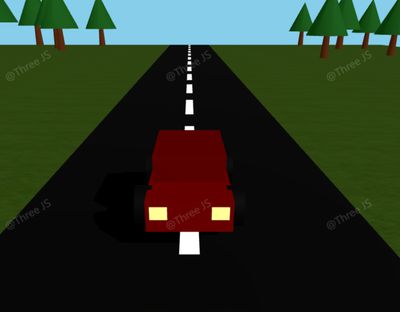
本案例演示 无限行驶 效果:基于 WebGL 实现「无限行驶」可视化效果,附完整可运行源码;核心用到 OrbitControls。建议先打开文首在线案例查看动态画面,再对照下方源码逐步理解。
核心概念
- Scene / Camera / WebGLRenderer 构成最小渲染闭环;大场景可开
logarithmicDepthBuffer缓解 Z-fighting。 - OrbitControls 提供轨道旋转/缩放;开启
enableDamping后需在 animate 中controls.update()。 - 阅读下方完整源码时,建议从
init/load/animate三条主线入手,再深入 shader 与工具函数。
实现步骤
- 搭建灯光与环境(如有)
- requestAnimationFrame 循环 update + render
代码要点
import * as THREE from 'three'
import { OrbitControls } from 'three/examples/jsm/controls/OrbitControls.js'

// 基础场景设置
const container = document.getElementById('box')
const scene = new THREE.Scene()
scene.background = new THREE.Color(0x87CEEB)

// 相机和渲染器
const camera = new THREE.PerspectiveCamera(60, container.clientWidth / container.clientHeight, 0.1, 1000)
camera.position.set(0, 5, 10)

const renderer = new THREE.WebGLRenderer({ antialias: true })
renderer.setSize(container.clientWidth, container.clientHeight)
renderer.shadowMap.enabled = true
container.appendChild(renderer.domElement)

// 控制器
const controls = new OrbitControls(camera, renderer.domElement)
controls.enableDamping = true

// 光照
scene.add(new THREE.AmbientLight(0xffffff, 0.5))
const dirLight = new THREE.DirectionalLight(0xffffff, 0.8)
dirLight.position.set(10, 10, 10)
dirLight.castShadow = true
dirLight.shadow.mapSize.width = dirLight.shadow.mapSize.height = 1024
scene.add(dirLight)

// 无限道路系统类
class InfiniteRoad {
  constructor() {
    this.speed = 0.2
    this.roadLength = 200

    // 创建共享纹理加载器
    const textureLoader = new THREE.TextureLoader()

    // 创建道路和草地
    this.road = this.createPlane(10, this.roadLength,
      textureLoader.load('https://threejs.org/examples/textures/roads/road1.jpg'),
      { repeat: [1, 10], y: 0.01, color: 0x444444 })

    this.grass = this.createPlane(100, this.roadLength,
      textureLoader.load('https://threejs.org/examples/textures/terrain/grasslight-big.jpg'),
      { repeat: [8, 40], y: 0, color: 0x88aa55 })

    // 创建道路标记
    this.createRoadMarkings()

    // 创建树木
    this.createTrees()
  }

  // 辅助方法:创建平面
  createPlane(width, length, texture, options) {
    texture.wrapS = texture.wrapT = THREE.RepeatWrapping
    texture.repeat.set(options.repeat[0], options.repeat[1])

    const mesh = new THREE.Mesh(
      new THREE.PlaneGeometry(width, length),
      new THREE.MeshStandardMaterial({
        map: texture,
        color: options.color,
        roughness: 0.8
      })
    )
    mesh.rotation.x = -Math.PI / 2
    mesh.position.y = options.y
    mesh.receiveShadow = true
    scene.add(mesh)
    return mesh
  }

  // 创建道路标记
  createRoadMarkings() {
    this.roadMarkings = []
    const markingGap = 8
    const totalMarkings = Math.ceil(this.roadLength / markingGap) * 2

    for (let i = 0; i < totalMarkings; i++) {
      const marking = new THREE.Mesh(
        new THREE.PlaneGeometry(0.5, 5),
        new THREE.MeshBasicMaterial({ color: 0xffffff })
      )
      marking.rotation.x = -Math.PI / 2
      marking.position.y = 0.02
      marking.position.z = -this.roadLength / 2 + i * markingGap
      this.roadMarkings.push(marking)
      scene.add(marking)
    }
  }

  // 创建树木
  createTrees() {
    this.trees = []
    const createTree = () => {
      const tree = new THREE.Group()

      // 树干
      const trunk = new THREE.Mesh(
        new THREE.CylinderGeometry(0.5, 0.8, 5, 8),
        new THREE.MeshStandardMaterial({ color: 0x8B4513, roughness: 0.9 })
      )
      trunk.position.y = 2.5
      trunk.castShadow = true
      tree.add(trunk)

      // 树冠
      const foliage = new THREE.Mesh(
        new THREE.ConeGeometry(4, 8, 8),
        new THREE.MeshStandardMaterial({ color: 0x228B22, roughness: 0.8 })
      )
      foliage.position.y = 8
      foliage.castShadow = true
      tree.add(foliage)

      // 随机缩放和旋转
      const scale = 0.8 + Math.random() * 0.5
      tree.scale.set(scale, scale, scale)
      tree.rotation.y = Math.random() * Math.PI * 2

      return tree
    }

    // 在道路两侧放置树木
    for (let i = 0; i < 20; i++) {
      // 左侧树木
      const leftTree = createTree()
      leftTree.position.set(-20 - Math.random() * 20, 0, -this.roadLength / 2 + i * 20 + Math.random() * 10)
      this.trees.push(leftTree)
      scene.add(leftTree)

      // 右侧树木
      const rightTree = createTree()
      rightTree.position.set(20 + Math.random() * 20, 0, -this.roadLength / 2 + i * 20 + Math.random() * 10)
      this.trees.push(rightTree)
      scene.add(rightTree)
    }
  }

  update() {
    // 更新纹理偏移实现无限滚动
    if (this.road.material.map) this.road.material.map.offset.y += this.speed * 0.01
    if (this.grass.material.map) this.grass.material.map.offset.y += this.speed * 0.01

    // 更新道路标记和树木位置
    this.updateRoadElements(this.roadMarkings)
    this.updateRoadElements(this.trees, true)
  }

  // 通用更新方法
  updateRoadElements(elements, isTree = false) {
    for (const element of elements) {
      element.position.z += this.speed

      if (element.position.z > this.roadLength / 2) {
        element.position.z -= this.roadLength

        // 树木需要随机调整X轴位置
        if (isTree) {
          const side = element.position.x < 0 ? -1 : 1
          element.position.x = side * (20 + Math.random() * 20)
        }
      }
    }
  }
}

// 简化的汽车类
class Car {
  constructor() {
    this.speed = 0.2
    this.object = new THREE.Group()
    this.wheels = []

    // 车身
    const body = new THREE.Mesh(
      new THREE.BoxGeometry(2, 0.75, 4.5),
      new THREE.MeshStandardMaterial({ color: 0xFF0000, metalness: 0.6, roughness: 0.4 })
    )
    body.position.y = 0.6
    body.castShadow = true
    this.object.add(body)

    // 车顶
    const roof = new THREE.Mesh(
      new THREE.BoxGeometry(1.8, 0.7, 2.5),
      new THREE.MeshStandardMaterial({ color: 0xDD0000, metalness: 0.6, roughness: 0.4 })
    )
    roof.position.set(0, 1.3, -0.2)
    roof.castShadow = true
    this.object.add(roof)

    // 创建车轮
    this.createWheels()

    // 添加车灯
    this.addLights()

    // 设置汽车位置
    this.object.position.y = 0.5
    scene.add(this.object)
  }

  createWheels() {
    const wheelPositions = [
      [-1.1, 0.5, 1.4], [1.1, 0.5, 1.4],   // 前轮
      [-1.1, 0.5, -1.4], [1.1, 0.5, -1.4]  // 后轮
    ]

    const wheelGeometry = new THREE.CylinderGeometry(0.5, 0.5, 0.4, 16)
    const wheelMaterial = new THREE.MeshStandardMaterial({
      color: 0x111111,
      metalness: 0.5,
      roughness: 0.7
    })

    wheelPositions.forEach(pos => {
      const wheel = new THREE.Mesh(wheelGeometry, wheelMaterial)
      wheel.rotation.z = Math.PI / 2
      wheel.position.set(...pos)
      wheel.castShadow = true
      this.wheels.push(wheel)
      this.object.add(wheel)

      // 添加轮毂
      const hub = new THREE.Mesh(
        new THREE.CylinderGeometry(0.2, 0.2, 0.41, 8),
        new THREE.MeshStandardMaterial({ color: 0xCCCCCC, metalness: 0.8, roughness: 0.2 })
      )
      wheel.add(hub)
    })
  }

  addLights() {
    // 前灯
    const headlightGeometry = new THREE.BoxGeometry(0.4, 0.3, 0.1)
    const headlightMaterial = new THREE.MeshBasicMaterial({ color: 0xFFFF99 })

    for (let x = -1; x <= 1; x += 2) {
      const headlight = new THREE.Mesh(headlightGeometry, headlightMaterial)
      headlight.position.set(x * 0.7, 0.7, 2.25)
      this.object.add(headlight)

      // 前灯光源
      const spotLight = new THREE.SpotLight(0xFFFFAA, 0.8, 20, Math.PI / 6, 0.5, 2)
      spotLight.position.copy(headlight.position)
      spotLight.target.position.set(x * 0.7, 0, 10)
      this.object.add(spotLight)
      this.object.add(spotLight.target)
    }

    // 尾灯
    const taillightMaterial = new THREE.MeshBasicMaterial({ color: 0xFF0000 })
    for (let x = -1; x <= 1; x += 2) {
      const taillight = new THREE.Mesh(headlightGeometry, taillightMaterial)
      taillight.position.set(x * 0.7, 0.7, -2.25)
      this.object.add(taillight)
    }
  }

  update() {
    // 车轮旋转效果
    this.wheels.forEach(wheel => {
      wheel.rotation.x -= this.speed * 0.5
    })
  }
}

// 创建场景对象
const infiniteRoad = new InfiniteRoad()
const car = new Car()

// 窗口调整
window.addEventListener('resize', () => {
  const width = container.clientWidth
  const height = container.clientHeight
  camera.aspect = width / height
  camera.updateProjectionMatrix()
  renderer.setSize(width, height)
})

// 动画循环
function animate() {
  requestAnimationFrame(animate)
  controls.update()
  infiniteRoad.update()
  car.update()
  renderer.render(scene, camera)
}

animate()
完整源码:GitHub
小结
- 本文提供 无限行驶 完整 Three.js 源码与在线 Demo,建议先运行案例再改 uniform/参数做二次实验
- 更多 Three.js 实战案例见 three-cesium-examples 合集 与 GitHub 开源仓库