数学公式应用 · Math Apply · ▶ 在线运行案例
案例合集: 三维可视化功能案例(threehub.cn)
开源仓库github地址: https://github.com/z2586300277/three-cesium-examples
**400个案例代码: ** 网盘链接
你将学到什么
- OrbitControls 相机轨道交互
- CatmullRomCurve3 样条曲线路径
requestAnimationFrame渲染循环与resize自适应
效果说明
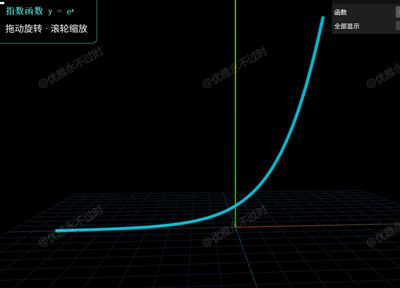
本案例演示 数学公式应用 效果:基于 WebGL 实现「数学公式应用」可视化效果,附完整可运行源码;核心用到 OrbitControls、CatmullRomCurve3。建议先打开文首在线案例查看动态画面,再对照下方源码逐步理解。
核心概念
- Scene / Camera / WebGLRenderer 构成最小渲染闭环;大场景可开
logarithmicDepthBuffer缓解 Z-fighting。 - OrbitControls 提供轨道旋转/缩放;开启
enableDamping后需在 animate 中controls.update()。 - 曲线类
getPoints(n)将贝塞尔/样条离散为路径点,再写入 BufferGeometry 驱动飞线或路径动画。
实现步骤
- 搭建灯光与环境(如有)
- requestAnimationFrame 循环 update + render
代码要点
<!DOCTYPE html>
<html lang="zh-CN">

<head>
  <meta charset="UTF-8" />
  <title>Three.js 中高中数学函数三维可视化</title>
  <style>
    * {
      margin: 0;
      padding: 0
    }

    body {
      background: #05050f;
      overflow: hidden;
      font-family: Arial, sans-serif
    }

    #info {
      position: absolute;
      top: 12px;
      left: 12px;
      z-index: 10;
      color: #ddd;
      background: rgba(0, 0, 0, .7);
      padding: 10px 16px;
      border-radius: 8px;
      border: 1px solid #4ecdc4;
      line-height: 1.9;
    }

    #name {
      font-size: 16px;
      color: #4ecdc4;
      font-family: monospace;
      font-weight: bold
    }
  </style>
</head>

<body>
  <div id="info">
    <div id="name">一次函数 y = x</div>
    拖动旋转 · 滚轮缩放
  </div>
  <script type="importmap">
    {
      "imports":{
        "three":"https://threejs.org/build/three.module.js",
        "three/addons/":"https://threejs.org/examples/jsm/"
      }
    }</script>
  <script type="module">
    import * as THREE from 'three'
    import { OrbitControls } from 'three/addons/controls/OrbitControls.js'
    import { GUI } from 'three/addons/libs/lil-gui.module.min.js'

    const scene = new THREE.Scene()
    const camera = new THREE.PerspectiveCamera(60, innerWidth / innerHeight, 0.1, 1000)
    camera.position.set(0, 6, 18)
    const renderer = new THREE.WebGLRenderer({ antialias: true })
    renderer.setSize(innerWidth, innerHeight)
    document.body.appendChild(renderer.domElement)
    const controls = new OrbitControls(camera, renderer.domElement)
    controls.enableDamping = true

    scene.add(new THREE.AxesHelper(10))
    scene.add(new THREE.GridHelper(20, 20, 0x1a2a3a, 0x0d1520))
    scene.add(new THREE.AmbientLight(0xffffff, 0.6))
    const dLight = new THREE.DirectionalLight(0xffffff, 1.2)
    dLight.position.set(5, 10, 8); scene.add(dLight)

    // 中高中常用函数定义,返回 null 表示该点不连续/无意义
    const fns = {
      '一次函数  y = x': x => x,
      '二次函数  y = x²': x => x * x * 0.25,
      '三次函数  y = x³': x => x * x * x * 0.02,
      '正弦函数  y = sin(x)': x => Math.sin(x) * 3,
      '余弦函数  y = cos(x)': x => Math.cos(x) * 3,
      '正切函数  y = tan(x)': x => { const v = Math.tan(x); return Math.abs(v) < 8 ? v * 1.2 : null },
      '指数函数  y = eˣ': x => { const v = Math.exp(x * 0.6); return v < 9 ? v : null },
      '对数函数  y = ln(x)': x => x > 0.01 ? Math.log(x) * 2.5 : null,
      '绝对值    y = |x|': x => Math.abs(x),
      '反比例    y = 1/x': x => Math.abs(x) > 0.25 ? 3 / x : null,
      '平方根    y = √x': x => x >= 0 ? Math.sqrt(x) * 2 : null,
    }

    const COLORS = [0xff6b6b, 0xffd166, 0x06d6a0, 0x4cc9f0, 0xe040fb,
      0xff9800, 0x00e5ff, 0x8bc34a, 0xf06292, 0xff5722, 0x26c6da]

    // 采样函数点,空值处自动断开
    function sample(fn, xMin = -8, xMax = 8, steps = 500) {
      const segments = []; let seg = []
      for (let i = 0; i <= steps; i++) {
        const x = xMin + (xMax - xMin) * i / steps
        const y = fn(x)
        if (y == null || !isFinite(y)) {
          if (seg.length > 2) segments.push(seg)
          seg = []
        } else {
          seg.push(new THREE.Vector3(x, y, 0))
        }
      }
      if (seg.length > 2) segments.push(seg)
      return segments
    }

    // 每段点生成管状 TubeGeometry
    function buildTube(pts, color) {
      const curve = new THREE.CatmullRomCurve3(pts)
      const geo = new THREE.TubeGeometry(curve, Math.min(pts.length * 2, 300), 0.07, 8, false)
      const mat = new THREE.MeshPhongMaterial({ color, emissive: color, emissiveIntensity: 0.25, shininess: 100 })
      return new THREE.Mesh(geo, mat)
    }

    // 预构建所有函数 Group,默认隐藏
    const fnNames = Object.keys(fns)
    const groups = fnNames.map((name, i) => {
      const g = new THREE.Group()
      sample(fns[name]).forEach(pts => g.add(buildTube(pts, COLORS[i])))
      g.visible = false
      scene.add(g)
      return g
    })

    let cur = 0
    groups[0].visible = true

    const p = { 函数: fnNames[0], 全部显示: false }
    const gui = new GUI({ title: '中高中数学函数' })
    gui.add(p, '函数', fnNames).onChange(name => {
      if (!p['全部显示']) groups[cur].visible = false
      cur = fnNames.indexOf(name)
      if (!p['全部显示']) groups[cur].visible = true
      document.getElementById('name').textContent = name
    })
    gui.add(p, '全部显示').onChange(all => {
      groups.forEach((g, i) => g.visible = all || i === cur)
    })

    window.onresize = () => {
      camera.aspect = innerWidth / innerHeight
      camera.updateProjectionMatrix()
      renderer.setSize(innerWidth, innerHeight)
    }

      ; (function loop() {
        requestAnimationFrame(loop)
        controls.update()
        renderer.render(scene, camera)
      })()
  </script>
</body>

</html>
完整源码:GitHub
小结
- 本文提供 数学公式应用 完整 Three.js 源码与在线 Demo,建议先运行案例再改 uniform/参数做二次实验
- 更多 Three.js 实战案例见 three-cesium-examples 合集 与 GitHub 开源仓库