矩阵操作 · Matrix Oper · ▶ 在线运行案例
案例合集: 三维可视化功能案例(threehub.cn)
开源仓库github地址: https://github.com/z2586300277/three-cesium-examples
**400个案例代码: ** 网盘链接
你将学到什么
- GSAP 时间轴与补间动画
- CSS2D/3D 标签 DOM 叠加
requestAnimationFrame渲染循环与resize自适应
效果说明
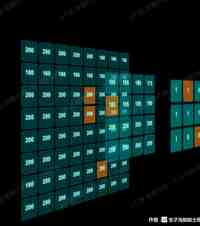
本案例演示 矩阵操作 效果:基于 WebGL 实现「矩阵操作」可视化效果,附完整可运行源码;核心用到 GSAP、CSS2D/3D。建议先打开文首在线案例查看动态画面,再对照下方源码逐步理解。
核心概念
- Scene / Camera / WebGLRenderer 构成最小渲染闭环;大场景可开
logarithmicDepthBuffer缓解 Z-fighting。 - 阅读下方完整源码时,建议从
init/load/animate三条主线入手,再深入 shader 与工具函数。
实现步骤
- 搭建灯光与环境(如有)
- requestAnimationFrame 循环 update + render
代码要点
<html>

<head>
    <meta charset="UTF-8">
    <title>threejs-example 1-model</title>
    <script type="importmap">
        {
          "imports": {
            "three": "https://threejs.org/build/three.module.js",
            "three/addons/": "https://threejs.org/examples/jsm/"
          }
        }
      </script>
      <script>

      </script>
    <style>
        body {
            margin: 0;
            background-color: black;
        }

        a {
            color: #8ff;
        }

        .element {
            width: 120px;
            height: 120px;
            box-shadow: 0px 0px 12px rgba(0, 255, 255, 0.5);
            border: 1px solid rgba(127, 255, 255, 0.25);
            font-family: Helvetica, sans-serif;
            text-align: center;
            line-height: normal;
            cursor: default;
        }

        .element-active {
            background-color: rgba(255, 145, 0, 0.582) !important;
        }

        .element:hover {
            box-shadow: 0px 0px 12px rgba(0, 255, 255, 0.75);
            border: 1px solid rgba(127, 255, 255, 0.75);
        }

        .element .symbol {
            position: absolute;
            top: 30px;
            left: 0px;
            right: 0px;
            font-size: 40px;
            font-weight: bold;
            color: rgba(255, 255, 255, 0.75);
            text-shadow: 0 0 10px rgba(0, 255, 255, 0.95);
        }
    </style>
</head>

<body>
    <div id="container"></div>

</body>
<script type="module">
    import * as THREE from "three";
    import TWEEN from "three/addons/libs/tween.module.js";
    import { TrackballControls } from "three/addons/controls/TrackballControls.js";
    import { CSS3DRenderer, CSS3DObject } from "three/addons/renderers/CSS3DRenderer.js";

    // 适用矩阵 8*8,12*12,16*16
    // 8*8矩阵
    const m1 = [
        200, 200, 200, 200, 200, 180, 160, 180,
        180, 160, 180, 160, 160, 180, 180, 180,
        200, 200, 200, 200, 200, 200, 200, 200,
        200, 200, 200, 200, 200, 200, 200, 200,
        200, 200, 200, 200, 200, 200, 200, 200,
        200, 200, 200, 200, 200, 200, 200, 200,
        180, 200, 200, 200, 200, 200, 200, 200,
        200, 200, 200, 200, 200, 200, 200, 220,
    ];

    const m2 = pooling8to4(m1);
    const m3 = normalizationTo3(m2);

    let camera, scene, renderer;
    let controls;

    const objects = [];// 保存数字板的原始对象
    const targets = { table: [] };// 保存目标位置

    init();
    animate();

    function init() {

        camera = new THREE.PerspectiveCamera(40, window.innerWidth / window.innerHeight, 1, 10000);
        camera.position.x = -2200;
        camera.position.z = 400;
        camera.position.z = 1900;
        console.log("camera", camera);

        scene = new THREE.Scene();

        generateMatrix(m1, 8, 0, 0.4);
        generateMatrix(m2, 4, 400, 0.6);
        generateMatrix(m3, 3, 800, 0.8);

        renderer = new CSS3DRenderer();
        renderer.setSize(window.innerWidth, window.innerHeight);
        document.getElementById("container").appendChild(renderer.domElement);


        controls = new TrackballControls(camera, renderer.domElement);
        controls.minDistance = 500;
        controls.maxDistance = 6000;
        controls.addEventListener("change", render);


        transform(targets.table, 2000);

        setInterval(() => {
            const randomIndex = Math.floor(Math.random() * objects.length);
            if (objects[randomIndex]) {
                objects[randomIndex].element.classList.add("element-active");
                console.log(" objects[randomIndex]", objects[randomIndex]);
            }
        }, 1000);

        window.addEventListener("resize", onWindowResize);

    }

    function generateMatrix(arr, len, zPosition, opacity) {
        // 生成矩阵的图层效果
        const targetsArr = [];
        for (let i = 0; i < arr.length; i += 1) {
            const element = document.createElement("div");
            element.className = "element";
            element.style.backgroundColor = `rgba(0,127,127,${opacity})`;

            const symbol = document.createElement("div");
            symbol.className = "symbol";
            symbol.textContent = arr[i];
            element.appendChild(symbol);

            const objectCSS = new CSS3DObject(element);
            objectCSS.position.x = Math.random() * 4000 - 2000;
            objectCSS.position.y = Math.random() * 4000 - 2000;
            objectCSS.position.z = Math.random() * 4000 - 2000;
            scene.add(objectCSS);
            objects.push(objectCSS);

            const object = new THREE.Object3D();
            object.position.x = ((i % len) * 140) - len * 80;
            object.position.y = - ((Math.ceil((i + 1) / len)) * 140) + len * 50;
            object.position.z = zPosition;

            targets.table.push(object);
            targetsArr.push(object);

        }
        return targetsArr;
    }

    function pooling8to4(arr) {
        // 将输入矩阵8*8 池化成 4*4 矩阵 取平均值
        const result = [];
        for (let i = 0; i < 16; i += 1) {
            const num1 = arr[i * 2];
            const num2 = arr[i * 2 + 1];
            const num3 = arr[i * 2 + 8];
            const num4 = arr[i * 2 + 9];
            result.push(Math.ceil((num1 + num2 + num3 + num4) / 4));
        }
        return result;
    }

    function normalizationTo3(arr) {
        // 伪装运算,取前9个值,单数为1,复数为0,生成3*3矩阵
        const result = [];
        for (let i = 0; i < 9; i += 1) {
            result.push(arr[i] % 2);
        }
        return result;
    }

    function transform(targets, duration) {

        TWEEN.removeAll();

        for (let i = 0; i < objects.length; i++) {

            const object = objects[i];
            const target = targets[i];

            new TWEEN.Tween(object.position)
                .to({ x: target.position.x, y: target.position.y, z: target.position.z }, Math.random() * duration + duration)
                .easing(TWEEN.Easing.Exponential.InOut)
                .start();

            // new TWEEN.Tween( object.rotation )
            //     .to( { x: target.rotation.x, y: target.rotation.y, z: target.rotation.z }, Math.random() * duration + duration )
            //     .easing( TWEEN.Easing.Exponential.InOut )
            //     .start();

        }

        new TWEEN.Tween(this)
            .to({}, duration * 2)
            .onUpdate(render)
            .start();

    }

    function onWindowResize() {

        camera.aspect = window.innerWidth / window.innerHeight;
        camera.updateProjectionMatrix();

        renderer.setSize(window.innerWidth, window.innerHeight);

        render();

    }

    function animate() {

        requestAnimationFrame(animate);

        TWEEN.update();

        controls.update();

    }

    function render() {

        renderer.render(scene, camera);

    }
</script>

</html>
完整源码:GitHub
小结
- 本文提供 矩阵操作 完整 Three.js 源码与在线 Demo,建议先运行案例再改 uniform/参数做二次实验
- 更多 Three.js 实战案例见 three-cesium-examples 合集 与 GitHub 开源仓库