模型边框 · Model Border · ▶ 在线运行案例
案例合集: 三维可视化功能案例(threehub.cn)
开源仓库github地址: https://github.com/z2586300277/three-cesium-examples
**400个案例代码: ** 网盘链接
你将学到什么
- OrbitControls 相机轨道交互
- glTF/Draco 模型加载与优化
- BufferGeometry 自定义顶点/索引数据
- EdgesGeometry 模型边线提取
requestAnimationFrame渲染循环与resize自适应
效果说明
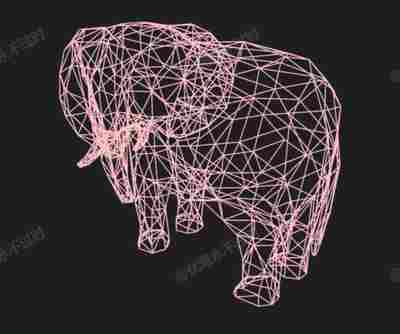
本案例演示 模型边框 效果:基于 WebGL 实现「模型边框」可视化效果,附完整可运行源码;核心用到 OrbitControls、glTF/Draco、BufferGeometry。建议先打开文首在线案例查看动态画面,再对照下方源码逐步理解。
核心概念
- Scene / Camera / WebGLRenderer 构成最小渲染闭环;大场景可开
logarithmicDepthBuffer缓解 Z-fighting。 - OrbitControls 提供轨道旋转/缩放;开启
enableDamping后需在 animate 中controls.update()。 - 阅读下方完整源码时,建议从
init/load/animate三条主线入手,再深入 shader 与工具函数。
实现步骤
- 搭建 Scene、PerspectiveCamera、WebGLRenderer,挂载 canvas 并处理
resize - 异步加载模型 / 3D Tiles / GeoJSON 等资源并加入 scene 或 entities
- 创建 OrbitControls(及 Raycaster 等交互控件,若源码包含)
- 在
requestAnimationFrame循环中更新状态并 render(Cesium 为viewer.render或自动渲染)
代码要点
import * as THREE from 'three'
import { OrbitControls } from 'three/examples/jsm/controls/OrbitControls.js'
import { GLTFLoader } from 'three/examples/jsm/loaders/GLTFLoader.js'
import { DRACOLoader } from 'three/examples/jsm/loaders/DRACOLoader.js'
import { BufferGeometry, EdgesGeometry } from 'three';
import { mergeAttributes } from 'three/addons/utils/BufferGeometryUtils.js';

class MeshEdgesGeometry extends BufferGeometry {

    constructor(object, thresholdAngle = 1) {

        super();

        object.updateWorldMatrix(true, true);

        var position = this.extractEdges(object, thresholdAngle);

        this.setAttribute('position', position);

    } // MeshEdgesGeometry.constructor

    extractEdges(object, thresholdAngle) {

        var attributes = [];

        object.traverse(child => {

            if (child.geometry) {

                var geo = new EdgesGeometry(child.geometry, thresholdAngle);
                var pos = geo.getAttribute('position');

                attributes.push(pos.applyMatrix4(child.matrixWorld));

            } // if

        }); // object.traverse

        if (attributes.length == 0) {

            throw 'MeshEdgesGeometry: No edges found';

        }

        return mergeAttributes(attributes);

    } // MeshEdgesGeometry.extractEdges

} // MeshEdgesGeometry

const box = document.getElementById('box')

const scene = new THREE.Scene()

const camera = new THREE.PerspectiveCamera(75, box.clientWidth / box.clientHeight, 0.1, 100000)

camera.position.set(10, 10, 12)

const renderer = new THREE.WebGLRenderer({ antialias: true, alpha: true, logarithmicDepthBuffer: true })

renderer.setSize(box.clientWidth, box.clientHeight)

box.appendChild(renderer.domElement)

new OrbitControls(camera, renderer.domElement)

window.onresize = () => {

    renderer.setSize(box.clientWidth, box.clientHeight)

    camera.aspect = box.clientWidth / box.clientHeight

    camera.updateProjectionMatrix()

}

animate()

function animate() {

    requestAnimationFrame(animate)

    renderer.render(scene, camera)

}

const loader = new GLTFLoader()

loader.setDRACOLoader(new DRACOLoader().setDecoderPath(FILE_HOST + 'js/three/draco/'))

loader.load(

    FILE_HOST + 'files/model/elegant.glb',

    gltf => {

        const model = new THREE.LineSegments(new MeshEdgesGeometry(gltf.scene), new THREE.LineBasicMaterial({ color: 'pink' }));

        scene.add(model)

    }

)
完整源码:GitHub
小结
- 本文提供 模型边框 完整 Three.js 源码与在线 Demo,建议先运行案例再改 uniform/参数做二次实验
- 更多 Three.js 实战案例见 three-cesium-examples 合集 与 GitHub 开源仓库