管道流动 · Pipe Flow · ▶ 在线运行案例
案例合集: 三维可视化功能案例(threehub.cn)
开源仓库github地址: https://github.com/z2586300277/three-cesium-examples
**400个案例代码: ** 网盘链接
你将学到什么
- OrbitControls 相机轨道交互
- CatmullRomCurve3 样条曲线路径
- GSAP 时间轴与补间动画
- 监听窗口
resize同步更新 camera 与 renderer
效果说明
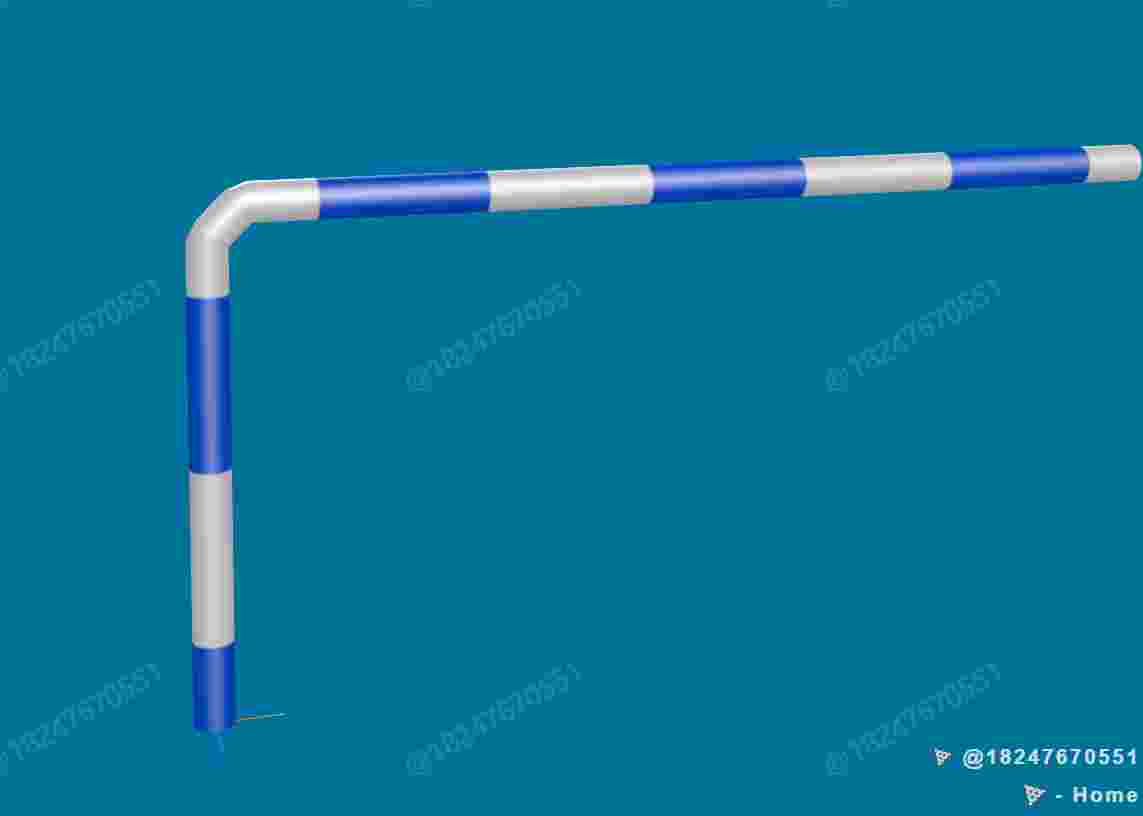
本案例演示 管道流动 效果:基于 WebGL 实现「管道流动」可视化效果,附完整可运行源码;核心用到 OrbitControls、CatmullRomCurve3、GSAP。建议先打开文首在线案例查看动态画面,再对照下方源码逐步理解。
核心概念
- Scene / Camera / WebGLRenderer 构成最小渲染闭环;大场景可开
logarithmicDepthBuffer缓解 Z-fighting。 - OrbitControls 提供轨道旋转/缩放;开启
enableDamping后需在 animate 中controls.update()。 - 曲线类
getPoints(n)将贝塞尔/样条离散为路径点,再写入 BufferGeometry 驱动飞线或路径动画。
实现步骤
- 搭建 Scene、PerspectiveCamera、WebGLRenderer,挂载 canvas 并处理
resize - 用曲线离散点构建 BufferGeometry,写入自定义 attribute 驱动动画
- 创建 OrbitControls(及 Raycaster 等交互控件,若源码包含)
- 在定时器或 GSAP 时间轴中更新 uniform / 变换,驱动特效播放
- 在
requestAnimationFrame循环中更新状态并 render(Cesium 为viewer.render或自动渲染)
代码要点
import * as THREE from "three";
import { OrbitControls } from "three/examples/jsm/controls/OrbitControls.js";
import { GUI } from "dat.gui";
import Stats from "three/examples/jsm/libs/stats.module.js";
import gsap from "gsap";

class MyMesh extends THREE.Mesh{

    constructor(name, geometry, material) {
        super(geometry, material)
        this.name = name
    }

    getBox(){
        // 更新模型的世界矩阵
        this.updateMatrixWorld()
        // 获取模型的包围盒
        const box = new THREE.Box3().setFromObject(this)

        return {
            minX: box.min.x,
            maxX: box.max.x,
            minY: box.min.y,
            maxY: box.max.y,
            minZ: box.min.z,
            maxZ: box.max.z,
            xLength: box.max.x - box.min.x,
            yLength: box.max.y - box.min.y,
            zLength: box.max.z - box.min.z,
            // 数轴上任意两点中心点公式 = a + (b - a)/2
            centerX: box.min.x + (box.max.x - box.min.x)/2,
            centerY: box.min.y + (box.max.y - box.min.y)/2,
            centerZ: box.min.z + (box.max.z - box.min.z)/2
        }
    }

}

class DemoPipe extends MyMesh {
    flowAnimation;
    flowTexture;
    constructor(name, options) {
        const defaultOptions = {
            radius: 70,
            color: 0x777777,
            radiusSegments: 16,
            tubularSegments: 100,
            curve: new THREE.CatmullRomCurve3(),
        };
        const finalOptions = Object.assign({}, defaultOptions, options);
        const flowTexture = new THREE.TextureLoader().load(FILE_HOST + "threeExamples/application/flow.png");
        flowTexture.colorSpace = THREE.SRGBColorSpace;
        flowTexture.wrapS = flowTexture.wrapT = THREE.RepeatWrapping;
        // finalOptions.curve.getLength() / 1000 获取管道总长度 / 1000, 是贴图横向重复次数, 以确保每条管道贴图样式相同
        flowTexture.repeat.set(finalOptions.curve.getLength() / 1000, 1);
        flowTexture.needsUpdate = true;
        const mat = new THREE.MeshPhongMaterial({
            color: finalOptions.color,
            transparent: true,
            side: THREE.DoubleSide,
            specular: finalOptions.color,
            shininess: 15,
            //map: flowTexture
        });
        //mat.needsUpdate = true
        const geo = new THREE.TubeGeometry(finalOptions.curve, finalOptions.tubularSegments, finalOptions.radius, finalOptions.radiusSegments);
        super(name, geo, mat);
        this.flowTexture = flowTexture;
        this.flowAnimation = this.createFlowAnimation();
    }
    createFlowAnimation() {
        return gsap.to(this.flowTexture.offset, {
            x: -3,
            duration: 1,
            ease: "none",
            repeat: -1,
            paused: true
        });
    }
    startFlow() {
        const mat = this.material;
        mat.map = this.flowTexture;
        this.flowAnimation.resume();
    }
    stopFlow() {
        this.flowAnimation.pause();
        const mat = this.material;
        mat.map = null;
    }
}

class ThreeCore {
    dom;
    scene;
    camera;
    defaultCamera;
    renderer;
    clock;
    options;
    stats;
    // 要执行动画的对象集合, 子类可以把自己的动画写进 onRender 也可以 this.addAnimate() 添加到父类动画集合里
    animates;
    constructor(dom, options) {
        this.dom = dom;
        this.options = options;
        this.scene = new THREE.Scene();
        this.clock = new THREE.Clock();
        this.animates = {};
        const k = dom.clientWidth / dom.clientHeight;
        if ("fov" in options.cameraOptions) {
            this.defaultCamera = new THREE.PerspectiveCamera(options.cameraOptions.fov, k, options.cameraOptions.near, options.cameraOptions.far);
        }
        else {
            const s = options.cameraOptions.s;
            this.defaultCamera = new THREE.OrthographicCamera(-s * k, s * k, s, -s, options.cameraOptions.near, options.cameraOptions.far);
        }
        this.camera = this.defaultCamera;
        this.scene.add(this.camera);
        const rendererOptions = {
            // 抗锯齿
            antialias: true,
            alpha: true,
            // 深度缓冲, 解决模型重叠部分不停闪烁问题
            // 这个属性会导致精灵材质会被后面的物体遮挡
            // 只能出现问题的时候, 在那个场景 new ThreeCore继承类的时候, 传入rendererOptions参数, 将此参数改为 false
            logarithmicDepthBuffer: true
        };
        const renderer = new THREE.WebGLRenderer(Object.assign({}, rendererOptions, options.rendererOptions));
        renderer.setSize(dom.clientWidth, dom.clientHeight);
        renderer.setPixelRatio(window.devicePixelRatio);
        dom.appendChild(renderer.domElement);
        this.renderer = renderer;
        this.stats = new Stats();
        dom.appendChild(this.stats.dom);
        window.addEventListener("resize", this.onResize, false);
        //利用 setTimeout 宏任务最后执行特性, 使js执行过程要等所有微任务和同步代码执行完再执行, 否则 this.init() 可能会在场景未搭建完毕就执行报错或没有生产对象

        this.init();
        this.animate();

    }
    // 提供给子类覆写
    onRenderer() { }
    // 提供给子类覆写
    onDestroy() { }
    animate() {
        this.renderer.setAnimationLoop(() => {
            this.onRenderer();
            this.stats.update();
            // 执行动画
            for (const key in this.animates) {
                this.animates[key](this.clock.getDelta());
            }
            this.renderer.render(this.scene, this.camera);
        });
    }
    addAnimate(name, func) {
        this.animates[name] = func;
    }
    removeAnimate(name) {
        delete this.animates[name];
    }
    onResize = () => {
        const width = this.dom.clientWidth;
        const height = this.dom.clientHeight;
        const k = width / height;
        // 更新相机
        if (this.camera instanceof THREE.PerspectiveCamera) {
            this.camera.aspect = k;
        }
        else {
            const s = this.options.cameraOptions.s;
            this.camera.left = -s * k;
            this.camera.right = s * k;
            this.camera.top = s;
            this.camera.bottom = -s;
        }
        this.camera.updateProjectionMatrix();
        // 更新renderer
        this.renderer.setSize(width, height);
        this.renderer.setPixelRatio(window.devicePixelRatio);
    };
    destroyed() {
        // 需要手动移除掉 gui, 否则刷新页面时会出现多个gui
        document.querySelector(".dg.main.a")?.remove();
        window.removeEventListener("resize", this.onResize.bind(this));
        this.onDestroy();
        this.renderer.setAnimationLoop(null);
        this.renderer.renderLists.dispose();
        this.renderer.dispose();
        this.renderer.forceContextLoss();
        this.renderer.domElement.innerHTML = "";
        this.scene.clear();
        THREE.Cache.clear();
    }
}

class ThreeProject extends ThreeCore {
    orbit;
    pipe;
    constructor(dom) {
        super(dom, {
            cameraOptions: {
                fov: 45,
                near: 0.1,
                far: 30000
            }
        });
        this.scene.background = new THREE.Color(0x00719e); // 天蓝色
        this.camera.position.set(0, 2000, 5000);
        const ambientLight = new THREE.AmbientLight(0xffffff, 5);
        this.scene.add(ambientLight);
        const directionalLight1 = new THREE.DirectionalLight(0xffffff, 4);
        directionalLight1.position.set(0, 10000, 20000);
        this.scene.add(directionalLight1);
        const directionalLight2 = new THREE.DirectionalLight(0xffffff, 8);
        directionalLight2.position.set(0, 10000, -20000);
        this.scene.add(directionalLight2);
        this.orbit = new OrbitControls(this.camera, this.renderer.domElement);
        this.orbit.target.x = 1500;
        this.orbit.target.y = 1500;
        this.orbit.update();
        const axesHelper = new THREE.AxesHelper(200);
        this.scene.add(axesHelper);
        this.pipe = this.addAndGetPipe();
    }
    init() {
        this.addGUI();
    }
    addGUI() {
        const gui = new GUI();
        gui.add({ startFlow: () => this.pipe.startFlow() }, 'startFlow').name('开始流动');
        gui.add({ stopFlow: () => this.pipe.stopFlow() }, 'stopFlow').name('停止流动');
    }
    addAndGetPipe() {
        const p1 = new THREE.Vector3(0, 0, 0);
        const p2 = new THREE.Vector3(0, 1400, 0);
        const p3 = new THREE.Vector3(50, 1450, 0);
        const p4 = new THREE.Vector3(100, 1500, 0);
        const p5 = new THREE.Vector3(3000, 1500, 0);
        const line1 = new THREE.LineCurve3(p1, p2);
        const curve1 = new THREE.CatmullRomCurve3([p2, p3, p4]);
        const line2 = new THREE.LineCurve3(p4, p5);
        const curvePath = new THREE.CurvePath();
        curvePath.curves.push(line1, curve1, line2);
        const pipe = new DemoPipe("管道1", {
            radius: 60,
            color: 0x777777,
            tubularSegments: 200,
            radiusSegments: 16,
            curve: curvePath,
        });
        this.scene.add(pipe);
        return pipe;
    }
    onRenderer() {
        this.orbit.update();
    }
}

new ThreeProject(document.getElementById('box'))
完整源码:GitHub
小结
- 本文提供 管道流动 完整 Three.js 源码与在线 Demo,建议先运行案例再改 uniform/参数做二次实验
- 更多 Three.js 实战案例见 three-cesium-examples 合集 与 GitHub 开源仓库