采样波 · Samplex Wave · ▶ 在线运行案例
案例合集: 三维可视化功能案例(threehub.cn)
开源仓库github地址: https://github.com/z2586300277/three-cesium-examples
**400个案例代码: ** 网盘链接
你将学到什么
- EffectComposer 多 Pass 后期处理管线
- UnrealBloomPass 辉光 Bloom 效果
- OrbitControls 相机轨道交互
- THREE.Points 粒子点渲染
- Raycaster 鼠标拾取与交互
- BufferGeometry 自定义顶点/索引数据
requestAnimationFrame渲染循环与resize自适应
效果说明
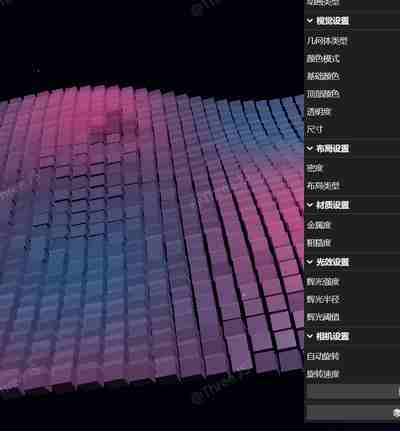
本案例演示 采样波 效果:原场景渲染后经 EffectComposer 叠加 Bloom/模糊等全屏后期,支持鼠标拾取、绘制或拖拽交互;核心用到 EffectComposer、UnrealBloomPass、OrbitControls。建议先打开文首在线案例查看动态画面,再对照下方源码逐步理解。
核心概念
EffectComposer 多 Pass 链式渲染:RenderPass → 特效 Pass → 输出屏幕。
composer.render()替代renderer.render()。OrbitControls 轨道旋转缩放;开
enableDamping时每帧需controls.update()。阴影四步:
renderer.shadowMap.enabled、光源castShadow、物体castShadow、地面receiveShadow。CubeTexture 六面贴图作
scene.background;scene.environment供 PBR 材质反射。
实现步骤
- 搭建 Scene / Camera / Renderer 与 OrbitControls
- EffectComposer 组装 Pass 链并 render
代码要点
import * as THREE from 'three';
import { OrbitControls } from 'three/examples/jsm/controls/OrbitControls.js';
import { GUI } from 'three/examples/jsm/libs/lil-gui.module.min.js';
import { EffectComposer } from 'three/examples/jsm/postprocessing/EffectComposer.js';
import { RenderPass } from 'three/examples/jsm/postprocessing/RenderPass.js';
import { UnrealBloomPass } from 'three/examples/jsm/postprocessing/UnrealBloomPass.js';

// 获取容器元素
const box = document.getElementById('box');

// 创建场景
const scene = new THREE.Scene();
scene.background = new THREE.Color(0x000000);

// 设置渲染器
const renderer = new THREE.WebGLRenderer({ antialias: true });
renderer.setSize(box.clientWidth, box.clientHeight);
renderer.setPixelRatio(Math.min(window.devicePixelRatio, 2));
renderer.toneMapping = THREE.ACESFilmicToneMapping;
renderer.toneMappingExposure = 1.2;
box.appendChild(renderer.domElement);

// 创建相机
const camera = new THREE.PerspectiveCamera(45, box.clientWidth / box.clientHeight, 0.1, 100);
camera.position.set(0, 20, 35);
scene.add(camera);

// 创建控制器
const controls = new OrbitControls(camera, renderer.domElement);
controls.enableDamping = true;
controls.dampingFactor = 0.25;
controls.enableZoom = true;

// 添加灯光
const ambientLight = new THREE.AmbientLight(0x555555);
scene.add(ambientLight);

const light1 = new THREE.DirectionalLight(0xffffff, 1);
light1.position.set(0, 30, 0);
scene.add(light1);

const light2 = new THREE.DirectionalLight(0xffffff, 1);
light2.position.set(30, 30, 0);
scene.add(light2);

// 创建后期处理效果
const composer = new EffectComposer(renderer);
const renderPass = new RenderPass(scene, camera);
composer.addPass(renderPass);

// 辉光效果
const bloomPass = new UnrealBloomPass(
  new THREE.Vector2(box.clientWidth, box.clientHeight),
  0.8, // 强度
  0.35, // 半径
  0.9  // 阈值
);
composer.addPass(bloomPass);

// 创建环境
scene.fog = new THREE.FogExp2(0x000819, 0.0025);
scene.background = new THREE.Color(0x000819); // 深蓝色背景

// 添加星空背景
function createStars() {
  const starsGeometry = new THREE.BufferGeometry();
  const starsCount = 3000;
  const positions = new Float32Array(starsCount * 3);
  const sizes = new Float32Array(starsCount);

  for (let i = 0; i < starsCount; i++) {
    positions[i * 3] = (Math.random() - 0.5) * 200;
    positions[i * 3 + 1] = (Math.random() - 0.5) * 200 + 50;
    positions[i * 3 + 2] = (Math.random() - 0.5) * 200;
    sizes[i] = Math.random() * 2;
  }

  starsGeometry.setAttribute('position', new THREE.BufferAttribute(positions, 3));
  starsGeometry.setAttribute('size', new THREE.BufferAttribute(sizes, 1));

  const starsMaterial = new THREE.PointsMaterial({
    color: 0xffffff,
    sizeAttenuation: true,
    transparent: true,
    blending: THREE.AdditiveBlending,
    size: 0.1
  });

  const stars = new THREE.Points(starsGeometry, starsMaterial);
  scene.add(stars);
}
createStars();

// 参数设置 - 增强版
const params = {
  // 波浪参数
  simplexVariation: 0.05,
  simplexAmp: 2.0,
  waveSpeed: 1.0,

  // 视觉参数
  geometry: 'box',
  colorMode: 'gradient',
  baseColor: 0x2bc1ff,
  topColor: 0xff4b8c,
  opacity: 0.7,
  size: 0.8,
  metalness: 0.5,
  roughness: 0.2,

  // 密度参数
  density: 0.8,

  // 效果参数
  bloomStrength: 0.8,
  bloomRadius: 0.35,
  bloomThreshold: 0.9,

  // 相机设置
  autoRotate: true,
  rotateSpeed: 0.5,

  // 动画设置
  animationPreset: 'wave',
  resetCamera: () => {
    camera.position.set(0, 15, 35);
    camera.lookAt(0, 0, 0);
  },

  // 布局设置
  layoutPreset: 'grid',
  randomize: () => {
    regenerateShapes(true);
  }
};

// 高级噪声函数
class EnhancedNoise {
  constructor() {
    // ...existing noise setup...
  }

  // 支持多种波形混合
  noise4d(x, y, z, w) {
    // 混合多种波形,创造更复杂的模式
    const noise1 = Math.sin(x*10 + w) * Math.cos(y*8 - w*0.5) * Math.sin(z*5);
    const noise2 = Math.cos(x*5 - w*0.7) * Math.sin(y*4 + w*0.3) * Math.cos(z*3);
    const noise3 = Math.sin(x*2.3 + w*0.2) * Math.cos(y*3.5 - w*0.1) * Math.sin(z*4.1);

    switch(params.animationPreset) {
      case 'wave':
        return (noise1 * 0.6 + noise2 * 0.3 + noise3 * 0.1) * 2;
      case 'ripple':
        const dist = Math.sqrt(x*x + z*z) * 10;
        return Math.sin(dist - w) * Math.exp(-dist * 0.1) * 2;
      case 'pulse':
        return Math.sin(w * 0.5 + Math.sqrt(x*x + z*z) * 3) * 1.8;
      default:
        return noise1 * 2;
    }
  }
}

const noise = new EnhancedNoise();
let iteration = 0;
const shapes = [];

// 色彩计算器
function getColor(height, x, z) {
  const normalizedHeight = (height + params.simplexAmp) / (2 * params.simplexAmp);

  switch(params.colorMode) {
    case 'gradient':
      // 从底部颜色到顶部颜色的渐变
      const baseColor = new THREE.Color(params.baseColor);
      const topColor = new THREE.Color(params.topColor);
      return baseColor.lerp(topColor, normalizedHeight);

    case 'rainbow':
      // HSL彩虹效果
      const hue = (normalizedHeight * 0.8 + 0.2) % 1.0;
      return new THREE.Color().setHSL(hue, 0.7, 0.5);

    case 'position':
      // 基于位置的颜色变化
      const angle = Math.atan2(z, x) / (2 * Math.PI) + 0.5;
      const dist = Math.sqrt(x*x + z*z) / 25;
      const hue2 = (angle + dist + iteration * 0.001) % 1.0;
      return new THREE.Color().setHSL(hue2, 0.8, 0.5);

    default:
      return new THREE.Color(params.baseColor);
  }
}

// 创建几何体工厂
function createGeometry() {
  const size = params.size;
  switch(params.geometry) {
    case 'box':
      return new THREE.BoxGeometry(size, size, size);
    case 'sphere':
      return new THREE.SphereGeometry(size * 0.5, 8, 8);
    case 'torus':
      return new THREE.TorusGeometry(size * 0.3, size * 0.2, 16, 16);
    case 'cone':
      return new THREE.ConeGeometry(size * 0.5, size, 8);
    case 'octahedron':
      return new THREE.OctahedronGeometry(size * 0.5);
  }
}

// 创建单个形状
function Shape(x, z) {
  this.originalX = x;
  this.originalZ = z;

  // 创建几何体
  this.geometry = createGeometry();

  // 创建高级材质
  this.material = new THREE.MeshPhysicalMaterial({
    color: getColor(0, x, z),
    roughness: params.roughness,
    metalness: params.metalness,
    transparent: true,
    opacity: params.opacity,
    reflectivity: 0.5,
    clearcoat: 0.3,
    clearcoatRoughness: 0.4,
    flatShading: true
  });

  this.mesh = new THREE.Mesh(this.geometry, this.material);
  this.mesh.position.set(x, 0, z);
  this.speed = Math.random() * 0.5 + 0.5;
}

// 更新形状
Shape.prototype.update = function() {
  // 获取高度
  const height = noise.noise4d(
    this.originalX * params.simplexVariation,
    this.originalZ * params.simplexVariation,
    0,
    iteration / 100 * params.waveSpeed
  ) * params.simplexAmp;

  // 设置位置和缩放
  this.mesh.position.y = height;

  // 动态添加旋转
  this.mesh.rotation.x += 0.003 * this.speed;
  this.mesh.rotation.z += 0.002 * this.speed;

  // 更新材质
  this.material.color.copy(getColor(height, this.originalX, this.originalZ));
  this.material.opacity = params.opacity;
  this.material.roughness = params.roughness;
  this.material.metalness = params.metalness;

  // 基于高度设置发光
  const emissiveIntensity = Math.max(0, (height / params.simplexAmp) * 0.3);
  this.material.emissive.copy(this.material.color).multiplyScalar(emissiveIntensity);
};

// 生成形状
function generateShapes() {
  // 根据密度计算立方体数量
  const baseCount = Math.round(35 * params.density);
  const population = { x: baseCount, z: baseCount };

  // 清除形状
  const shapesToRemove = [...shapes];
  shapes.length = 0;

  // 删除旧网格
  shapesToRemove.forEach(shape => {
    scene.remove(shape.mesh);
    shape.geometry.dispose();
    shape.material.dispose();
  });

  if (params.layoutPreset === 'grid') {
    // 网格布局
    for (let i = population.x * -0.5; i <= population.x / 2; i++) {
      for (let u = population.z * -0.5; u <= population.z / 2; u++) {
        const shape = new Shape(i, u);
        shapes.push(shape);
        scene.add(shape.mesh);
      }
    }
  } else if (params.layoutPreset === 'circle') {
    // 圆形布局
    const count = population.x * population.z / 2;
    const radius = Math.min(population.x, population.z) / 2;

    for (let i = 0; i < count; i++) {
      const angle = (i / count) * Math.PI * 2;
      const dist = Math.sqrt(Math.random()) * radius;
      const x = Math.cos(angle) * dist;
      const z = Math.sin(angle) * dist;

      const shape = new Shape(x, z);
      shapes.push(shape);
      scene.add(shape.mesh);
    }
  } else if (params.layoutPreset === 'random') {
    // 随机布局
    const count = population.x * population.z / 3;
    const range = Math.min(population.x, population.z) / 2;

    for (let i = 0; i < count; i++) {
      const x = (Math.random() - 0.5) * range * 2;
      const z = (Math.random() - 0.5) * range * 2;

      const shape = new Shape(x, z);
      shapes.push(shape);
      scene.add(shape.mesh);
    }
  }
}

// 重新生成形状
function regenerateShapes(randomize = false) {
  if (randomize) {
    // 随机改变参数
    params.simplexVariation = Math.random() * 0.1 + 0.01;
    params.simplexAmp = Math.random() * 4 + 0.5;
    params.waveSpeed = Math.random() * 2 + 0.5;

    // 随机选择形状和颜色模式
    const geometries = ['box', 'sphere', 'torus', 'cone', 'octahedron'];
    const colorModes = ['gradient', 'rainbow', 'position'];
    params.geometry = geometries[Math.floor(Math.random() * geometries.length)];
    params.colorMode = colorModes[Math.floor(Math.random() * colorModes.length)];

    // 随机颜色
    params.baseColor = Math.random() * 0xffffff;
    params.topColor = Math.random() * 0xffffff;

    updateGUI();
  }

  generateShapes();
}

// 添加光线生成器
function addLights() {
  // 点光源
  const pointLight = new THREE.PointLight(0xffffff, 1, 50);
  pointLight.position.set(0, 20, 0);
  scene.add(pointLight);

  // 环境光
  scene.add(new THREE.AmbientLight(0x333333));

  // 聚光灯
  const spotLight = new THREE.SpotLight(0x4444ff, 1);
  spotLight.position.set(-20, 30, -10);
  spotLight.angle = Math.PI / 6;
  spotLight.penumbra = 0.2;
  spotLight.castShadow = true;
  scene.add(spotLight);
}
addLights();

// 创建GUI - 增强版
function createGUI() {
  const gui = new GUI({ title: '波浪控制面板', width: 300 });

  // 波浪参数
  const waveFolder = gui.addFolder('波浪设置');
  waveFolder.add(params, 'simplexVariation', 0.01, 0.2).name('频率').onChange(() => {});
  waveFolder.add(params, 'simplexAmp', 0.2, 5).name('振幅').onChange(() => {});
  waveFolder.add(params, 'waveSpeed', 0.1, 3).name('速度').onChange(() => {});
  waveFolder.add(params, 'animationPreset', ['wave', 'ripple', 'pulse']).name('动画类型');

  // 视觉参数
  const visualFolder = gui.addFolder('视觉设置');
  visualFolder.add(params, 'geometry', ['box', 'sphere', 'torus', 'cone', 'octahedron'])
    .name('几何体类型')
    .onChange(() => regenerateShapes());
  visualFolder.add(params, 'colorMode', ['gradient', 'rainbow', 'position'])
    .name('颜色模式');
  visualFolder.addColor(params, 'baseColor').name('基础颜色');
  visualFolder.addColor(params, 'topColor').name('顶部颜色');
  visualFolder.add(params, 'opacity', 0.1, 1).name('透明度');
  visualFolder.add(params, 'size', 0.2, 2).name('尺寸')
    .onChange(() => regenerateShapes());

  // 布局参数
  const layoutFolder = gui.addFolder('布局设置');
  layoutFolder.add(params, 'density', 0.2, 1).name('密度')
    .onChange(() => regenerateShapes());
  layoutFolder.add(params, 'layoutPreset', ['grid', 'circle', 'random'])
    .name('布局类型')
    .onChange(() => generateShapes());

  // 材质参数
  const materialFolder = gui.addFolder('材质设置');
  materialFolder.add(params, 'metalness', 0, 1).name('金属度');
  materialFolder.add(params, 'roughness', 0, 1).name('粗糙度');

  // 后期效果
  const effectFolder = gui.addFolder('光效设置');
  effectFolder.add(params, 'bloomStrength', 0, 3)
    .name('辉光强度')
    .onChange(value => bloomPass.strength = value);
  effectFolder.add(params, 'bloomRadius', 0, 1)
    .name('辉光半径')
    .onChange(value => bloomPass.radius = value);
  effectFolder.add(params, 'bloomThreshold', 0, 1)
    .name('辉光阈值')
    .onChange(value => bloomPass.threshold = value);

  // 相机控制
  const cameraFolder = gui.addFolder('相机设置');
  cameraFolder.add(params, 'autoRotate').name('自动旋转')
    .onChange(value => controls.autoRotate = value);
  cameraFolder.add(params, 'rotateSpeed', 0.1, 5)
    .name('旋转速度')
    .onChange(value => controls.autoRotateSpeed = value);
  cameraFolder.add(params, 'resetCamera').name('重置相机');

  // 动作按钮
  gui.add(params, 'randomize').name('🎲 随机效果');

  return gui;
}

const gui = createGUI();

// 更新GUI
function updateGUI() {
  // 更新GUI控件以反映随机参数
  for (let folder of Object.values(gui.folders)) {
    for (let controller of folder.controllers) {
      controller.updateDisplay();
    }
  }
}

// 设置控制器
controls.autoRotate = params.autoRotate;
controls.autoRotateSpeed = params.rotateSpeed;
controls.enableDamping = true;
controls.dampingFactor = 0.05;

// 生成初始形状
generateShapes();

// 添加交互
const raycaster = new THREE.Raycaster();
const mouse = new THREE.Vector2();
let hoveredObject = null;
let originalColor = null;

function onMouseMove(event) {
  // 转换鼠标坐标为归一化设备坐标
  mouse.x = (event.clientX / box.clientWidth) * 2 - 1;
  mouse.y = -(event.clientY / box.clientHeight) * 2 + 1;
}

document.addEventListener('mousemove', onMouseMove);

// 动画循环
function animate() {
  requestAnimationFrame(animate);

  iteration++;

  // 更新所有形状
  for (let i = 0; i < shapes.length; i++) {
    shapes[i].update();
  }

  // 处理悬停交互
  raycaster.setFromCamera(mouse, camera);
  const intersects = raycaster.intersectObjects(
    shapes.map(shape => shape.mesh)
  );

  if (hoveredObject) {
    hoveredObject.material.emissiveIntensity = 0;
    hoveredObject = null;
  }

  if (intersects.length > 0) {
    hoveredObject = intersects[0].object;
    hoveredObject.material.emissiveIntensity = 0.8;
  }

  controls.update();
  composer.render();
}

// 窗口大小调整
window.addEventListener('resize', function() {
  camera.aspect = box.clientWidth / box.clientHeight;
  camera.updateProjectionMatrix();
  renderer.setSize(box.clientWidth, box.clientHeight);
  composer.setSize(box.clientWidth, box.clientHeight);
});

animate();
完整源码:GitHub
小结
- 本文提供 采样波 完整 Three.js 源码与在线 Demo,建议先运行案例再改 uniform/参数做二次实验
- 更多 Three.js 实战案例见 three-cesium-examples 合集 与 GitHub 开源仓库