人物模型动画案例 · Model Animation · ▶ 在线运行案例
案例合集: 三维可视化功能案例(threehub.cn)
开源仓库github地址: https://github.com/z2586300277/three-cesium-examples
**400个案例代码: ** 网盘链接
你将学到什么
- glTF 模型中的 骨骼动画(Skeletal Animation) 如何播放
AnimationMixer+AnimationAction的核心 API- crossFadeTo 实现待机 / 行走 / 跑步之间的平滑过渡
- 用 lil-gui 面板调试权重、暂停、单步播放
效果说明
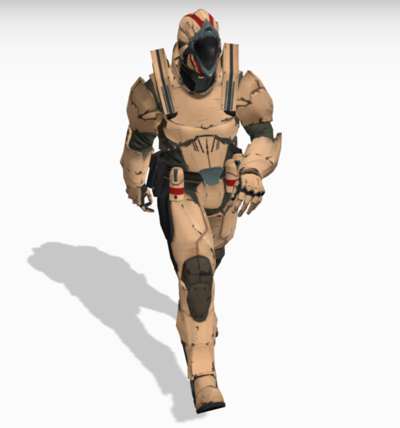
加载 Soldier.glb 士兵模型,在灰色地面上展示 待机、行走、跑步 三套动作。右侧 GUI 面板可:
- 切换显示模型 / 骨骼辅助线
- 暂停、单步推进动画
- 一键 crossFade 切换动作(如「从待机到行走」)
- 手动调节各动作 混合权重 与全局 timeScale
相机通过 OrbitControls 环绕人物,并自动跟随模型位置。
核心概念
glTF 动画数据结构
glTF 加载完成后,gltf.animations 是一个 AnimationClip 数组,每个 clip 包含一组关键帧轨道(位置、旋转、缩放或骨骼矩阵):
loader.load(url, (gltf) => {
    model = gltf.scene;
    const animations = gltf.animations;  // [clip0, clip1, clip2, ...]
});
本案例中 clip 索引对应关系(以 Soldier.glb 为准):
| 索引 | 动作 |
|---|---|
animations[0] |
idle 待机 |
animations[1] |
run 跑步 |
animations[3] |
walk 行走 |
::: tip
不同模型的 clip 顺序不同,加载后应 console.log(animations.map(a => a.name)) 确认。
:::
AnimationMixer 播放管线
AnimationClip  →  mixer.clipAction(clip)  →  AnimationAction
                                                    ↓
                                            action.play() / crossFadeTo()
                                                    ↓
                              每帧 mixer.update(delta)  →  更新骨骼矩阵  →  模型动起来
mixer = new THREE.AnimationMixer(model);
idleAction = mixer.clipAction(animations[0]);
idleAction.play();

// 渲染循环中
mixer.update(clock.getDelta());
crossFadeTo 过渡
两个动作同时播放,通过 权重渐变 实现无缝切换:
setWeight(endAction, 1);
endAction.time = 0;
startAction.crossFadeTo(endAction, duration, true);
//                              过渡时长(秒)  是否同步时间轴
setEffectiveWeight(weight) 控制每个 action 的贡献比例;三个 action 同时 play() 时,权重之和通常为 1。
SkeletonHelper
skeleton = new THREE.SkeletonHelper(model);
skeleton.visible = false;  // GUI 可切换显示
用于调试骨骼层级与关节方向,上线前隐藏即可。
实现步骤
- init — Scene、Camera、Renderer、阴影、地面、灯光
- GLTFLoader 加载 Soldier.glb →
scene.add(model) - 创建
AnimationMixer,绑定 idle / walk / run 三个clipAction - createPanel — lil-gui 六组控制项
renderer.setAnimationLoop(animate)替代手写 rAF- animate —
mixer.update(delta)+ 相机跟随 + OrbitControls
代码要点
import * as THREE from "three";
import Stats from "three/examples/jsm/libs/stats.module.js";
import { GUI } from "three/examples/jsm/libs/lil-gui.module.min.js";
import { GLTFLoader } from "three/examples/jsm/loaders/GLTFLoader.js";
import { OrbitControls } from 'three/examples/jsm/controls/OrbitControls.js'

let scene, renderer, camera, stats;
let model, skeleton, mixer, clock;

const crossFadeControls = [];

let idleAction, walkAction, runAction;
let idleWeight, walkWeight, runWeight;
let actions, settings;

let singleStepMode = false;
let sizeOfNextStep = 0;

let controls;
let cameraTarget = new THREE.Vector3();

init();

function init() {
  const container = document.getElementById("box");

  camera = new THREE.PerspectiveCamera(
    45,
    window.innerWidth / window.innerHeight,
    1,
    100
  );
  camera.position.set(1, 2, -3);
  camera.lookAt(0, 1, 0);

  clock = new THREE.Clock();

  scene = new THREE.Scene();
  scene.background = new THREE.Color(0xa0a0a0);
  scene.fog = new THREE.Fog(0xa0a0a0, 10, 50);

  const hemiLight = new THREE.HemisphereLight(0xffffff, 0x8d8d8d, 3);
  hemiLight.position.set(0, 20, 0);
  scene.add(hemiLight);

  const dirLight = new THREE.DirectionalLight(0xffffff, 3);
  dirLight.position.set(-3, 10, -10);
  dirLight.castShadow = true;
  dirLight.shadow.camera.top = 2;
  dirLight.shadow.camera.bottom = -2;
  dirLight.shadow.camera.left = -2;
  dirLight.shadow.camera.right = 2;
  dirLight.shadow.camera.near = 0.1;
  dirLight.shadow.camera.far = 40;
  scene.add(dirLight);

  // 相机辅助器
  // scene.add( new THREE.CameraHelper( dirLight.shadow.camera ) );

  // 地面
  const mesh = new THREE.Mesh(
    new THREE.PlaneGeometry(100, 100),
    new THREE.MeshPhongMaterial({ color: 0xcbcbcb, depthWrite: false })
  );
  mesh.rotation.x = -Math.PI / 2;
  mesh.receiveShadow = true;
  scene.add(mesh);

  const loader = new GLTFLoader();

  loader.load(
    FILE_HOST + 'files/model/Soldier.glb',
    function (gltf) {
      model = gltf.scene;
      scene.add(model);

      model.traverse(function (object) {
        if (object.isMesh) object.castShadow = true;
      });
      console.log(model, "模型");
      //

      skeleton = new THREE.SkeletonHelper(model);
      skeleton.visible = false;
      scene.add(skeleton);

      //

      createPanel();

      //

      const animations = gltf.animations;

      mixer = new THREE.AnimationMixer(model);

      idleAction = mixer.clipAction(animations[0]);
      walkAction = mixer.clipAction(animations[3]);
      runAction = mixer.clipAction(animations[1]);

      actions = [idleAction, walkAction, runAction];

      activateAllActions();

      renderer.setAnimationLoop(animate);
    }
  );

  renderer = new THREE.WebGLRenderer({ antialias: true });
  renderer.setPixelRatio(window.devicePixelRatio);
  renderer.setSize(window.innerWidth, window.innerHeight);
  renderer.shadowMap.enabled = true;
  container.appendChild(renderer.domElement);

  stats = new Stats();
  container.appendChild(stats.dom);

  stats.dom.style.position = 'absolute';
  stats.dom.style.left = '30px';
  stats.dom.style.top = '0px';

  window.addEventListener("resize", onWindowResize);

  controls = new OrbitControls(camera, renderer.domElement);
  controls.enableDamping = true;
  controls.dampingFactor = 0.05;
  controls.screenSpacePanning = false;
  controls.minDistance = 3;
  controls.maxDistance = 20;
  controls.maxPolarAngle = Math.PI / 2;
}

function createPanel() {
  const panel = new GUI({ width: 310 });

  const folder1 = panel.addFolder("可见性控制");
  const folder2 = panel.addFolder("动画激活/停用");
  const folder3 = panel.addFolder("暂停/步进");
  const folder4 = panel.addFolder("动画过渡");
  const folder5 = panel.addFolder("混合权重");
  const folder6 = panel.addFolder("全局速度");

  settings = {
    "show model": true,
    "show skeleton": false,
    "deactivate all": deactivateAllActions,
    "activate all": activateAllActions,
    "pause/continue": pauseContinue,
    "make single step": toSingleStepMode,
    "modify step size": 0.05,
    "from walk to idle": function () {
      prepareCrossFade(walkAction, idleAction, 1.0);
    },
    "from idle to walk": function () {
      prepareCrossFade(idleAction, walkAction, 0.5);
    },
    "from walk to run": function () {
      prepareCrossFade(walkAction, runAction, 2.5);
    },
    "from run to walk": function () {
      prepareCrossFade(runAction, walkAction, 5.0);
    },
    "use default duration": true,
    "set custom duration": 3.5,
    "modify idle weight": 0.0,
    "modify walk weight": 1.0,
    "modify run weight": 0.0,
    "modify time scale": 1.0,
  };

  folder1.add(settings, "show model").name("显示模型").onChange(showModel);
  folder1
    .add(settings, "show skeleton")
    .name("显示骨骼")
    .onChange(showSkeleton);
  folder2.add(settings, "deactivate all").name("停用所有");
  folder2.add(settings, "activate all").name("激活所有");
  folder3.add(settings, "pause/continue").name("暂停/继续");
  folder3.add(settings, "make single step").name("单步执行");
  folder3.add(settings, "modify step size", 0.01, 0.1, 0.001).name("步长修改");
  crossFadeControls.push(
    folder4.add(settings, "from walk to idle").name("从行走到待机")
  );
  crossFadeControls.push(
    folder4.add(settings, "from idle to walk").name("从待机到行走")
  );
  crossFadeControls.push(
    folder4.add(settings, "from walk to run").name("从行走到跑步")
  );
  crossFadeControls.push(
    folder4.add(settings, "from run to walk").name("从跑步到行走")
  );
  folder4.add(settings, "use default duration").name("使用默认时长");
  folder4.add(settings, "set custom duration", 0, 10, 0.01).name("自定义时长");
  folder5
    .add(settings, "modify idle weight", 0.0, 1.0, 0.01)
    .name("待机权重")
    .listen()
    .onChange(function (weight) {
      setWeight(idleAction, weight);
    });
  folder5
    .add(settings, "modify walk weight", 0.0, 1.0, 0.01)
    .name("行走权重")
    .listen()
    .onChange(function (weight) {
      setWeight(walkAction, weight);
    });
  folder5
    .add(settings, "modify run weight", 0.0, 1.0, 0.01)
    .name("跑步权重")
    .listen()
    .onChange(function (weight) {
      setWeight(runAction, weight);
    });
  folder6
    .add(settings, "modify time scale", 0.0, 1.5, 0.01)
    .name("时间缩放")
    .onChange(modifyTimeScale);

  folder1.open();
  folder2.open();
  folder3.open();
  folder4.open();
  folder5.open();
  folder6.open();
}

function showModel(visibility) {
  model.visible = visibility;
}

function showSkeleton(visibility) {
  skeleton.visible = visibility;
}

function modifyTimeScale(speed) {
  mixer.timeScale = speed;
}

function deactivateAllActions() {
  actions.forEach(function (action) {
    action.stop();
  });
}

function activateAllActions() {
  setWeight(idleAction, settings["modify idle weight"]);
  setWeight(walkAction, settings["modify walk weight"]);
  setWeight(runAction, settings["modify run weight"]);

  actions.forEach(function (action) {
    action.play();
  });
}

function pauseContinue() {
  if (singleStepMode) {
    singleStepMode = false;
    unPauseAllActions();
  } else {
    if (idleAction.paused) {
      unPauseAllActions();
    } else {
      pauseAllActions();
    }
  }
}

function pauseAllActions() {
  actions.forEach(function (action) {
    action.paused = true;
  });
}

function unPauseAllActions() {
  actions.forEach(function (action) {
    action.paused = false;
  });
}

function toSingleStepMode() {
  unPauseAllActions();

  singleStepMode = true;
  sizeOfNextStep = settings["modify step size"];
}

function prepareCrossFade(startAction, endAction, defaultDuration) {
  // 根据用户选择切换默认/自定义过渡持续时间
  const duration = setCrossFadeDuration(defaultDuration);

  // 确保不在单步模式下,且所有动作都未暂停
  singleStepMode = false;
  unPauseAllActions();

  // 如果当前动作是'机'(持续4秒),立即执行过渡
  // 否则等待当前动作完成其当前循环
  if (startAction === idleAction) {
    executeCrossFade(startAction, endAction, duration);
  } else {
    synchronizeCrossFade(startAction, endAction, duration);
  }
}

function setCrossFadeDuration(defaultDuration) {
  // 根据用户选择切换默认/自定义过渡持续时间
  if (settings["use default duration"]) {
    return defaultDuration;
  } else {
    return settings["set custom duration"];
  }
}

function synchronizeCrossFade(startAction, endAction, duration) {
  mixer.addEventListener("loop", onLoopFinished);

  function onLoopFinished(event) {
    if (event.action === startAction) {
      mixer.removeEventListener("loop", onLoopFinished);

      executeCrossFade(startAction, endAction, duration);
    }
  }
}

function executeCrossFade(startAction, endAction, duration) {
  // 在开始过渡之前,确保结束动作的权重为1
  setWeight(endAction, 1);
  endAction.time = 0;

  // 使用渐变过渡 - 第三个参数设为false可以尝试无扭曲过渡
  startAction.crossFadeTo(endAction, duration, true);
}

// 此函数是必需的,因为animationAction.crossFadeTo()会禁用其起始动作
// 并将起始动作的时间缩放设置为((起始动画持续时间)/(结束动画持续时间))
function setWeight(action, weight) {
  action.enabled = true;
  action.setEffectiveTimeScale(1);
  action.setEffectiveWeight(weight);
}

// 由渲染循环调用
function updateWeightSliders() {
  settings["modify idle weight"] = idleWeight;
  settings["modify walk weight"] = walkWeight;
  settings["modify run weight"] = runWeight;
}

// 由渲染循环调用
function updateCrossFadeControls() {
  if (idleWeight === 1 && walkWeight === 0 && runWeight === 0) {
    crossFadeControls[0].disable(); // 禁用从行走到待机
    crossFadeControls[1].enable(); // 启用从待机到行走
    crossFadeControls[2].disable(); // 禁用从行走到跑步
    crossFadeControls[3].disable(); // 禁用从跑步到行走
  }
}

function onWindowResize() {
  camera.aspect = window.innerWidth / window.innerHeight;
  camera.updateProjectionMatrix();

  renderer.setSize(window.innerWidth, window.innerHeight);
}

function animate() {
  idleWeight = idleAction.getEffectiveWeight();
  walkWeight = walkAction.getEffectiveWeight();
  runWeight = runAction.getEffectiveWeight();

  // 如果权重从"外部"修改(通过过渡效果),更新面板值
  updateWeightSliders();

  // 根据当前权重值启用/禁用过渡控制
  updateCrossFadeControls();

  // 获取上一帧到当前帧的时间差,用于混合器更新(非单步模式下)
  let mixerUpdateDelta = clock.getDelta();

  // 如果在单步模式下,执行一步然后停止(直到用户再次点击)
  if (singleStepMode) {
    mixerUpdateDelta = sizeOfNextStep;
    sizeOfNextStep = 0;
  }

  // 更新动画混合器、状态面板,并渲染此帧
  mixer.update(mixerUpdateDelta);

  if (model) {
    // 更新相机目标点
    cameraTarget.copy(model.position);
    cameraTarget.y += 1;

    // 更新轨道控制器的目标点
    controls.target.copy(cameraTarget);
  }

  // 更新控制器 - 这会处理缩放和旋转
  controls.update();

  renderer.render(scene, camera);

  stats.update();
}
完整源码:GitHub
小结
- 骨骼动画三件套:AnimationClip → AnimationMixer → AnimationAction
- 动作切换优先用 crossFadeTo,比硬切
stop()+play()自然 - 本案例是 Three.js 官方 webgl_animation_walk 的中文 GUI 增强版,适合作为项目动画系统起点