模型视图 · Model Views · ▶ 在线运行案例
案例合集: 三维可视化功能案例(threehub.cn)
开源仓库github地址: https://github.com/z2586300277/three-cesium-examples
**400个案例代码: ** 网盘链接
你将学到什么
- 用 Box3 + FOV 反算「刚好框住模型」的相机距离
- 绕 Y/X 轴旋转 观察方向 得到六视图位置
- gsap 切换 camera.position 与 controls.target
效果说明
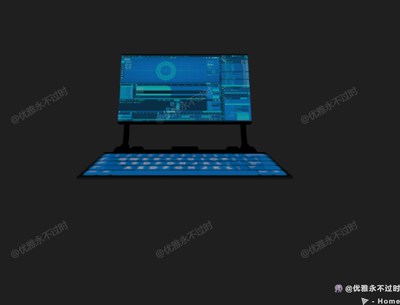
加载电脑模型,GUI 按钮 前视图 / 右视图 / 上视图,相机平滑飞到对应标准视角,target 始终为模型中心。
核心概念
const box = new THREE.Box3().setFromObject(object);
const center = box.getCenter(new THREE.Vector3());
const radius = box.max.clone().sub(box.min).length() / 2;

// 距离 = 半径 / tan(fov/2)
const distance = radius / Math.tan(Math.PI * fov / 360);
const dir = object.getWorldDirection(new THREE.Vector3());
const frontView = dir.clone().multiplyScalar(distance).add(center);

// 右视图:方向绕 Y 转 90°
const rightView = dir.clone()
    .applyAxisAngle(new THREE.Vector3(0, 1, 0), Math.PI / 2)
    .add(center);
这是 CAD/编辑器 「正视图」「俯视图」 按钮的常用算法。
代码要点
import * as THREE from 'three'
import { OrbitControls } from 'three/examples/jsm/controls/OrbitControls.js'
import { GLTFLoader } from 'three/examples/jsm/loaders/GLTFLoader.js'
import { GUI } from 'dat.gui'
import gsap from 'gsap'

const box = document.getElementById('box')

const scene = new THREE.Scene()

const camera = new THREE.PerspectiveCamera(75, box.clientWidth / box.clientHeight, 0.1, 100000)

camera.position.set(5, 5, 5)

const renderer = new THREE.WebGLRenderer({ antialias: true, alpha: true, logarithmicDepthBuffer: true })

renderer.setSize(box.clientWidth, box.clientHeight)

box.appendChild(renderer.domElement)

const controls = new OrbitControls(camera, renderer.domElement)

controls.enableDamping = true

window.onresize = () => {

    renderer.setSize(box.clientWidth, box.clientHeight)

    camera.aspect = box.clientWidth / box.clientHeight

    camera.updateProjectionMatrix()

}

let model

const gui = new GUI()

new GLTFLoader().load(

    FILE_HOST + 'models/glb/computer.glb',

    gltf => {

        model = scene.add(gltf.scene)

        const { frontView, target, rightView, topView, bottomView, backView, maxView } = getObjectViews(model)

        const setView = view => {

            createGsapAnimation(controls.object.position, view)

            createGsapAnimation(controls.target, target)

        }

        gui.add({ '前视图': () => setView(frontView) }, '前视图')

        gui.add({ '右视图': () => setView(rightView) }, '右视图')

        gui.add({ '上视图': () => setView(topView) }, '上视图')

    }

)

animate()

function animate() {

    requestAnimationFrame(animate)

    controls.update()

    renderer.render(scene, camera)

}

function getObjectViews(object, fov = 50) {

    const box = new THREE.Box3().setFromObject(object)

    const { max, min } = box

    const center = new THREE.Vector3()

    box.getCenter(center)

    const radius = new THREE.Vector3().subVectors(max, min).length() / 2

    const dir = object.getWorldDirection(new THREE.Vector3()) // 物体方向

    const distance = radius / Math.tan(Math.PI * fov / 360) // 根据半径和相机视角 计算出距离

    const vector = dir.multiplyScalar(distance) // 方向距离向量

    const frontView = vector.clone().add(center)

    const leftView = vector.clone().applyAxisAngle(new THREE.Vector3(0, 1, 0), -Math.PI / 2).add(center)

    const rightView = vector.clone().applyAxisAngle(new THREE.Vector3(0, 1, 0), Math.PI / 2).add(center)

    const topView = vector.clone().applyAxisAngle(new THREE.Vector3(1, 0, 0), -Math.PI / 2).add(center)

    const bottomView = vector.clone().applyAxisAngle(new THREE.Vector3(1, 0, 0), Math.PI / 2).add(center)

    const backView = vector.clone().applyAxisAngle(new THREE.Vector3(0, 1, 0), Math.PI).add(center)

    return { frontView, leftView, rightView, topView, bottomView, backView, target: center }

}

function createGsapAnimation(position, position_) {

    return gsap.to(

        position,

        {

            ...position_,

            duration: 1,

            ease: 'none',

            repeat: 0,

            yoyo: false,

            yoyoEase: true,

        }

    )

}
完整源码:GitHub
小结
- 本文提供 模型视图 完整 Three.js 源码与在线 Demo,建议先运行案例再改 uniform/参数做二次实验
- 更多 Three.js 实战案例见 three-cesium-examples 合集 与 GitHub 开源仓库