三维转屏幕坐标 · World to Screen · ▶ 在线运行案例
案例合集: 三维可视化功能案例(threehub.cn)
开源仓库github地址: https://github.com/z2586300277/three-cesium-examples
**400个案例代码: ** 网盘链接
你将学到什么
vector.project(camera)世界坐标 → NDC → 屏幕像素- 不用 CSS2DRenderer 的 手动 DOM 跟随 写法
- 每帧在 rAF 里更新标签位置
效果说明
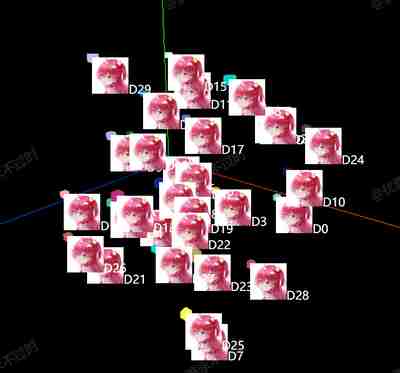
30 个小立方体,每个上方有一个 绝对定位的 DOM(图片 + 文字 D0~D29),随立方体在屏幕上移动而移动,像简易版 3D 标牌。
核心概念
project 管线
世界坐标 (World)
    ↓ matrixWorld × projectionMatrix
NDC 归一化设备坐标 (-1 ~ 1)
    ↓ 视口变换
屏幕像素 (px)
const worldPosition = mesh.getWorldPosition(new THREE.Vector3());
worldPosition.project(camera);

const screenX = (worldPosition.x + 1) / 2 * width;
const screenY = (-worldPosition.y + 1) / 2 * height;

div.style.left = screenX + 'px';
div.style.top = screenY + 'px';
注意 Y 轴翻转:NDC 的 y 向上,屏幕 CSS 的 y 向下,故 screenY 取负。
与 CSS2DRenderer 对比
| 方式 | 本案例 | cssElement |
|---|---|---|
| 实现 | 手算 project + DOM | CSS2DRenderer 自动投影 |
| 深度遮挡 | 无,DOM 总在最上层 | 可选 |
| 适用 | 理解原理、轻量标签 | 生产推荐 |
代码要点
import * as THREE from 'three'
import { OrbitControls } from 'three/examples/jsm/controls/OrbitControls.js'

const DOM = document.getElementById('box')

const scene = new THREE.Scene()

const camera = new THREE.PerspectiveCamera(75, DOM.clientWidth / DOM.clientHeight, 0.1, 1000)

camera.position.set(10, 10, 10)

const renderer = new THREE.WebGLRenderer()

renderer.setSize(DOM.clientWidth, DOM.clientHeight)

DOM.appendChild(renderer.domElement)

const controls = new OrbitControls(camera, renderer.domElement)

controls.enableDamping = true

scene.add(new THREE.AxesHelper(50))

const R = () => Math.random() * 10 - 5

const list = []

for (let i = 0; i < 30; i++) {

    const div = createDom('D' + i)

    const mesh = new THREE.Mesh(new THREE.BoxGeometry(0.3, 0.3, 0.3), new THREE.MeshBasicMaterial({ color: Math.random() * 0xffffff }))

    mesh.position.set(R(), R(), R())

    scene.add(mesh)

    mesh.div = div

    list.push(mesh)

}

function updateCSS2DVisibility() {

    list.forEach(mesh => {

        const worldPosition = mesh.getWorldPosition(new THREE.Vector3())

        worldPosition.project(camera);

        const width = renderer.domElement.clientWidth

        const height = renderer.domElement.clientHeight

        const screenX = (worldPosition.x + 1) / 2 * width

        const screenY = (-worldPosition.y + 1) / 2 * height

        mesh.div.style.left = screenX + 'px'

        mesh.div.style.top = screenY + 'px'

    })

}

animate()

function animate() {

    requestAnimationFrame(animate)

    updateCSS2DVisibility()

    controls.update()

    renderer.render(scene, camera)

}

window.onresize = () => {

    renderer.setSize(box.clientWidth, box.clientHeight)

    camera.aspect = box.clientWidth / box.clientHeight

    camera.updateProjectionMatrix()

}

// 创建dom
function createDom(text) {

    const div = document.createElement('div')

    div.style.position = 'absolute'

    const img = document.createElement('img')

    img.src = HOST + '/files/author/KallkaGo.jpg'

    img.style.width = '50px'

    img.style.height = '50px'

    div.appendChild(img)

    div.innerHTML += text

    div.style.color = 'white'

    document.body.appendChild(div)

    return div

}
完整源码:GitHub
小结
- 本文提供 三维转屏幕坐标 完整 Three.js 源码与在线 Demo,建议先运行案例再改 uniform/参数做二次实验
- 更多 Three.js 实战案例见 three-cesium-examples 合集 与 GitHub 开源仓库