模型热力图 · Heatmap Model · ▶ 在线运行案例
案例合集: 三维可视化功能案例(threehub.cn)
开源仓库github地址: https://github.com/z2586300277/three-cesium-examples
**400个案例代码: ** 网盘链接
你将学到什么
- ShaderMaterial 自定义着色器实现核心视觉效果
- OrbitControls 相机轨道交互
requestAnimationFrame渲染循环与resize自适应
效果说明
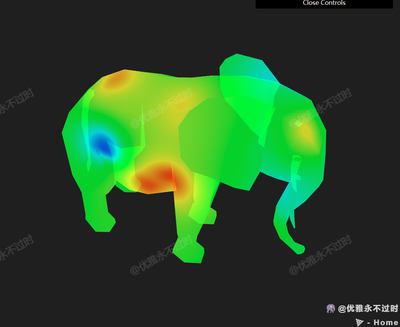
本案例演示 模型热力图 效果:基于 WebGL 实现「模型热力图」可视化效果,附完整可运行源码;核心用到 ShaderMaterial、OrbitControls。建议先打开文首在线案例查看动态画面,再对照下方源码逐步理解。
核心概念
- Scene / Camera / WebGLRenderer 构成最小渲染闭环;大场景可开
logarithmicDepthBuffer缓解 Z-fighting。 - ShaderMaterial 通过
uniforms+ 自定义 GLSL 控制逐像素/逐点效果;透明粒子常配合depthTest: false。 - OrbitControls 提供轨道旋转/缩放;开启
enableDamping后需在 animate 中controls.update()。
实现步骤
- 搭建 Scene、PerspectiveCamera、WebGLRenderer,挂载 canvas 并处理
resize - 定义 uniforms / onBeforeCompile 或 ShaderMaterial,编写 GLSL 与材质参数
- 创建 OrbitControls(及 Raycaster 等交互控件,若源码包含)
- 在定时器或 GSAP 时间轴中更新 uniform / 变换,驱动特效播放
- 在
requestAnimationFrame循环中更新状态并 render(Cesium 为viewer.render或自动渲染)
代码要点
import * as THREE from 'three'
import { OrbitControls } from 'three/examples/jsm/controls/OrbitControls.js'
import { OBJLoader } from 'three/examples/jsm/loaders/OBJLoader.js'
import { GUI } from "three/addons/libs/lil-gui.module.min.js";

const box = document.getElementById('box')

const scene = new THREE.Scene()

const camera = new THREE.PerspectiveCamera(75, box.clientWidth / box.clientHeight, 0.1, 1000000)

camera.position.set(200, 200, 200)

const renderer = new THREE.WebGLRenderer({ antialias: true, alpha: true, logarithmicDepthBuffer: true })

renderer.setSize(box.clientWidth, box.clientHeight)

renderer.setPixelRatio(window.devicePixelRatio * 2)

box.appendChild(renderer.domElement)

const controls = new OrbitControls(camera, renderer.domElement)

controls.enableDamping = true

window.onresize = () => {

    renderer.setSize(box.clientWidth, box.clientHeight)

    camera.aspect = box.clientWidth / box.clientHeight

    camera.updateProjectionMatrix()

}

// 渲染
animate()

function animate() {

    renderer.render(scene, camera)

    controls.update()

    requestAnimationFrame(animate)

}

class InterpolatedGradientMaterial extends THREE.ShaderMaterial {
    constructor({
        dataPoints = [],
        dataValues = [],
        colorLow = new THREE.Color(0x0000FF),
        colorHigh = new THREE.Color(0xFF0000),
        minValue = 0,
        maxValue = 1,
        opacity = 1,
        weightFunction = 'inverse_square',
        smoothstepEdges = { min: 0.0, max: 1.0 }
    }) {
        // 如果数据为空,填充假数据
        if (dataPoints.length === 0 || dataValues.length === 0) {
            console.warn("dataPoints and dataValues are empty. Using default fake data.")
            const fakeDataLength = 10 // 假数据长度
            dataPoints = Array.from({ length: fakeDataLength }, (_, i) => new THREE.Vector3(i, 0, 0)) // 填充简单的假数据
            dataValues = Array.from({ length: fakeDataLength }, (_, i) => i) // 填充简单的假数据
        }

        const vertexShader = /* glsl */`
            varying vec3 vPosition;
            void main() {
                vPosition = position;
                gl_Position = projectionMatrix * modelViewMatrix * vec4(position, 1.0);
            }
        `

        const fragmentShader = /* glsl */`
            varying vec3 vPosition;
            uniform vec3 dataPoints[DATA_POINTS_LENGTH];
            uniform float dataValues[DATA_POINTS_LENGTH];
            uniform vec3 colorLow;
            uniform vec3 colorHigh;
            uniform float minValue;
            uniform float maxValue;
            uniform int weightFunctionType;
            uniform vec2 smoothstepEdges;
            uniform float opacity;

            vec3 rgb2hsv(vec3 c) {
                vec4 K = vec4(0.0, -1.0 / 3.0, 2.0 / 3.0, -1.0);
                vec4 p = mix(vec4(c.bg, K.wz), vec4(c.gb, K.xy), step(c.b, c.g));
                vec4 q = mix(vec4(p.xyw, c.r), vec4(c.r, p.yzx), step(p.x, c.r));
                float d = q.x - min(q.w, q.y);
                float e = 1.0e-10;
                return vec3(abs(q.z + (q.w - q.y) / (6.0 * d + e)), d / (q.x + e), q.x);
            }

            vec3 hsv2rgb(vec3 c) {
                vec4 K = vec4(1.0, 2.0 / 3.0, 1.0 / 3.0, 3.0);
                vec3 p = abs(fract(c.xxx + K.xyz) * 6.0 - K.www);
                return c.z * mix(K.xxx, clamp(p - K.xxx, 0.0, 1.0), c.y);
            }

            float getWeight(float distance) {
                if (weightFunctionType == 0) { // inverse
                    return 1.0 / distance;
                } else if (weightFunctionType == 1) { // inverse square
                    return 1.0 / (distance * distance);
                } else if (weightFunctionType == 2) { // exponential
                    return exp(-distance);
                }
                return 1.0 / (distance * distance); // default to inverse square
            }

            void main() {
                float totalWeight = 0.0;
                float weightedValue = 0.0;
                for(int i = 0; i < DATA_POINTS_LENGTH; i++) {
                    float distance = length(vPosition - dataPoints[i]);
                    float weight = getWeight(distance);
                    totalWeight += weight;
                    weightedValue += dataValues[i] * weight;
                }
                float interpolatedValue = weightedValue / totalWeight;
                float normalizedValue = (interpolatedValue - minValue) / (maxValue - minValue);
                normalizedValue = smoothstep(smoothstepEdges.x, smoothstepEdges.y, normalizedValue);

                vec3 hsvLow = rgb2hsv(colorLow);
                vec3 hsvHigh = rgb2hsv(colorHigh);
                vec3 hsvColor = mix(hsvLow, hsvHigh, normalizedValue);
                vec3 color = hsv2rgb(hsvColor);

                gl_FragColor = vec4(color, opacity);
            }
        `

        super({
            vertexShader,
            fragmentShader: fragmentShader.replace(/DATA_POINTS_LENGTH/g, dataPoints.length.toString()),
            uniforms: {
                dataPoints: { value: dataPoints },
                dataValues: { value: dataValues },
                colorLow: { value: colorLow },
                colorHigh: { value: colorHigh },
                minValue: { value: minValue },
                maxValue: { value: maxValue },
                opacity: { value: opacity },
                weightFunctionType: { value: ['inverse', 'inverse_square', 'exponential'].indexOf(weightFunction) },
                smoothstepEdges: { value: new THREE.Vector2(smoothstepEdges.min, smoothstepEdges.max) }
            },
            transparent: true
        })

        this.dataPointsLength = dataPoints.length
    }

    updateData(dataPoints, dataValues) {
        if (dataPoints.length !== this.dataPointsLength) {
            console.warn('New data length does not match the original length. Shader recompilation required.')
            this.recompileShader(dataPoints.length)
        }

        this.uniforms.dataPoints.value = dataPoints
        this.uniforms.dataValues.value = dataValues
        this.uniformsNeedUpdate = true
    }

    recompileShader(newLength) {
        const newFragmentShader = this.fragmentShader.replace(
            new RegExp(this.dataPointsLength.toString(), 'g'),
            newLength.toString()
        )
        this.fragmentShader = newFragmentShader
        this.needsUpdate = true
        this.dataPointsLength = newLength

        // 重新创建 uniforms
        this.uniforms.dataPoints.value = new Array(newLength).fill(new THREE.Vector3())
        this.uniforms.dataValues.value = new Array(newLength).fill(0)
    }
}


// 加载模型
new OBJLoader().load(

    FILE_HOST + 'files/model/z2586300277.obj',

    (obj) => {

        const box3 = new THREE.Box3().setFromObject(obj)

        const material = setHeat(box3)

        obj.traverse((child) => {

            if (child instanceof THREE.Mesh) {

                child.material = material

            }

        })

        scene.add(obj)

    }

)

function setHeat(box3) {

    // 定义数据点和数据值
    const dataPoints = []
    const dataValues = []

    const getPoint = () => new THREE.Vector3(

        Math.random() * (box3.max.x - box3.min.x) + box3.min.x,

        Math.random() * (box3.max.y - box3.min.y) + box3.min.y,

        Math.random() * (box3.max.z - box3.min.z) + box3.min.z

    )

    // 在box3 的范围内随机生成点
    for (let i = 0; i < 20; i++) {

        dataPoints.push(getPoint())

        dataValues.push(Math.random())

    }

    // 创建自定义材质
    const material = new InterpolatedGradientMaterial({
        dataPoints: dataPoints,
        dataValues: dataValues,
        colorLow: new THREE.Color(0x0000FF),  // 蓝色
        colorHigh: new THREE.Color(0xFF0000), // 红色
        minValue: 0,
        maxValue: 1,
        opacity: 0.8,
        weightFunction: 'inverse_square',
        smoothstepEdges: { min: 0.0, max: 1.0 }
    });

    setInterval(() => {

        dataPoints.pop()

        dataPoints.unshift(getPoint())

        dataValues.pop()

        dataValues.unshift(Math.random())

        material.updateData(dataPoints, dataValues)

    }, 200)

    // GUI 控制
    const materialFolder = new GUI();

    materialFolder
        .addColor(material.uniforms.colorLow, "value")
        .name("Color Low");
    materialFolder
        .addColor(material.uniforms.colorHigh, "value")
        .name("Color High");
    materialFolder
        .add(material.uniforms.minValue, "value", 0, 1)
        .name("Min Value");
    materialFolder
        .add(material.uniforms.maxValue, "value", 0, 1)
        .name("Max Value");
    materialFolder
        .add(material.uniforms.weightFunctionType, "value", {
            Inverse: 0,
            "Inverse Square": 1,
            Exponential: 2,
        })
        .name("Weight Function")
        .onChange((value) => {
            material.uniforms.weightFunctionType.value = parseInt(value, 10);
        });
    materialFolder
        .add(material.uniforms.smoothstepEdges.value, "x", 0, 1)
        .name("Smoothstep Min");
    materialFolder
        .add(material.uniforms.smoothstepEdges.value, "y", 0, 1)
        .name("Smoothstep Max");

    return material

}
完整源码:GitHub
小结
- 本文提供 模型热力图 完整 Three.js 源码与在线 Demo,建议先运行案例再改 uniform/参数做二次实验
- 更多 Three.js 实战案例见 three-cesium-examples 合集 与 GitHub 开源仓库