IndexedDB使用 · Use IndexDB · ▶ 在线运行案例
案例合集: 三维可视化功能案例(threehub.cn)
开源仓库github地址: https://github.com/z2586300277/three-cesium-examples
**400个案例代码: ** 网盘链接
你将学到什么
- OrbitControls 相机轨道交互
- glTF/Draco 模型加载与优化
requestAnimationFrame渲染循环与resize自适应
效果说明
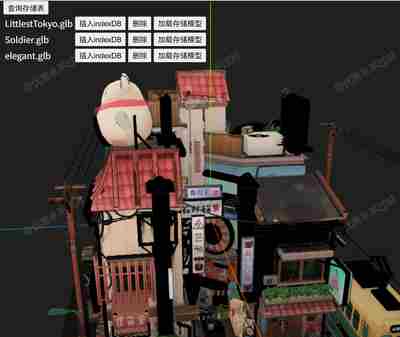
本案例演示 IndexedDB使用 效果:基于 WebGL 实现「IndexedDB使用」可视化效果,附完整可运行源码;核心用到 OrbitControls、glTF/Draco。建议先打开文首在线案例查看动态画面,再对照下方源码逐步理解。
核心概念
- Scene / Camera / WebGLRenderer 构成最小渲染闭环;大场景可开
logarithmicDepthBuffer缓解 Z-fighting。 - OrbitControls 提供轨道旋转/缩放;开启
enableDamping后需在 animate 中controls.update()。 - 阅读下方完整源码时,建议从
init/load/animate三条主线入手,再深入 shader 与工具函数。
实现步骤
- 搭建灯光与环境(如有)
- requestAnimationFrame 循环 update + render
代码要点
<!doctype html>
<html lang="en">

<head>
  <meta charset="UTF-8" />
  <meta name="viewport" content="width=device-width, initial-scale=1.0" />
  <title>Open Three</title>
  <script type="importmap">
{
    "imports": {
        "three": "https://threejs.org/build/three.module.min.js",
        "three/examples/jsm/": "https://threejs.org/examples/jsm/"
    }
}
</script>
  <style>
    body {
      margin: 0;
      padding: 1px;
      box-sizing: border-box;
      background-color: #1f1f1f;
      display: flex;
      flex-direction: column;
      width: 100vw;
      height: 100vh;
    }

    #box {
      width: 100%;
      height: 100%;
    }

    .panel {
      width: 400px;
      height: auto;
      position: absolute;
      z-index: 100;
      top: 0;
      left: 50;
      color: #fff;
    }

    table {
      color: #fff;
    }
  </style>
</head>

<body>
  <div id="box"></div>
  <div class="panel">
    <button onclick="getAll()">查询存储表</button>
    <table>
      <tbody>
        <tr>
          <td>LittlestTokyo.glb</td>
          <td><button onclick="insert('LittlestTokyo.glb')">插入indexDB</button></td>
          <td><button onclick="del('LittlestTokyo.glb')">删除</button></td>
          <td><button onclick="load('LittlestTokyo.glb')">加载存储模型</button></td>
        </tr>
        <tr>
          <td>Soldier.glb</td>
          <td><button onclick="insert('Soldier.glb')">插入indexDB</button></td>
          <td><button onclick="del('Soldier.glb')">删除</button></td>
          <td><button onclick="load('Soldier.glb')">加载存储模型</button></td>
        </tr>
        <tr>
          <td>elegant.glb</td>
          <td><button onclick="insert('elegant.glb')">插入indexDB</button></td>
          <td><button onclick="del('elegant.glb')">删除</button></td>
          <td><button onclick="load('elegant.glb')">加载存储模型</button></td>
        </tr>
      </tbody>
    </table>
  </div>
  <script type="module">
    import * as THREE from 'three'
    import { OrbitControls } from 'three/examples/jsm/controls/OrbitControls.js'
    import { GLTFLoader } from 'three/examples/jsm/loaders/GLTFLoader.js'
    import { DRACOLoader } from 'three/examples/jsm/loaders/DRACOLoader.js'

    const box = document.getElementById('box')

    const scene = new THREE.Scene()

    const camera = new THREE.PerspectiveCamera(50, box.clientWidth / box.clientHeight, 0.1, 100000)

    camera.position.set(10, 10, 10)

    const renderer = new THREE.WebGLRenderer({ antialias: true, alpha: true, logarithmicDepthBuffer: true })

    renderer.setSize(box.clientWidth, box.clientHeight)

    box.appendChild(renderer.domElement)

    new OrbitControls(camera, renderer.domElement)

    scene.add(new THREE.AxesHelper(500), new THREE.AmbientLight(0xffffff, 3))

    animate()

    function animate() {

      requestAnimationFrame(animate)

      renderer.render(scene, camera)

    }

    window.onresize = () => {

      renderer.setSize(box.clientWidth, box.clientHeight)

      camera.aspect = box.clientWidth / box.clientHeight

      camera.updateProjectionMatrix()

    }

    // 打开数据库
    const SCENE_DB = window.indexedDB.open('z2586300277-three', 1)

    // 初始化数据库 执行一次
    SCENE_DB.onupgradeneeded = event => {

      const db = event.target.result // 数据库

      db.createObjectStore('GLB', { keyPath: 'name' })  // 创建一个张表 设置主键 name

    }

    // 打开数据库成功
    SCENE_DB.onsuccess = event => window.DATABASE = event.target.result // 数据库

    // 表GLB 事务 读写
    const GLB_table = () => {

      const transaction = window.DATABASE.transaction(['GLB'], 'readwrite')

      const GLB_table = transaction.objectStore('GLB')

      return GLB_table

    }

    /* 获取表 */
    window.getAll = () => {

      const searchAll = GLB_table().getAll()

      searchAll.onsuccess = event => {

        const { result } = searchAll

        alert('获取数据成功------' + result.length + '个——' + result.map(k => k.name).join(','))

      }

    }

    /* 插入 */
    window.insert = (name) => {

      const url = 'https://z2586300277.github.io/3d-file-server/files/model/' + name

      fetch(url).then(response => response.blob()).then(blob => {

        const setRequest = GLB_table().put({ name, blob })

        setRequest.onsuccess = () => alert(name + '存储成功')

      })

    }

    /* 删除 */
    window.del = (name) => {

      const deleteRequest = GLB_table().delete(name)

      deleteRequest.onsuccess = () => alert(name + '删除成功')

    }

    /* 加载 */
    window.load = (name) => {

      const getRequest = GLB_table().get(name)

      getRequest.onsuccess = event => {

        const { result } = getRequest

        if (!result) return alert(name + '未存储')

        new GLTFLoader()
          .setDRACOLoader(new DRACOLoader().setDecoderPath(FILE_HOST + 'js/three/draco/'))
          .load(URL.createObjectURL(result.blob), gltf => scene.add(gltf.scene))

      }

    }
  </script>
</body>

</html>
完整源码:GitHub
小结
- 本文提供 IndexedDB使用 完整 Three.js 源码与在线 Demo,建议先运行案例再改 uniform/参数做二次实验
- 更多 Three.js 实战案例见 three-cesium-examples 合集 与 GitHub 开源仓库