点、线 · Points & Lines · ▶ 在线运行案例
案例合集: 三维可视化功能案例(threehub.cn)
开源仓库github地址: https://github.com/z2586300277/three-cesium-examples
**400个案例代码: ** 网盘链接
你将学到什么
Points+PointsMaterial绘制点精灵Line+LineBasicMaterial绘制线段size是 屏幕像素 而非世界单位
效果说明
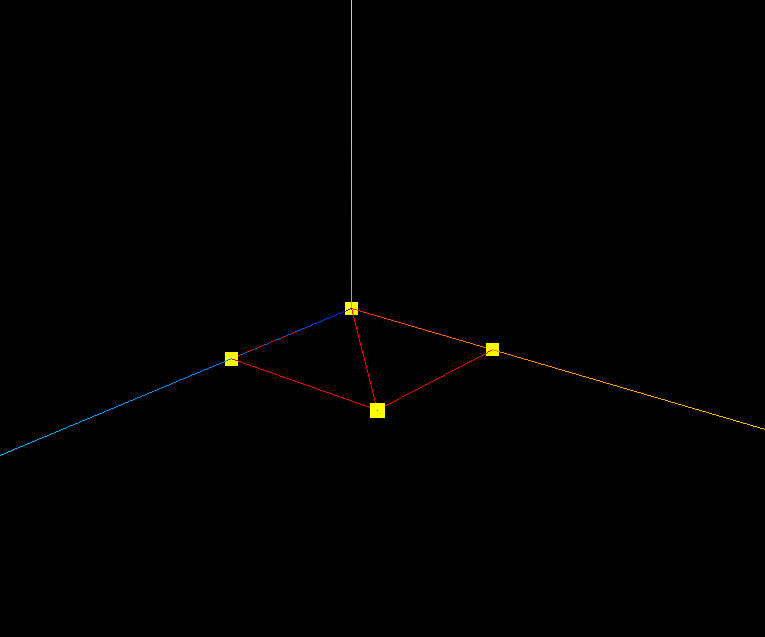
同一三角形顶点,以 黄色大点 和 红色线段 两种方式叠加显示。旋转场景时可看到线的连接顺序。
核心概念
WebGL 有三种基本绘制模式:
POINTS      →  Three.Points
LINES       →  Three.Line / LineSegments / LineLoop
TRIANGLES   →  Three.Mesh
PointsMaterial.size
new THREE.PointsMaterial({
    color: 0xffff00,
    size: 10.0  // 单位:像素(screen space),不受透视影响
});
若需要 世界空间大小 的点(远小近大),需自定义 Shader 或在顶点着色器里用 gl_PointSize。
Line 连接规则
THREE.Line 按 position 数组顺序 依次连线:0→1→2→0→1→2…
若要单独控制每条边,用 LineSegments;闭合环用 LineLoop。
实现步骤
- 复用 网格 的 BufferGeometry(6 顶点)
Points+PointsMaterial→ 黄色点Line+LineBasicMaterial→ 红色线- 两者
scene.add
代码要点
import * as THREE from 'three';
import { OrbitControls } from 'three/examples/jsm/controls/OrbitControls.js'

const scene = new THREE.Scene();

// 网格模型Mesh其实就一个一个三角形(面)拼接构成
const geometry = new THREE.BufferGeometry();
const vertices = new Float32Array([
    0, 0, 0,
    50, 0, 0,
    50, 0, 50,

    0, 0, 0,
    0, 0, 50,
    50, 0, 50,
]);

geometry.attributes.position = new THREE.BufferAttribute(vertices, 3);


// 点渲染模式
const material2 = new THREE.PointsMaterial({
    color: 0xffff00,
    size: 10.0 //点对象像素尺寸
});
const points = new THREE.Points(geometry, material2); //点模型对象
scene.add(points);

// 线材质对象
const material1 = new THREE.LineBasicMaterial({
    color: 0xff0000 //线条颜色
});
// 创建线模型对象
const line = new THREE.Line(geometry, material1);
scene.add(line);


// AxesHelper
const axesHelper = new THREE.AxesHelper(150);
scene.add(axesHelper);

// 相机
const camera = new THREE.PerspectiveCamera();  //相机
camera.position.set(200, 200, 200); //相机位置
camera.lookAt(0, 0, 0);   //相机观察位置

// 渲染器
const renderer = new THREE.WebGLRenderer(); // 创建渲染器
const box = document.getElementById('box');
renderer.setSize(box.clientWidth, box.clientHeight); //渲染区域
renderer.render(scene, camera); //执行渲染
box.appendChild(renderer.domElement);;

const controls = new OrbitControls(camera, renderer.domElement);
controls.addEventListener('change', function () {
    renderer.render(scene, camera);
});
完整源码:GitHub
小结
- 本文提供 点、线 完整 Three.js 源码与在线 Demo,建议先运行案例再改 uniform/参数做二次实验
- 更多 Three.js 实战案例见 three-cesium-examples 合集 与 GitHub 开源仓库