城市光效 · City Effect · ▶ 在线运行案例
案例合集: 三维可视化功能案例(threehub.cn)
开源仓库github地址: https://github.com/z2586300277/three-cesium-examples
**400个案例代码: ** 网盘链接
你将学到什么
- Material.onBeforeCompile 在不写完整 ShaderMaterial 的情况下改内置 shader
- 替换
#include <begin_vertex>/#include <dithering_fragment>注入 GLSL - 四套大屏特效:生长、上升流光、圆扩散、扫光
- FBX 分层处理:建筑 / 地面 / 道路 + EdgesGeometry 线框
效果说明
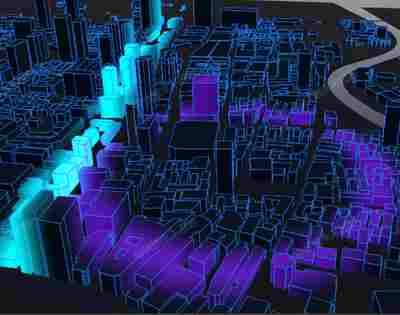
加载上海 FBX 城市模型,建筑从低到高「长出来」,表面有蓝色上升带、紫色同心扩散波、青色 X 向扫光;建筑边线同步生长,地面与道路单独设色。
核心概念
onBeforeCompile 工作方式
Three.js 内置 MeshStandardMaterial 等会先拼好 vertex/fragment shader,再调用:
material.onBeforeCompile = (shader) => {
    shader.uniforms.uProgress = { value: 0 };
    shader.vertexShader = shader.vertexShader.replace(
        '#include <begin_vertex>',
        `#include <begin_vertex>
         transformed.z = position.z * min(uProgress, 1.0);`
    );
};
#include <xxx> 是 shaderChunk 片段,可在 Three 源码 renderers/shaders/ShaderChunk/ 查原文。
四套特效分工
| 函数 | 注入位置 | 视觉 |
|---|---|---|
applyGrowShader |
vertex begin_vertex |
uProgress 压扁 Z,建筑生长 |
applyRiseShader |
fragment dithering_fragment |
沿高度 smoothstep 上升亮带 |
applySpreadShader |
fragment | 距原点距离环形波 mod(uSpreadTime) |
applySweepShader |
fragment | 沿 X 的扫光条 |
uniform 在 rAF 里通过 renderList 回调统一更新:
const renderList = [];
renderList.push((time) => { shader.uniforms.uRiseTime.value = time * 30.0; });

function animate() {
    renderList.forEach(fn => fn(clock.getElapsedTime()));
    // ...
}
FBX 分层 modelHandlerMap
const modelHandlerMap = {
    CITY_UNTRIANGULATED: (model, group) => { /* 建筑 + 线框 + 四套 shader */ },
    LANDMASS: (model) => { /* 深色地面 */ },
    ROADS: (model) => { /* 道路色 */ },
};
线框:EdgesGeometry + LineSegments,需 rotateX(-Math.PI/2) 对齐 FBX 坐标系。
实现步骤
- Scene / Camera / Renderer / OrbitControls,CubeTexture 天空盒
- FBXLoader 加载城市,按
child.name走 handler - 建筑材质
onBeforeCompile链式调用四个 apply 函数 - 线框材质同样
applyGrowShader同步生长 - Clock + renderList 驱动所有 uniform 动画
代码要点
import * as THREE from 'three'
import { OrbitControls } from 'three/examples/jsm/controls/OrbitControls.js'
import { FBXLoader } from 'three/examples/jsm/loaders/FBXLoader.js'

const box = document.getElementById('box')

const scene = new THREE.Scene()

const camera = new THREE.PerspectiveCamera(50, box.clientWidth / box.clientHeight, 0.1, 100000)

camera.position.set(0, 400, 1000)

const renderer = new THREE.WebGLRenderer({ antialias: true, alpha: true, logarithmicDepthBuffer: true })

renderer.setPixelRatio(window.devicePixelRatio * 1.3)

renderer.setSize(box.clientWidth, box.clientHeight)

box.appendChild(renderer.domElement)

const controls = new OrbitControls(camera, renderer.domElement)

controls.enableDamping = true

// 文件地址
const urls = [0, 1, 2, 3, 4, 5].map(k => (FILE_HOST + 'files/sky/skyBox0/' + (k + 1) + '.png'));

const textureCube = new THREE.CubeTextureLoader().load(urls);

scene.background = textureCube;

const renderList = []

const light = new THREE.AmbientLight(0xadadad)

scene.add(light)

const directionalLight = new THREE.DirectionalLight(0xffffff, 0.5)

directionalLight.position.set(600, 600, 0)

scene.add(directionalLight)

/**
 * 对于shader内容的修改,需要根据具体内容进行处理
 * shader中会存在#include <begin_vertex>等语句,这些事three定义的glsl,具体脚本内容查看three源码中renderer/shaders/shaderChunk下对应脚本文件
 * 而修改shader就是在对应的脚本语句后修改脚本或增加语句
 */
const applyGrowShader = (shader) => {
    shader.uniforms.uProgress = { value: 0 }
    shader.vertexShader = `
    uniform float uProgress;
    ${shader.vertexShader}
  `
    shader.vertexShader = shader.vertexShader.replace(
        '#include <begin_vertex>',
        `
      #include <begin_vertex>
      transformed.z = position.z * min(uProgress, 1.0);
    `
    )
    renderList.push((progress) => {
        shader.uniforms.uProgress.value = progress
    })
}
// 建筑表面流动上升效果
const applyRiseShader = (shader) => {
    shader.uniforms.uRiseTime = { value: 0 }
    shader.uniforms.uRiseColor = { value: new THREE.Color('#87CEEB') }

    shader.vertexShader = shader.vertexShader.replace(
        '#include <common>',
        `
      #include <common>
      varying vec3 vTransformedNormal;
      varying float vHeight;
    `
    )
    shader.vertexShader = shader.vertexShader.replace(
        '#include <begin_vertex>',
        `
      #include <begin_vertex>
      vTransformedNormal = normalize(normal);
      vHeight = transformed.z;
    `
    )

    shader.fragmentShader = shader.fragmentShader.replace(
        '#include <common>',
        `
      #include <common>
      uniform vec3 uRiseColor;
      uniform float uRiseTime;
      varying float vHeight;
      varying vec3 vTransformedNormal;

      vec3 riseLine() {
        float smoothness = 1.8;
        float speed = uRiseTime;
        bool isTopBottom = (vTransformedNormal.z > 0.0 || vTransformedNormal.z < 0.0) && vTransformedNormal.x == 0.0 && vTransformedNormal.y == 0.0;
        float ratio = isTopBottom ? 0.0 : smoothstep(speed, speed + smoothness, vHeight) - smoothstep(speed + smoothness, speed + smoothness * 2.0, vHeight);
        return uRiseColor * ratio;
      }
    `
    )
    shader.fragmentShader = shader.fragmentShader.replace(
        '#include <dithering_fragment>',
        `
      #include <dithering_fragment>
      gl_FragColor = gl_FragColor + vec4(riseLine(), 1.0);
    `
    )
    renderList.push((time) => {
        shader.uniforms.uRiseTime.value = time * 30.0
    })
}

// 扩散波效果
const applySpreadShader = (shader) => {
    shader.uniforms.uSpreadTime = { value: 0 }
    shader.uniforms.uSpreadColor = { value: new THREE.Color('#9932CC') }

    shader.vertexShader = shader.vertexShader.replace(
        '#include <common>',
        `
      #include <common>
      varying vec2 vTransformedPosition;
    `
    )
    shader.vertexShader = shader.vertexShader.replace(
        '#include <begin_vertex>',
        `
      #include <begin_vertex>
      vTransformedPosition = vec2(position.x, position.y);
    `
    )
    shader.fragmentShader = shader.fragmentShader.replace(
        '#include <common>',
        `
      #include <common>
      uniform vec3 uSpreadColor;
      uniform float uSpreadTime;
      varying vec2 vTransformedPosition;

      vec3 spread() {
        vec2 center = vec2(0.0);
        float smoothness = 60.0;
        float start = mod(uSpreadTime, 1800.0);
        float distance = length(vTransformedPosition - center);
        float ratio = smoothstep(start, start + smoothness, distance) - smoothstep(start + smoothness, start + smoothness * 2.0, distance);
        return uSpreadColor * ratio;
      }
    `
    )
    shader.fragmentShader = shader.fragmentShader.replace(
        '#include <dithering_fragment>',
        `
      #include <dithering_fragment>
      gl_FragColor = gl_FragColor + vec4(spread(), 1.0);
    `
    )
    renderList.push((time) => {
        shader.uniforms.uSpreadTime.value = time * 200.0
    })
}
// 扫光
const applySweepShader = (shader) => {
    shader.uniforms.uSweepTime = { value: 0 }
    shader.uniforms.uSweepColor = { value: new THREE.Color('#00FFFF') }

    shader.vertexShader = shader.vertexShader.replace(
        '#include <common>',
        `
      #include <common>
      varying vec2 vSweepPosition;
    `
    )
    shader.vertexShader = shader.vertexShader.replace(
        '#include <begin_vertex>',
        `
      #include <begin_vertex>
      vSweepPosition = vec2(position.x, position.y);
    `
    )
    shader.fragmentShader = shader.fragmentShader.replace(
        '#include <common>',
        `
      #include <common>
      uniform vec3 uSweepColor;
      uniform float uSweepTime;
      varying vec2 vSweepPosition;

      vec3 sweep() {
        vec2 center = vec2(0.0);
        float smoothness = 60.0;
        float start = mod(uSweepTime, 1800.0) - 800.0;
        float ratio = smoothstep(start, start + smoothness, vSweepPosition.x) - smoothstep(start + smoothness, start + smoothness * 2.0, vSweepPosition.x);
        return uSweepColor * ratio;
      }
    `
    )
    shader.fragmentShader = shader.fragmentShader.replace(
        '#include <dithering_fragment>',
        `
      #include <dithering_fragment>
      gl_FragColor = gl_FragColor + vec4(sweep(), 1.0);
    `
    )
    renderList.push((time) => {
        shader.uniforms.uSweepTime.value = time * 160.0
    })
}

const modelHandlerMap = {
    CITY_UNTRIANGULATED: (model, group) => {
        // 城市建筑
        const { geometry, position, material } = model

        // 模型线框化
        const lienMaterial = new THREE.LineBasicMaterial({ color: '#2685fe' })
        const lineBox = new THREE.LineSegments(new THREE.EdgesGeometry(geometry, 1), lienMaterial)
        lineBox.position.copy(position)
        // 模型坐标系与WebGL坐标系不同需要处理
        lineBox.rotateX(-Math.PI / 2)
        group.add(lineBox)

        // 在原先材质效果的基础上修改shader
        material.onBeforeCompile = (shader) => {
            material.color = new THREE.Color('#0e233d')
            material.transparent = true
            material.opacity = 0.9
            // 实现生长效果
            applyGrowShader(shader)
            applyRiseShader(shader)
            applySpreadShader(shader)
            applySweepShader(shader)
        }
        lienMaterial.onBeforeCompile = (shader) => {
            applyGrowShader(shader)
        }
    },
    LANDMASS: (model) => {
        // 地面
        const material = model.material
        material.color = new THREE.Color('#040912')
        material.transparent = true
        material.opacity = 0.8
    },
    ROADS: (model) => {
        // 道路
        const material = model.material
        material.color = new THREE.Color('#292e4c')
    }
}

new FBXLoader().load(FILE_HOST + 'models/fbx/shanghai.FBX', cityScene => {

    const group = new THREE.Group()

    cityScene.children.forEach((item) => {

        const clonedData = item.clone()

        modelHandlerMap[clonedData.name]?.(clonedData, group)

        group.add(clonedData)

    })

    scene.add(group)

})

const clock = new THREE.Clock()

animate()

function animate() {

    renderList.forEach(fn => fn(clock.getElapsedTime()))

    requestAnimationFrame(animate)

    controls.update()

    renderer.render(scene, camera)

}

window.onresize = () => {

    renderer.setSize(box.clientWidth, box.clientHeight)

    camera.aspect = box.clientWidth / box.clientHeight

    camera.updateProjectionMatrix()

}
完整源码:GitHub
小结
- 本文提供 城市光效 完整 Three.js 源码与在线 Demo,建议先运行案例再改 uniform/参数做二次实验
- 更多 Three.js 实战案例见 three-cesium-examples 合集 与 GitHub 开源仓库