网格着色器 · Grid Shader · ▶ 在线运行案例
案例合集: 三维可视化功能案例(threehub.cn)
开源仓库github地址: https://github.com/z2586300277/three-cesium-examples
**400个案例代码: ** 网盘链接
你将学到什么
- ShaderMaterial 自定义着色器实现核心视觉效果
- OrbitControls 相机轨道交互
requestAnimationFrame渲染循环与resize自适应
效果说明
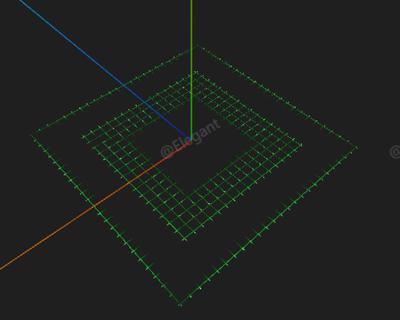
本案例演示 网格着色器 效果:基于 WebGL 实现「网格着色器」可视化效果,附完整可运行源码;核心用到 ShaderMaterial、OrbitControls。建议先打开文首在线案例查看动态画面,再对照下方源码逐步理解。
核心概念
- Scene / Camera / WebGLRenderer 构成最小渲染闭环;大场景可开
logarithmicDepthBuffer缓解 Z-fighting。 - ShaderMaterial 通过
uniforms+ 自定义 GLSL 控制逐像素/逐点效果;透明粒子常配合depthTest: false。 - OrbitControls 提供轨道旋转/缩放;开启
enableDamping后需在 animate 中controls.update()。
实现步骤
- 搭建 Scene、PerspectiveCamera、WebGLRenderer,挂载 canvas 并处理
resize - 定义 uniforms / onBeforeCompile 或 ShaderMaterial,编写 GLSL 与材质参数
- 创建 OrbitControls(及 Raycaster 等交互控件,若源码包含)
- 在
requestAnimationFrame循环中更新状态并 render(Cesium 为viewer.render或自动渲染)
代码要点
import * as THREE from 'three'
import { OrbitControls } from 'three/examples/jsm/controls/OrbitControls.js'

const box = document.getElementById('box')

const scene = new THREE.Scene()

const camera = new THREE.PerspectiveCamera(75, box.clientWidth / box.clientHeight, 0.1, 100000)

camera.position.set(50, 50, 50)

const renderer = new THREE.WebGLRenderer({ antialias: true, alpha: true, logarithmicDepthBuffer: true })

renderer.setSize(box.clientWidth, box.clientHeight)

box.appendChild(renderer.domElement)

new OrbitControls(camera, renderer.domElement)

scene.add(new THREE.AxesHelper(100))

window.onresize = () => {

    renderer.setSize(box.clientWidth, box.clientHeight)

    camera.aspect = box.clientWidth / box.clientHeight

    camera.updateProjectionMatrix()

}

const resolution = new THREE.Vector2(box.clientWidth, box.clientHeight)
const uniforms = {
    uTime: { value: 0 },
    uColor: { value: new THREE.Color('#00ff23') },
    uRepititions: { value: 5, min: 1, max: 10, step: 1 },
    uResolution: {
        max: resolution,
        value: resolution
    }
}

// refer https://shad3rs.vercel.app/shaders/grid
const vert = /* glsl */`
varying vec3 vNormal;
varying vec3 vPosition;

void main() {
    vec4 modelPosition = modelMatrix * vec4(position, 1.0);
    gl_Position = projectionMatrix * viewMatrix * modelPosition;

    // Model normal
    vec3 modelNormal = (modelMatrix * vec4(normal, 0.0)).xyz;

    // Varyings
    vNormal = modelNormal;
    vPosition = modelPosition.xyz;
}`

const frag = /* glsl */`
uniform vec2 uResolution;
uniform int uRepititions;
uniform vec3 uColor;
uniform float uTime;

varying vec3 vPosition;

#define DEBUG 0

const float PI = 3.14159265;
float sRGBencode(float C_linear) {
    return C_linear > 0.0031308 ? (1.055 * pow(C_linear, 1. / 2.4) - 0.055) : (12.92 * C_linear);
}
vec3 sRGBencode(vec3 C_linear) {
    C_linear = clamp(C_linear, 0., 1.);
    return vec3(sRGBencode(C_linear.x), sRGBencode(C_linear.y), sRGBencode(C_linear.z));
}

float hash(vec3 uv) {
    uint x = floatBitsToUint(uv.x) | 1u; // 0 is a fixed point so we remove it. although this introduces duplicate 1
    uint y = floatBitsToUint(uv.y);
    uint z = floatBitsToUint(uv.z);

    y ^= y >> 13;
    y ^= y << 17;
    y ^= y >> 5;
    y *= 0x2545F491u;

    x ^= y;
    x ^= x >> 13;
    x ^= x << 17;
    x ^= x >> 5;
    x *= 0x4F6CDD1Du;

    z ^= x;
    z ^= z >> 13;
    z ^= z << 17;
    z ^= z >> 5;
    z *= 0x1D6C45F4u;

    // Shift down by 9 to use top 23 bits in mantissa
    // Use exponent and sign bits from 0.5
    // floatBitsToUint(.5) is a constant so that part can be pre-computed. (0x3f000000)
    // Since the top 23 bits are shifted right, the rest (top bits) are zero and do not need to be masked out
    // uint w = ((z>>9) & 0x007FFFFFu) | (0xFF800000u & floatBitsToUint(.5));

    uint w = (z >> 9) | 0x3f000000u; // simplified version of the above commented out line

    // re-normalize from [0.5, 1) to [0, 1)
    // This probably loses some bits, but should still be ok
    return 2. * uintBitsToFloat(w) - 1.;
}

vec3 drops(vec2 uv) {
    vec3 color = vec3(0);
    float hash_cnt = 0.;
    // GRID
    float grid_size = 40.;
    // vec2 g = cos(grid_size * (uv * 2.0) * PI);
    vec2 g = cos(grid_size * (1.0 + uv) * PI);
    float grid = smoothstep(0.98, 0.99, max(g.x, g.y));
    grid += (.0001 / (1.5 + max(g.x, g.y)) + grid * (grid_size / 255.) * hash(vec3(uv, 0.)));

    // MASKS
    vec2 mask_uv = abs(uv);
    float square_mask = smoothstep(1.01, 1.0, max(mask_uv.x, mask_uv.y));
    float disc_mask = smoothstep(1., .66, length(uv));

    // UNIT CIRCLE
    float circle = smoothstep(0.01, 0.005, abs(length(uv) - 1.));

    for(int i = 0; i < uRepititions; i++) {
        int anim_instance = i;
        // ANIMATION
        float time_offset = hash(vec3(anim_instance, 1., hash_cnt++));
        float speed_offset = hash(vec3(anim_instance, 1., hash_cnt++));

        float speed = sin(0.1 * mix(0.2, 2.0, speed_offset));

        float t = speed * uTime + time_offset;
        float drop_cycle = fract(t );
        float drop_instance = floor(t);

        // COLOR
        // vec3 L = normalize(vec3(1));
        // vec3 U = normalize(vec3(2, -1, -1) / 3.);
        // vec3 V = cross(L, U);
        // float hue = 2. * PI * hash(vec3(drop_instance, anim_instance, hash_cnt++));
        // vec3 pulse_color = clamp(.5 * L + U * cos(hue) + V * sin(hue), 0., 1.);
        vec3 pulse_color = uColor;

        // PULSE
        // vec2 pos = vec2(-.5 + hash(vec3(drop_instance, 1., hash_cnt++)), -.5 + hash(vec3(drop_instance, 1., hash_cnt++)));
        vec2 pos = vec2(0.0);
        // vec2 p = abs(uv - pos);
        // vec2 p = vec2(length(abs(uv - pos)));
        // vec2 p = abs(uv - pos) - vec2(3.0, 1.0);
        // vec2 p = vec2(max(abs(uv.x - pos.x), abs(uv.y - pos.y)));
        vec2 p = vec2(max(abs(uv.x - pos.x), abs(uv.y - pos.y)));

        float pulse_tail_len = 2.0;
        float f = (p.x + p.y) - (pulse_tail_len + 2. * sqrt(1.)) * drop_cycle;
        float pulse = max(1. - abs(f) / pulse_tail_len, 0.) * exp(-abs(f)) / (0.001 + 100. * abs(f));

        pulse_color = mix(pulse_color, vec3(1), 0.1 * smoothstep(0.8, .95, pulse));

        pulse = mix(pulse, pulse * smoothstep(0.01, 0.00, f), .8);

        color += pulse * pulse_color * grid;
    }

    color += 0.01 * (.075 / (1.5 + max(g.x, g.y)) + (40. / 255.) * hash(vec3(uv, 0.)));

    //color += 0.1*grid;
    color *= mix(0.0, 1., disc_mask);
    color *= disc_mask;

    #if DEBUG
    color += circle;
    #endif

    return color;
}

void main() {
    // BASIC SETUP
    vec2 uv = vPosition.xz;
    vec3 color = vec3(0);

    #if DEBUG
    color = drops(uv);
    color = sqrt(tanh(color * color));
    color = sRGBencode(color);
    gl_FragColor = vec4(color, 1);
    return;
    #endif

    // CAMERA SETUP
    float focal = 1.0;
    vec3 ro = vec3(0, 5.0, 0.);
    vec3 rd = vec3(uv, -focal);

    float angle = -0.5 * PI;
    float c = cos(angle), s = sin(angle);
    mat2 R = mat2(c, s, -s, c);
    rd.yz = R * rd.yz;

    angle = PI;
    c = cos(angle), s = sin(angle);
    R = mat2(c, s, -s, c);
    rd.xz = R * rd.xz;

    float t = -ro.y / rd.y;
    if(t > 0.) {
        vec3 ray_hit_pos = ro + t * rd;
        color = drops(.005 * ray_hit_pos.xz);
    } else {
        gl_FragColor = vec4(0, 0, 0, 1);
        return;
    }

    color = sqrt(tanh(color * color));

    // 计算颜色亮度,用于确定透明度
    float brightness = dot(color, vec3(0.299, 0.587, 0.114));
    // 低于阈值的区域设为透明
    float alpha = smoothstep(0.05, 0.1, brightness);

    gl_FragColor = vec4(color, alpha);


    #include <tonemapping_fragment>
    #include <colorspace_fragment>
}`

const material = new THREE.ShaderMaterial({
    vertexShader: vert,
    fragmentShader: frag,
    uniforms: uniforms,
    side: THREE.DoubleSide,
    transparent: true,
    depthWrite: false // 添加这一行以避免半透明物体的深度排序问题
})
const geo = new THREE.PlaneGeometry(50, 50, 1, 1)
const mesh = new THREE.Mesh(geo, material)
mesh.rotation.x = -Math.PI / 2
scene.add(mesh)

animate()

function animate() {

    requestAnimationFrame(animate)

    uniforms.uTime.value += 0.01

    renderer.render(scene, camera)

}
完整源码:GitHub
小结
- 本文提供 网格着色器 完整 Three.js 源码与在线 Demo,建议先运行案例再改 uniform/参数做二次实验
- 更多 Three.js 实战案例见 three-cesium-examples 合集 与 GitHub 开源仓库